9 Best Ergonomic Mouse for Laptop (November 2026)
The best ergonomic laptop mice include the Logitech Lift Vertical Mouse (best overall), the TECKNET Ergonomic Mouse (best value for quiet offices), and the Lenovo Yoga Pro Mouse for large hands.
On this page (8 sections)
- The best ergonomic mice for laptop work, ranked
- How these ergonomic laptop mice compare
- How we compared these ergonomic laptop mice
- Which ergonomic mouse fits your hand size?
- Should you choose Bluetooth or a USB receiver?
- Do you need a rechargeable battery or standard cells?
- What should MacBook users watch for?
- Which ergonomic laptop mouse should you buy?
The best ergonomic mouse for laptop use is the Logitech Lift Vertical Mouse, which puts the wrist at a 57-degree angle and fits small to medium right hands. The TECKNET Ergonomic Mouse is the smart value pick if you want quiet clicks and three-device switching, while the Lenovo Yoga Pro Mouse suits larger hands.
Laptop work creates a specific problem. The keyboard sits low and flat, so your forearm rests flat too, and the wrist stays twisted for hours.
A vertical mouse turns the hand into a handshake position and takes some of that twist out of the day. If you want the wider picture first, our guide to whether ergonomic mice really work covers what the shapes actually change.
This roundup compares nine vertical and tilted mice by hand fit, connection options, battery type and portability. The goal is simple: help you pick the one that matches your hand and your laptop bag.
Our picks at a glance
-
1
-
2

-
3

- 4
 Check it
Uineer Ergonomic Wireless Vertical Mouse
Best with side scroll - 5
 Best for travelCheck it
- 6
 Best simple setupCheck it
- 7
 Check it
TECKNET 3-Device Vertical Mouse
Best for shared desks - 8
 Best budget rechargeableCheck it
- 9
 Check it
UGREEN Ergonomic Wireless Mouse
Best for big hands on a budget
The best ergonomic mice for laptop work, ranked
The Logitech Lift takes the top spot for most laptop users because it balances a certified vertical shape with easy Bluetooth pairing. Each pick below wins on a specific need, so start with your hand size and how you move between devices.
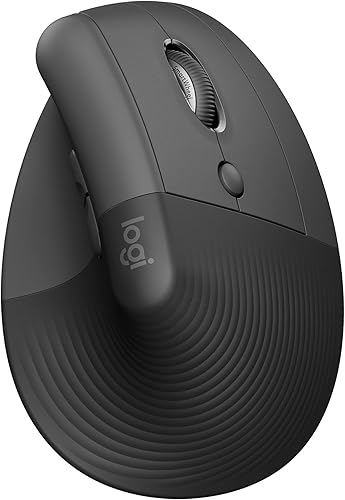
Logitech Lift Vertical Mouse: Best overall
- 57-degree vertical angle
- Bluetooth or Logi Bolt
- Up to 2 years on one AA battery
The most complete laptop mouse here, with a certified ergonomic shape and easy switching between three devices.
Pros
- 57-degree vertical shape
- Works on Windows, macOS and iPadOS
- Two-year battery life
Cons
- Right-hand only
- Limited to small and medium hands
Logitech builds this one for small to medium right hands, and the 57-degree angle is the core of the design. That angle lifts your wrist toward a handshake position and takes pressure off the forearm during long laptop sessions.
The softly textured grip and snug thumb rest give your hand somewhere to settle instead of hovering. It's ergo-certified, so the shape was designed and tested against criteria set by leading ergonomists.
At 125 g and 108 mm long, it stays stable without feeling heavy on a small desk.
Connection is the practical win for laptop owners. It pairs over Bluetooth Low Energy or the included Logi Bolt receiver, and it works with Windows 10 and 11, macOS 10.15, iPadOS 14 and Chrome OS.
The Easy-Switch button pairs three devices and hops between a work laptop and a home machine.
Logitech quotes up to two years from a single AA battery, which removes the charging routine. The SmartWheel scrolls quietly and the four customizable buttons run through Logi Options+.
The trade-off is size. Larger hands will find the body narrow next to the TECKNET or Lenovo picks, and this listing is the right-hand model.
For most laptop users with average hands, though, the fit is the reason it leads.
TECKNET Ergonomic Mouse: Best value for quiet offices
- 52-degree vertical angle
- Bluetooth and 2.4G
- 600mAh rechargeable battery
A rechargeable vertical mouse that pairs with three devices and clicks very quietly, for far less than the top pick.
Pros
- Three-device switching
- Quiet clicks
- Built-in rechargeable battery
Cons
- Forward and back buttons don't work on Mac
TECKNET's vertical mouse sits at a 52-degree angle and is shaped for small and medium hands. That's a slightly gentler tilt than the Lift, which some hands find easier to adjust to in the first week.
The standout is the rechargeable 600mAh battery. TECKNET says 1.5 hours of charging gives up to two months of use, and the Type-C cable means you won't be hunting for AA cells.
It connects over Bluetooth 5.0 or 3.0 plus a 2.4G USB receiver, and you can move between three devices with one button.
Clicks are rated 99% quieter, so a shared office or a late-night desk won't hear every press. Six buttons include forward and back for web browsing, and DPI runs from 800 to 4800 across six steps.
TECKNET rates the switches to 6 million clicks.
Two limits matter. The forward and back buttons don't work on Mac, so MacBook users lose the shortcut buttons.
And the plastic body feels less refined than the Logitech. For the price, though, this is the value pick for laptop multitaskers who hate changing batteries.
Lenovo Yoga Pro Mouse: Best for large hands
- Full-size right-hand grip
- Bluetooth 5.1 dual pairing
- USB-C rechargeable
A bigger, softer grip with a thumb rest and programmable buttons, for people who find vertical shapes too narrow.
Pros
- Full-size grip with thumb rest
- USB-C charging
- Adjustable DPI to 4000
Cons
- Tilt is milder than a true vertical mouse
The Yoga Pro is a tilted, full-size mouse rather than a true vertical one. It's built for medium and large hands, with soft material on the sides and a thumb rest that gives the palm more support than the narrower vertical bodies.
It measures 5 inches long and 2.8 inches wide.
If your hand cramped on a slim vertical mouse, this is the calmer step. The tilt is milder, so the wrist change is smaller, but the larger grip spreads pressure across the whole palm.
Lenovo adds programmable side and top buttons, silent left and right clicks and a two-way metal scroll wheel. The blue optical sensor tracks on most surfaces, and DPI goes to 4000 in three on-the-fly stages or more through the software.
Six buttons in total.
Power comes from a USB-C rechargeable battery. Lenovo says under two hours for a full charge and two to three months of use, paired over Bluetooth 5.1 with dual-host quick pairing and Swift Pair.
The trade-off is the ergonomic degree. A mild tilt won't give the same wrist-straightening as a 57-degree vertical shape.
Pick it if size and palm support matter more than a steep angle, or read our roundup of the best vertical mouse options if you want the full vertical feel.
Uineer Ergonomic Wireless Vertical Mouse: Best with side scroll
- Vertical grip with RGB light
- Three connection modes
- Side scroll wheel
Light for a vertical mouse and easy to move between a laptop, tablet and desktop, with a side wheel for spreadsheets.
Pros
- Light 105 g body
- Side scroll wheel
- Rechargeable over USB-C
Cons
- RGB lighting won't suit every desk
Uineer's mouse is light at 105 g, which matters when you lift and reposition it often on a small laptop desk. The vertical grip keeps the wrist straight and the forearm relaxed, and RGB lighting adds a bit of desk personality.
Uineer calls out a 59-degree angle in its own materials, so expect a pronounced tilt.
The side scroll wheel is the feature that sets it apart here. On wide spreadsheets or long web pages, horizontal scrolling from the thumb saves reaching for the trackpad.
Four DPI levels run from 800 to 3200, covering document work through light gaming.
It supports Bluetooth 5.0, Bluetooth 4.0 and 2.4G USB, so it can pair with three devices and switch between a laptop, tablet and desktop. The silent left and right buttons keep meetings and libraries quiet.
A 500mAh battery charges over Type-C in about two hours and lasts weeks on typical use, with a low-battery indicator.
The RGB light won't suit every office, and the scroll wheel plus lighting push it above the plainest picks in complexity. For laptop users who want a light vertical mouse with extra navigation, it's a strong fit.
Small hands should look at our best ergonomic mouse for small hands picks instead.
ProtoArc EM11 Vertical Mouse: Best for travel
- 58-degree vertical angle
- Fits hands under 7.5 in
- Three-device switching
A compact vertical mouse built around smaller hands and light bags, with quiet left and right clicks.
Pros
- Small-hand fit
- Rechargeable
- Three-device switching
Cons
- Buttons aren't programmable
ProtoArc designed the EM11 for hands under 7.5 inches long, so it's the natural choice for smaller hands and frequent travel. The 58-degree vertical angle is among the steepest in this group, keeping the wrist well away from a flat twist.
At 250 g it's the heaviest here, though the compact body still packs easily.
It connects to three devices through dual Bluetooth and a 2.4G USB-A receiver. Windows 8 and later, macOS 10.12 and later, and Android 4.3 and later all work.
A 500mAh battery recharges over Type-C, though the cable is for charging only and no USB-C receiver is included.
The silent left and right buttons help in shared spaces. DPI runs 1000, 1600 or 2400, enough for documents and browsing.
The back and forward buttons speed up web work, and the glossy finish wipes clean.
Be aware of two things before buying. The buttons aren't programmable, so you can't remap them.
And the forward and back buttons don't work on Mac. For a compact travel mouse with a steep angle, though, it's a well-judged package.
If portability and wireless freedom top your list, our roundup of the best wireless ergonomic mouse covers the wider field.
Anker Wireless Vertical Mouse: Best simple setup
- 2.4G USB receiver only
- Handshake grip
- 18-month warranty
Plug the receiver in and work, with no Bluetooth pairing steps and a familiar vertical grip.
Pros
- No pairing needed
- Next and previous buttons
- Sleeps after 8 minutes idle
Cons
- No Bluetooth
- Takes AAA batteries
Anker's vertical mouse is the simplest to set up here. There's no Bluetooth pairing at all: plug the 2.4G USB receiver into your laptop and it works.
That makes it a good fit for a locked-down work laptop where you can't pair devices. The receiver stows in the base when not in use.
The shape puts the hand in a handshake grip to keep the wrist neutral. DPI steps of 800, 1200 and 1600 cover everyday laptop work, and next and previous buttons handle web browsing.
Anker says the mouse sleeps after 8 minutes idle and wakes on a click. At 127 g it's lighter than the ProtoArc and UGREEN bodies here.
It runs on two AAA batteries, which aren't included, so budget for a pack. The click sound is audible, which rules it out for quiet shared rooms.
There's no Bluetooth either, so it can't pair with a tablet or phone.
The 18-month warranty adds peace of mind. Pick it if you want zero setup and a stable receiver connection.
Skip it if you need multi-device switching or silent clicks.
TECKNET 3-Device Vertical Mouse: Best for shared desks
- Bluetooth and 2.4G
- Six DPI levels to 4800
- Quiet left and right clicks
A bigger vertical body that moves between three devices and handles high-DPI work, though it needs its own batteries.
Pros
- Three-device switching
- 4800 DPI ceiling
- Low-battery warning light
Cons
- Batteries not included
- Side buttons don't work on macOS
This TECKNET model is the bigger sibling of the value pick above. It's shaped for medium and large hands, and the near-vertical palm position reduces wrist pressure during long sessions.
It's right-handed only. At 4.32 ounces it has more body than the smaller TECKNET, which suits larger palms.
Three-device switching is the headline: two Bluetooth slots plus one 2.4G USB receiver. That suits a desk where a work laptop, a personal laptop and a tablet all need a mouse.
Six DPI levels run from 800 to 4800, with the light flashing to confirm the step.
Only the left and right clicks are silent, so the other buttons still make noise. The mouse sleeps after 10 to 30 minutes idle and warns you with a blinking LED when the two AAA batteries run low.
Batteries aren't included. TECKNET recommends branded cells for longer life.
Side buttons don't work on macOS, and the body is heavier than the Uineer. Pick it for a shared desk or a large-handed user who wants high DPI and device switching.
Our wider guide to wireless ergonomic mice compares more options for this kind of setup.
Lekvey Vertical Mouse: Best budget rechargeable
- Rechargeable 600mAh battery
- Handshake grip
- Page back and forward buttons
A low-cost vertical mouse you charge over USB-C instead of feeding batteries, for medium and large hands.
Pros
- USB-C charging
- Page back and forward buttons
- Long battery life
Cons
- No Bluetooth
- Buttons aren't programmable
Lekvey's vertical mouse targets medium and large hands with a handshake grip. The built-in 600mAh battery charges over the included Type-C cable, and a full charge lasts about three to four weeks with 8 to 10 hours of daily use, or longer with light use.
Lekvey puts the battery life at around 150 hours.
Three DPI levels of 800, 1200 and 1600 are enough for laptop work. The page back and forward buttons speed up browsing.
A single nano receiver plugs in and plays, so there's no pairing step. Auto sleep saves power when you step away.
All buttons are non-programmable, so you can't remap the layout. There's no Bluetooth either, which limits it to laptops and desktops with a free USB port.
The forward and back buttons do work on Mac OS, which is a plus for MacBook users.
The 36-month warranty is generous for the price. Pick it if you want a cheap vertical mouse without battery changes.
Skip it if you need multi-device switching or a steeper angle.
UGREEN Ergonomic Wireless Mouse: Best for big hands on a budget
- Vertical handshake grip
- Bluetooth and 2.4G
- Smooth PTFE glide feet
A tall vertical shape for large hands, with quiet clicks and a 4000 DPI ceiling for bigger laptop screens.
Pros
- Bluetooth plus receiver
- Quiet clicks
- 4000 DPI top setting
Cons
- Runs on an AA battery
- Bulky for small hands
UGREEN's vertical mouse is designed for larger hands and long desk sessions. The handshake position reduces wrist rotation and muscle strain, and quiet clicks keep the workspace calm.
At 170 g it carries more weight than the Uineer but less than the ProtoArc.
A five-button layout covers navigation and browsing, and DPI runs 1000, 1600, 2000 or 4000. The PTFE glide feet reduce friction so the mouse moves smoothly without a pad.
It connects over 2.4G or Bluetooth and can switch between three devices, with up to 10 m of range.
Power comes from a single AA battery, with smart sleep to stretch life. It's compatible with Windows 11, macOS 13 Ventura, Linux, ChromeOS and Android.
The one-year manufacturer warranty backs it.
The trade-off is size and weight. It's heavier than the Uineer and not built for small hands.
Pick it if you have larger hands and want quiet tracking with Bluetooth flexibility. Otherwise the Lift remains the better all-round fit.
How these ergonomic laptop mice compare
| Product | Best for | Angle | Hand fit | Connection | Our score |
|---|---|---|---|---|---|
| Logitech Lift Vertical Mouse | overall | 57 degrees | Small to medium right hands | Bluetooth or USB receiver | 9.0 |
| TECKNET Ergonomic Mouse | value for quiet offices | 52 degrees | Small to medium hands | Bluetooth 5.0/3.0 and USB | 8.8 |
| Lenovo Yoga Pro Mouse | large hands | Tilted, not vertical | Medium to large hands | Bluetooth 5.1 | 8.3 |
| Uineer Ergonomic Wireless Vertical Mouse | with side scroll | Right hand, general size | Bluetooth 5.0/4.0 and 2.4G | 8.1 | |
| ProtoArc EM11 Vertical Mouse | travel | 58 degrees | Hands under 7.5 in long | Dual Bluetooth and USB receiver | 8.0 |
| Anker Wireless Vertical Mouse | simple setup | Right hand | 2.4G USB only | 7.8 | |
| TECKNET 3-Device Vertical Mouse | shared desks | Medium to large hands | Bluetooth 5.0/3.0 and 2.4G | 7.7 | |
| Lekvey Vertical Mouse | budget rechargeable | Medium to large hands | 2.4G USB only | 7.5 | |
| UGREEN Ergonomic Wireless Mouse | big hands on a budget | Larger hands | Bluetooth and 2.4G | 7.4 |
How we compared these ergonomic laptop mice
We compared nine vertical and tilted mice on the specs that decide daily comfort: the vertical angle, the stated hand fit, connection modes, battery type and how well each suits a laptop bag.
Hand size came first. A 57-degree mouse built for small hands won't help a large-handed buyer, so each pick carries a badge for the hand or job it fits best.
Angle came second, since steeper shapes straighten the wrist more but ask for a longer adjustment period. The 52-degree TECKNET and the 57 to 59-degree Logitech, Uineer and ProtoArc sit at opposite ends of that range.
We weighed connectivity by laptop reality. Bluetooth keeps a USB port free and pairs with tablets and phones, while a 2.4G receiver gives a stable link without setup.
Battery type decided the next cut, because rechargeable bodies save ongoing cost but need a cable, and AA or AAA models need spares in a drawer.
Finally, we looked at portability. Weight and footprint matter if the mouse travels in a bag every day.
Our score weighs specs, features and buyer feedback against what you're shopping for.
Which ergonomic mouse fits your hand size?
Hand size decides more than any feature here. Most vertical mice fall into small-to-medium or medium-to-large fits, and a mismatch undoes the comfort gain.
Measure from your wrist crease to the tip of your middle finger, then read the maker's fit range for each model.
If your hand is under 7.5 inches long
The ProtoArc EM11 is built for hands under 7.5 inches and has one of the steepest angles here at 58 degrees. The Logitech Lift and TECKNET Ergonomic Mouse are also designed for small to medium hands.
Pick the Lift for the most polished build and the TECKNET for quiet clicks and a rechargeable battery.
If your hand is medium to large
The Lenovo Yoga Pro Mouse is the biggest grip here, with a thumb rest and soft side material. The TECKNET 3-Device Vertical Mouse and Lekvey Vertical Mouse also target medium and large hands.
Pick the Lenovo for the most palm support and the TECKNET for three-device switching.
Should you choose Bluetooth or a USB receiver?
Bluetooth is the better laptop choice when you switch between devices. It frees your only USB port and pairs with MacBooks, Windows laptops and tablets without a dongle.
A 2.4G receiver is the better choice when you need a rock-steady connection and no setup. Many laptops now ship with only one or two USB ports, so the dongle question matters more than it used to.
Bluetooth wins for device switching
The Logitech Lift, TECKNET Ergonomic Mouse, Uineer, ProtoArc, TECKNET 3-Device, UGREEN and Lenovo Yoga Pro all offer Bluetooth. The Lift pairs three devices and works across Windows, macOS and iPadOS.
For a laptop that travels between home and office, that's the most useful feature on the list. The ProtoArc and Uineer add dual Bluetooth so two laptops can hold a slot each.
A receiver wins for simplicity and locked-down machines
The Anker Wireless Vertical Mouse and Lekvey Vertical Mouse use a 2.4G USB receiver only. Plug it in and the mouse works, with no pairing screen and no software.
That's handy for a work laptop with restrictions, and the receiver is stored in the mouse's base. The Lenovo Yoga Pro pairs over Bluetooth 5.1, which covers most needs.
Do you need a rechargeable battery or standard cells?
It depends on your charging habits. Rechargeable mice save money over time but need a cable and a free port.
AA or AAA mice run for months on cheap cells but leave you hunting for spares at the worst moment.
Rechargeable models
The TECKNET Ergonomic Mouse (600mAh), ProtoArc EM11 (500mAh), Uineer (500mAh), Lenovo Yoga Pro and Lekvey (600mAh) all charge over USB-C. TECKNET says 1.5 hours gives up to two months of use.
Lenovo says under two hours gives two to three months. These suit a desk where a cable is always within reach.
Standard-cell models
The Logitech Lift runs up to two years on one AA battery. The Anker takes two AAA cells, the TECKNET 3-Device Vertical Mouse needs two AAA batteries and the UGREEN needs one AA battery.
If you hate charging, the Lift is the clear winner: set a calendar reminder and forget about it.
What should MacBook users watch for?
Check the side-button support before buying. Several vertical mice leave the forward and back buttons inactive on Mac, even though the basic pointing and scrolling work fine.
The Lekvey is the one budget pick here that lists Mac support for its side buttons.
The Logitech Lift is the safest MacBook choice. It pairs over Bluetooth and supports macOS 10.15 and later, and its buttons can be customized in Logi Options+.
The Lenovo Yoga Pro also pairs over Bluetooth 5.1. Avoid the Anker if you need to pair with an iPad, since it's receiver only.
What about the iPad and Chrome OS?
The Lift supports iPadOS 14 and later and Chrome OS, which makes it the most flexible pick for a tablet-heavy workflow. The Uineer, ProtoArc and TECKNET 3-Device also list tablet compatibility.
If your laptop is a Chromebook, the Lift and UGREEN both cover Chrome OS in their supported systems.
Which ergonomic laptop mouse should you buy?
The Logitech Lift Vertical Mouse is the best ergonomic mouse for laptop work for most people, thanks to its certified 57-degree shape, three-device Bluetooth pairing and two-year battery. Buy the TECKNET Ergonomic Mouse if you want quiet clicks and a rechargeable battery for less.
Choose the Lenovo Yoga Pro Mouse for large hands and the ProtoArc EM11 for small hands or travel.
Use this rule of thumb. Small or medium hands with a MacBook should start with the Lift.
Small hands that travel should pick the ProtoArc. Large hands should take the Lenovo.
A locked-down work laptop points to the Anker or Lekvey for receiver-only simplicity. Those who want a light vertical mouse with a side scroll wheel should look at the Uineer.
If your wrist pain continues after a couple of weeks of use, talk to a doctor rather than buying another shape. For the bigger picture on shapes, read our guide to whether ergonomic mice really work and the best ergonomic mouse for small hands.
Our top 3 picks at a glance
-
1
-
2
-
3
Frequently asked questions
Is a vertical mouse better for laptop use?
It often is, because the laptop keyboard sits flat and a vertical mouse keeps your wrist straighter and your forearm more relaxed. The gain depends on fit, so match the mouse to your hand size before buying.
How long does it take to get used to an ergonomic mouse?
Many people need one to two weeks. ProtoArc and Uineer both suggest 1–2 weeks for their vertical shapes.
Expect slower pointing at first, then a more relaxed grip once your hand adjusts.
Can I use a vertical mouse with a MacBook?
Yes. The Logitech Lift works with macOS and iPadOS over Bluetooth, and the Lenovo Yoga Pro pairs over Bluetooth 5.1.
Check side-button support on Mac, since some models leave the forward and back buttons inactive there.
Do ergonomic mice need a special mouse pad?
No. Most models here track on ordinary desks and pads, and the UGREEN has PTFE glide feet for smooth movement.
A flat pad still helps keep the base level and protects the desk finish.
Should I get a vertical mouse or a regular ergonomic shape?
Pick vertical if wrist strain comes from twisting your forearm flat all day. Pick a tilted full-size mouse like the Lenovo Yoga Pro if you want a gentler change and a larger palm rest.
Do ergonomic mice work for left-handed users?
Some do. The Logitech Lift comes in a left-hand version, while most picks here are right-handed only.
Left-handed buyers should confirm the hand orientation before ordering.


