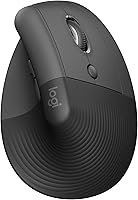
Do Ergonomic Mice Really Work?
Yes, ergonomic mice work for many people, but they are not a cure. A vertical or split design changes your wrist and forearm angle so the muscles work less. The comfort comes from the shape and from how you set it up, not from the mouse alone.
On this page (9 sections)
- Do ergonomic mouse work for wrist and forearm comfort?
- What is the actual evidence behind ergonomic mouse design?
- How does a vertical mouse change your hand position?
- Which ergonomic mouse design fits your hand and desk?
- How long does it take to adjust to an ergonomic mouse?
- What an ergonomic mouse can and cannot fix
- Do ergonomic mouse work well for everyone?
- How should you set up an ergonomic mouse for real results?
- So do ergonomic mouse work? The honest answer
Yes, ergonomic mice work for a lot of desk workers, but "work" needs a clear meaning. They change the angle of your hand and forearm so you stop twisting your wrist flat all day.
The relief is real for many people, and so are the limits. The mouse is one part of the setup, alongside desk height, chair position and how often you move.
Do ergonomic mouse work for wrist and forearm comfort?
They help by changing posture, not by adding padding. A standard mouse keeps your forearm turned palm-down and your wrist bent sideways.
A vertical mouse turns your hand into a handshake position, closer to neutral. Logitech says the MX Vertical's handshake position cuts muscular activity by 10 percent compared with a standard mouse.
That is the maker's claim, and it lines up with the basic idea: a flatter wrist angle means less strain on the forearm. Your hand uses different muscles when it sits upright, so the first days can feel odd.
Most people settle in over a week or two of short sessions.
What is the actual evidence behind ergonomic mouse design?
The evidence is strongest for posture and wrist angle, weaker for long-term pain outcomes. Ergonomic mice are built around known risk factors, such as wrist extension and forearm twist.
Reducing those is a sensible goal. Logitech has the Lift and MX Vertical designed and approved to criteria set out by leading ergonomists.
That is a design check, not proof that your pain will go away. Treat an ergonomic mouse as one tool in a full setup.
A doctor or ergonomist can look at your whole workstation and your symptoms. No mouse replaces that advice.
How does a vertical mouse change your hand position?
It tilts the grip so your thumb sits on top and your palm faces inward. The Lift and the MX Vertical both use a 57-degree angle.
Instead of pressing down on a flat top, you hold a more upright column. That angle keeps your wrist straighter and takes pressure off the underside of your forearm.
The Lift adds a softly textured grip and a snug thumb rest, which gives your thumb a place to sit rather than hang. Your fingers still click and scroll the same way.
The difference is the twist in your forearm, and that is where the comfort usually shows up first.
Which ergonomic mouse design fits your hand and desk?
Pick a vertical mouse for wrist posture, a split keyboard-style design for shoulder spread, and a trackball for zero arm travel. Most people searching for wrist relief land on a vertical shape.
Hand size decides more than brand loyalty. The Lift is built for small to medium right hands, while the MX Vertical is shaped to fit a range of hand sizes.
Left-handed users need to check which models come in a left version. If you use a Mac, the ergonomic mouse for Mac setups guide covers pairing and button mapping.
For a shortlist of upright options, see the best vertical mouse picks.
Which vertical mouse should you try first?
The Logitech Lift Vertical Mouse is the easiest starting point for most people. Its 57-degree angle promotes a more natural forearm posture, and it connects by Bluetooth Low Energy or the Logi Bolt receiver.
It works across Windows, macOS, iPadOS, Chrome OS and Linux. Four buttons are customizable through Logi Options+, and the SmartWheel handles precision and speed scrolling.
A single AA battery lasts up to 24 months.
The Logitech MX Vertical Mouse suits larger hands and users who want more cursor speed control. Its 4000 DPI sensor allows a cursor speed switch, and Logitech says it needs four times less hand movement than a 1000 DPI mouse.
It runs up to four months on a full charge and gets about three hours from a one-minute charge. It connects over Bluetooth or the included USB receiver.
Is a cheaper vertical mouse worth trying?
The Anker Wireless Vertical Mouse is a low-cost way to test the upright shape. It uses a 2.4 GHz USB receiver rather than Bluetooth, so it needs a free USB port.
The optical sensor offers 800, 1200 and 1600 DPI settings. It has next and previous buttons for browsing and drops into a power-saving mode after 8 minutes idle.
Two AAA batteries are not included. The plastic body and USB-only connection are the trade-offs at this price.
Which mice suit smaller hands?
Small hands can wrap too far around a wide vertical mouse. The Lift is the better fit here, since Logitech builds it for small to medium right hands.
Our guide to the best ergonomic mouse for small hands compares the compact options in more detail.
How long does it take to adjust to an ergonomic mouse?
Give it one to two weeks of part-time use before you judge it. Start with an hour or two a day and switch back to your old mouse when your hand tires.
Sudden full-day use can leave your forearm sore. Expect the first days to feel clumsy, and pointing feels slower while your hand learns the new grip.
That is normal and usually fades as the position becomes familiar. Keep your old mouse nearby during the switch.
If pain gets worse instead of easing, stop and get advice rather than pushing through.
What an ergonomic mouse can and cannot fix
It can reduce wrist strain and improve posture. It cannot cure a medical condition or undo a bad desk setup.
No mouse fixes a screen that is too low or a chair that leaves your arms reaching. An upright mouse also won't stop you from sitting still for hours.
Short breaks and small stretches do more for circulation than any shell shape. The Lift's quiet clicks and smooth scroll help you stay focused, not move more.
Keep your wrist straight and your forearm supported by the desk, not by the mouse alone. If numbness or tingling continues, see a doctor.
An ergonomic mouse is a comfort tool, not a treatment.
Do ergonomic mouse work well for everyone?
No. Some people never get comfortable with an upright grip, and that is fine.
The handshake position can feel unnatural if you have limited wrist mobility. Others find the mouse too tall for a low desk.
Left-handed users are limited too. The Lift comes in a left configuration, but many vertical models are right-hand only.
Check hand orientation before buying. The payoff also depends on how much you use the mouse, since a few hours a week may not be worth the adjustment.
All-day desk work is where the posture change matters most.
How should you set up an ergonomic mouse for real results?
Set the desk first, then the mouse. Your elbow should sit near a 90-degree angle and your wrist should stay close to neutral.
Adjust your chair and screen before blaming the shape. Take a short break every 30 to 45 minutes, stand up, stretch your fingers and let your arm hang.
These breaks do more than any mouse feature. If you switch between a laptop and a desktop, a wireless ergonomic mouse that pairs with several devices saves re-pairing time.
The Lift connects to up to 3 devices with Easy-Switch and supports Logitech Flow across screens.
So do ergonomic mouse work? The honest answer
Yes for most desk workers, as a posture fix rather than a cure. An upright mouse like the Logitech Lift Vertical Mouse gives small to medium hands a 57-degree grip that takes the flat twist out of the wrist.
Pick it if wrist strain is your main problem and you want Bluetooth plus long battery life. Choose the MX Vertical if your hands are larger and you want more cursor control.
Try the Anker Wireless Vertical Mouse if you just want to test the upright shape without spending much. Give whichever one you buy a couple of weeks, keep your old mouse nearby, and fix your desk height at the same time.
That combination is what makes an ergonomic mouse work in daily use.
Frequently asked questions
Do ergonomic mouse work right away?
No. Most people need a week or two to adjust, and some feel the change in their forearm before it feels normal.
Start with short sessions and switch back to your old mouse when your hand gets tired.
Can an ergonomic mouse fix carpal tunnel?
No. It can reduce wrist pressure and change your posture, but it is not a treatment.
If you have numbness, tingling or pain that lasts, talk to a doctor.
Is a vertical mouse better than a regular mouse?
It is better for wrist posture because your hand sits more upright instead of flat and twisted. Whether it feels better for you depends on your hand size and how long you sit at the desk.
Do you need a wrist rest with an ergonomic mouse?
Often you don't, because the upright shape supports the hand itself. A wrist rest can help if your desk edge is hard or your arm floats, but it should not press into your wrist while you type.