7 Best Ergonomic Mouse for Small Hands (November 2026)
The best ergonomic mice for small hands include the Logitech Lift Vertical Mouse for vertical beginners, the Logitech Signature M650 Mouse for familiar grips, and the Logitech Signature Plus M750 Mouse for multi-device desks.
On this page (8 sections)
- How we chose ergonomic mice for small hands
- Which ergonomic mouse for small hands should you choose?
- What should small hands look for in an ergonomic mouse?
- Is a vertical or standard shape better for small hands?
- How do you set up a small ergonomic mouse?
- What mistakes should you avoid when choosing a small mouse?
- How should you care for and use an ergonomic mouse?
- Which ergonomic mouse for small hands is the right choice?
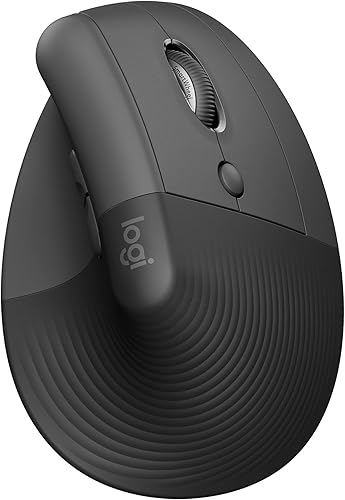
The Logitech Lift Vertical Mouse is the best ergonomic mouse for small hands if you want an upright grip. Its shape is designed for small to medium right hands, while the Logitech M650 suits you if you want a familiar mouse shape.
The right fit depends on more than a “small” label. Hand length, finger reach, grip style, connection needs and whether you prefer a vertical or standard shape all affect the choice.
For a wider look at how mouse shape and keyboard position work together, read our ergonomic mouse and keyboard buying guide. If you are considering an upright grip, our vertical mouse guide explains common shapes and who they suit.
Our picks at a glance
-
1
-
2

-
3

- 4
 Check it
TECKNET Small-Hand Vertical Mouse
Best for cursor control - 5
 Check it
Perixx PERIMICE-719 Mini Vertical Mouse
Best for measured hand fit - 6
 Best for rechargeable setupsCheck it
- 7
 Check it
PHILIPS SPK7628 Ergonomic Mouse
Best for compact work bags
How we chose ergonomic mice for small hands
The strongest picks give you a useful fit clue, a shape that matches a clear preference and connections that suit your desk. We compared each mouse’s stated hand guidance, shape, buttons and wireless options against what small-hand shoppers may need.
A fit label is only a starting point. A small mouse can still feel awkward if your fingers stretch to reach the main buttons or your palm has nowhere comfortable to rest.
The list runs from the highest to the lowest score. For help placing your keyboard and mouse on your desk, see our fit and setup guide.
| Product | Best for | Shape | Hand fit | Connection | Our score |
|---|---|---|---|---|---|
| Logitech Lift Vertical Mouse | vertical beginners | 57-degree vertical | Small to medium right hands | Bluetooth Low Energy or Logi Bolt USB | 9.0 |
| Logitech Signature M650 Mouse | familiar grips | Contoured standard shape | Small to medium option | Bluetooth Low Energy or Logi Bolt USB | 7.9 |
| Logitech Signature Plus M750 Mouse | multi-device desks | Contoured standard shape | Small to medium option | Bluetooth or USB receiver | 7.8 |
| TECKNET Small-Hand Vertical Mouse | cursor control | 52-degree vertical | Small to medium hands | 2.4GHz USB receiver | 7.4 |
| Perixx PERIMICE-719 Mini Vertical Mouse | measured hand fit | Mini vertical | Hand lengths under 7.5 in | 2.4GHz wireless | 7.1 |
| SABLUTE MAM3 Small-Hand Mouse | rechargeable setups | 57-degree vertical | Small to medium hands | Bluetooth or USB receiver | 7.0 |
| PHILIPS SPK7628 Ergonomic Mouse | compact work bags | 57-degree vertical | Hand lengths up to 7 in | 2.4GHz USB receiver | 6.8 |
Which ergonomic mouse for small hands should you choose?
Choose the Logitech Lift if you want a vertical mouse with a stated small to medium right-hand fit. Choose the M650 or M750 if you want a familiar shape and side grips.
Logitech Lift Vertical Mouse: Best for vertical beginners
- 57-degree vertical shape
- Designed for small to medium right hands
- Bluetooth Low Energy or Logi Bolt USB
- Customizable buttons
The upright shape, textured grip and thumb rest make the Lift a strong pick if you want a vertical mouse sized for small to medium hands. It also offers Bluetooth or USB receiver connections.
Pros
- Designed for small to medium right hands
- Textured grip and thumb rest
- Bluetooth and USB receiver options
Cons
- Right-hand configuration only in this pick
- Vertical shape may take adjustment
The Logitech Lift is the best all-around pick if you want to try a vertical mouse made for small to medium right hands. Its upright form, softly textured grip and thumb rest give your hand clear places to settle.
You can connect it through Bluetooth Low Energy or the Logi Bolt USB receiver. Customizable buttons and the SmartWheel add useful shortcuts and scrolling options for everyday work.
Skip the Lift if you need a left-handed version of this pick or strongly prefer the feel of a standard mouse. The upright position may take some adjustment, so start with shorter sessions before using it all day.
Choose the Lift for a vertical grip and a clearer small-hand fit than a generic size label. Our best vertical mouse picks cover more upright options.
Logitech Signature M650 Mouse: Best for familiar grips
- Small to medium size option
- Soft thumb area and rubber side grips
- Bluetooth Low Energy or Logi Bolt USB
- SilentTouch clicks
The M650 keeps a familiar mouse shape while offering a small to medium size option, a soft thumb area and rubber side grips. Its SmartWheel switches between precise and fast scrolling.
Pros
- Small to medium size option
- Soft thumb area and rubber side grips
- Two wireless connection options
Cons
- Not a vertical mouse
- Side buttons are customizable through Logitech Options+ on Windows and macOS
The Signature M650 is the better choice if you want a familiar mouse shape with a small to medium size option. Logitech offers different sizes and handedness in the range, so check you are selecting the version that fits your hand and orientation.
Its soft thumb area and rubber side grips give your hand places to rest along the sides. The SmartWheel switches between precise line-by-line scrolling and faster scrolling for long pages.
Bluetooth Low Energy and Logi Bolt USB are both available. Side buttons can be customized through Logitech Options+ on Windows and macOS, and SilentTouch reduces click noise.
Skip this model if you specifically want your hand held in a vertical position. Compare it with our best wireless ergonomic mouse guide if wireless shape and connections are your main priorities.
Logitech Signature Plus M750 Mouse: Best for multi-device desks
- Small to medium size option
- Pairs with up to three Bluetooth devices
- SmartWheel
- SilentTouch clicks
The M750 combines a small to medium size option with Easy-Switch for up to three Bluetooth devices. Its SmartWheel and quiet clicks suit readers who value those features in a familiar shape.
Pros
- Switches between up to three Bluetooth devices
- SmartWheel scrolling
- SilentTouch clicks
Cons
- Not a vertical mouse
- The USB receiver may be supplied inside or with the mouse
The Signature Plus M750 suits a small to medium hand when you move between several Bluetooth devices. Easy-Switch pairs and switches among up to three devices, which is useful at a desk shared by a computer, tablet or second computer.
The contoured shape, soft thumb area and rubber side grips keep the grip familiar. Its SmartWheel handles precise or faster scrolling, while SilentTouch reduces click noise.
Choose it over the M650 when switching devices is a key part of your routine. Skip it if you want a vertical shape or do not need multi-device switching.
TECKNET Small-Hand Vertical Mouse: Best for cursor control
- 52-degree angle
- Described for small to medium hands
- Five DPI settings
- 2.4GHz USB receiver
The TECKNET pairs a vertical shape with five adjustable DPI settings. It connects through a USB receiver, and its forward and back buttons aren't supported on Mac OS.
Pros
- Five adjustable DPI settings
- 2.4GHz connection with USB receiver
- Small to medium hand fit is specified
Cons
- Forward and back buttons aren't supported on Mac OS
- No Bluetooth connection
The TECKNET is a vertical option for shoppers who want to adjust cursor speed. Its five DPI settings let you choose among different sensitivities, and the shape is described for small to medium hands.
It connects through a 2.4GHz USB receiver, so check for a compatible port before you buy. The forward and back buttons are not supported on Mac OS, even though the mouse itself is described as compatible with Mac OS.
Choose it if you want a simple receiver connection and several cursor-speed settings. Skip it if Bluetooth matters or you rely on those side buttons with a Mac.
Perixx PERIMICE-719 Mini Vertical Mouse: Best for measured hand fit
- Mini vertical shape
- Designed for hand lengths under 7.5 in
- Three DPI settings
- 2.4GHz wireless
The PERIMICE-719 gives a specific hand-length guide: under 7.5 inches. Its right-handed vertical design has three DPI settings and a 2.4GHz wireless connection.
Pros
- Clear hand-length guidance
- Three DPI settings
- Soft rubber-coated surface
Cons
- Right-handed design
- Requires two AAA batteries, which aren't included
The Perixx PERIMICE-719 gives you a specific fit guide: it is designed for hand lengths under 7.5 inches. Measure from the base of your palm to the tip of your middle finger, then compare that length before choosing.
This mini vertical mouse has three DPI settings, quiet left and right buttons, and a soft rubber-coated surface. It uses a 2.4GHz wireless connection and takes two AAA batteries, which are not included.
Choose it if your hand falls within its stated range and you want a mini upright shape. Skip it if you need a left-hand configuration, Bluetooth or quiet side buttons, since the back and forward buttons are not silent.
SABLUTE MAM3 Small-Hand Mouse: Best for rechargeable setups
- 57-degree vertical shape
- Optimized for small to medium hands
- Bluetooth and USB receiver connections
- Built-in rechargeable battery
The MAM3 combines a vertical shape with Bluetooth and USB receiver connections, plus a built-in rechargeable battery. SABLUTE recommends a 3 to 7 day adjustment period for first-time vertical mouse users.
Pros
- Built-in rechargeable battery
- Bluetooth and USB receiver options
- Switches among three devices
Cons
- Right-hand configuration
- May need an adjustment period
The SABLUTE MAM3 suits you if you want a rechargeable vertical mouse for a small to medium hand. Its built-in battery avoids the need to keep disposable batteries on hand, and it can connect through Bluetooth or a USB receiver.
It can switch among three devices, and four DPI settings let you adjust cursor sensitivity. The seven-button layout includes Bluetooth and DPI switches, so take a moment to learn their placement before relying on them.
SABLUTE recommends 3 to 7 days for first-time vertical mouse users to adjust. Pick it if you want rechargeable power and multiple connections; skip it if you prefer a standard grip or a left-handed configuration.
PHILIPS SPK7628 Ergonomic Mouse: Best for compact work bags
- 57-degree vertical shape
- Designed for hand lengths up to 7 in
- 2.4GHz USB receiver
- Three DPI settings
The SPK7628 is a compact vertical option with a stated hand-length limit of 7 inches. It connects through a USB receiver, with a USB-C adapter needed for devices without USB-A.
Pros
- Stated fit for hand lengths up to 7 in
- Three DPI settings
- Receiver stores inside the mouse base
Cons
- No Bluetooth connection
- USB-C adapter isn't included
The PHILIPS SPK7628 suits a small hand that falls within its stated limit of up to 7 inches and wants a compact receiver-based setup. The USB receiver stores inside the mouse base, which helps keep it with the mouse when you travel.
It has a vertical shape and three DPI settings. The connection uses a 2.4GHz USB receiver, not Bluetooth; a USB-C to USB-A adapter is needed for devices without a USB-A port, and the adapter is not included.
Choose it if your hand length fits and your computer can use the receiver. Skip it if you need Bluetooth or do not want to carry an adapter for a USB-C-only device.
What should small hands look for in an ergonomic mouse?
Small hands should look for a clear fit guide, reachable buttons and a shape that matches the way they hold a mouse. Measure your hand and compare it with any stated limit before you buy.
Measure from the base of your palm to the tip of your middle finger. That gives you a length to compare with the Perixx’s under-7.5-inch guide or the PHILIPS’s up-to-7-inch guide.
Then consider finger reach and palm contact. While imagining your usual grip, ask whether your fingers would rest on the main buttons without stretching and whether your palm would have support without being pushed too far forward.
Check orientation as well as size. The seven options here are right-handed designs, so a left-handed user should start with our left-handed ergonomic mouse guide.
Finally, match the connection to your devices. Bluetooth avoids using a receiver, while receiver-based models need a suitable port; USB-C devices may need an adapter.
Is a vertical or standard shape better for small hands?
Neither shape fits every small hand; choose based on the grip you find comfortable and the button reach you need. The Lift, TECKNET, Perixx, SABLUTE and PHILIPS models have vertical shapes, while the M650 and M750 have contoured standard shapes.
A vertical shape turns your hand into a more upright position. Logitech describes the Lift’s 57-degree angle as supporting a more natural forearm posture, but the angle alone cannot tell you whether the grip or button positions will suit you.
A standard shape may feel more familiar if you have always used a traditional mouse. The M650 and M750 add thumb areas and rubber side grips without asking you to learn an upright grip.
If you are unsure, decide which grip you want before comparing small details such as DPI settings or button count. Your hand should rest naturally, and your fingers should reach the controls without strain.
How do you set up a small ergonomic mouse?
Place the mouse close to your keyboard and keep your forearm relaxed, then choose a connection method that works with your computer. Give yourself time to check hand position and cursor speed before settling into a long work session.
For a Bluetooth model, follow its pairing instructions and confirm it is connected to the device you intend to use. For a receiver model, plug the receiver into a compatible port; with the PHILIPS mouse, check whether a USB-C adapter is needed.
Set the pointer speed to a level that lets you move across the screen without repeatedly lifting or reaching. If your mouse has DPI settings, change them in small steps and keep the setting that makes precise work comfortable.
With a vertical model, begin with shorter sessions while you learn where the buttons sit. SABLUTE recommends 3 to 7 days for first-time users, and Perixx notes that adjustment can take time.
Keep the mouse on a stable, clean surface and avoid gripping it tightly. If the shape makes you tense your fingers or wrist, reposition it or return to a grip that feels comfortable.
What mistakes should you avoid when choosing a small mouse?
The most common mistake is treating “small” as a guarantee of fit. A size label or hand-length limit is a useful clue, but you still need to consider finger reach, grip preference, handedness and connection type.
Do not choose a vertical mouse just because you have small hands. It changes your grip, and a standard shape such as the M650 may be a better match if you prefer a familiar hand position.
Do not overlook port compatibility. A USB receiver may need an adapter on a USB-C-only computer, while a Bluetooth mouse depends on Bluetooth support and pairing.
Do not assume every feature works on every operating system. TECKNET’s forward and back buttons are not supported on Mac OS, and M650 side-button customization through Logitech Options+ is specified for Windows and macOS.
Do not judge fit after a few minutes if you are learning a new shape. Start with brief sessions, but stop if the grip feels uncomfortable rather than forcing yourself to adapt.
How should you care for and use an ergonomic mouse?
Keep the mouse and its work area free of dust and crumbs, and wipe the outside with a soft, dry cloth when needed. Avoid getting liquid into the buttons, scroll wheel or sensor.
Check the power method before a long work session. The Perixx uses two AAA batteries that are not included, while the SABLUTE has a built-in rechargeable battery; replace or recharge power before it runs out.
Store a receiver where it will not get lost. The PHILIPS receiver stores inside the base, while the other receiver models should be kept with the mouse when you travel.
Use the mouse with a relaxed grip and take short breaks during long stretches at a computer. Ergonomic shape can support a more comfortable setup, but it cannot make a poor desk position comfortable on its own.
Which ergonomic mouse for small hands is the right choice?
Pick the Logitech Lift if you want an upright grip sized for small to medium right hands. Choose the M650 for a familiar shape, or the M750 if switching among Bluetooth devices matters more than a vertical design.
For a specific hand-length guide, compare your measurement with the Perixx’s under-7.5-inch limit or the PHILIPS’s up-to-7-inch limit. Choose TECKNET if adjustable cursor speed is your priority, or SABLUTE if you want a rechargeable vertical mouse with multiple connection options.
The best ergonomic mouse for small hands is the one that fits your hand, reaches your devices and feels natural to use. If your grip preference points toward an upright shape, start with our guide to using a vertical mouse for the first time.
Our top 3 picks at a glance
-
1
-
2
-
3
Frequently asked questions
How do I know if an ergonomic mouse fits small hands?
Compare your hand length and finger reach with the fit guidance for the mouse. The Perixx PERIMICE-719 is designed for hand lengths under 7.5 inches, while the PHILIPS SPK7628 is designed for lengths up to 7 inches.
Also check whether your fingers reach the buttons without stretching and your palm can rest comfortably.
Is a vertical mouse better for small hands?
A vertical mouse can suit small hands when its size and button reach fit your grip. The Logitech Lift is designed for small to medium right hands, and TECKNET describes its shape for small to medium hands.
If an upright grip feels unfamiliar, the standard-shaped Logitech M650 is another option.
How long does it take to adjust to a vertical mouse?
Adjustment depends on the person and how often you use the mouse. SABLUTE recommends 3 to 7 days for first-time users, and Perixx says new users may need an adjustment period.
Start with short sessions and take a break if your hand feels uncomfortable.
Should I choose Bluetooth or a USB receiver?
Choose Bluetooth if your computer supports it and you want to keep a USB port free. A receiver can offer a simple plug-and-play setup, but check that your device has the right port or use an adapter if needed.
The Logitech Lift supports Bluetooth and Logi Bolt USB; the PHILIPS SPK7628 uses a USB receiver.
Are all small ergonomic mice made for left-handed users?
No. Check the hand orientation before choosing, since the products in this roundup are right-handed designs.
For a left-hand-specific shortlist, see our left-handed ergonomic mouse guide.


