9 Best Vertical Mouse (November 2026)
The best vertical mice include the Logitech Lift Vertical Mouse for small right hands, the Logitech MX Vertical Mouse for speed adjustments, and the Evoluent VerticalMouse 4 Wireless for Windows shortcuts.
On this page (7 sections)
- How we chose these vertical mice
- Best vertical mouse picks for different hands and setups
- How do you choose the best vertical mouse for your hand?
- Which connection and controls suit your desk?
- How should you set up and learn a vertical mouse?
- What common vertical mouse buying mistakes should you avoid?
- Which best vertical mouse should you choose?
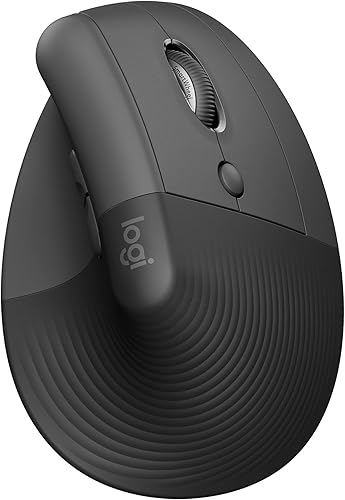
The best vertical mouse for most small to medium right hands is the Logitech Lift. Its 57-degree angle, thumb rest and choice of Bluetooth Low Energy or Logi Bolt USB cover the needs of many everyday desk setups.
Hand size and connection needs can change the right pick. The MX Vertical adds a cursor speed switch, while the ProtoArc EM11 Pro is sized for larger hands and has a side scroll wheel.
For a wider overview, start with our vertical mouse guide to sizes and grips. If you're deciding whether the upright shape suits you, our vertical mouse vs normal mouse comparison explains what changes in use.
Our picks at a glance
-
1
-
2
-
3

- 4
 Best for three-device switchingCheck it
- 5
 Best for receiver simplicityCheck it
- 6
 Check it
TECKNET 3-Device Vertical Mouse
Best for quiet shared desks - 7
 Check it
ProtoArc EM11 Pro Large-Hand Mouse
Best for wide spreadsheets - 8
 Best for USB-C chargingCheck it
- 9
 Check it
UGREEN Ergonomic Wireless Mouse
Best for quiet large hands
How we chose these vertical mice
We chose these vertical mice by comparing hand-fit guidance, connection options, controls and power needs with common desk setups. The Logitech Lift leads for small to medium right hands because its comfort features and two connection choices make it a practical everyday starting point.
This selection also includes options for larger hands, custom controls, quiet clicks and multi-device use. A vertical mouse changes the angle of your hand, so comfort depends on shell size, the position of the thumb rest and whether buttons are easy for you to reach.
| Product | Best for | Hand fit | Connection | Power | Our score |
|---|---|---|---|---|---|
| Logitech Lift Vertical Mouse | small right hands | Small to medium; right-hand model | Bluetooth Low Energy or Logi Bolt USB | 1 AA battery; up to 24 months | 9.0 |
| Logitech MX Vertical Mouse | speed adjustments | Right-hand model; fits a variety of hand shapes and sizes | Bluetooth Low Energy or USB receiver | Rechargeable; up to 4 months per charge | 8.8 |
| Evoluent VerticalMouse 4 Wireless | Windows shortcuts | Right-hand, regular size | Wireless USB | 8.3 | |
| ProtoArc EM11 Vertical Mouse | three-device switching | Small to medium; under 7.5 in hand length | Dual Bluetooth and USB-A receiver | Rechargeable 500 mAh battery | 8.0 |
| Anker Wireless Vertical Mouse | receiver simplicity | Right-hand model | 2.4 GHz USB receiver | Two AAA batteries, not included | 7.8 |
| TECKNET 3-Device Vertical Mouse | quiet shared desks | Right-hand; best for medium to large hands | Bluetooth and 2.4 GHz USB-A | Two AAA batteries, not included | 7.7 |
| ProtoArc EM11 Pro Large-Hand Mouse | wide spreadsheets | Large; 7.5–8.5 in hand length | Two Bluetooth channels and USB-A receiver | Rechargeable 500 mAh battery | 7.6 |
| Lekvey Vertical Mouse | USB-C charging | Right-hand; recommended for medium or large hands | 2.4 GHz USB receiver | Rechargeable by USB-C | 7.5 |
| UGREEN Ergonomic Wireless Mouse | quiet large hands | Right-hand; recommended for larger hands | Bluetooth or 2.4 GHz wireless | One AA battery | 7.4 |
Best vertical mouse picks for different hands and setups
The best pick depends on your hand size, computer connections and the controls you use most. Each option has a distinct reason to consider it, along with a clear reason to skip it if that feature does not fit your setup.
Logitech Lift Vertical Mouse: Best for small right hands
- 57-degree angle
- Bluetooth Low Energy or Logi Bolt USB
- Softly textured grip and thumb rest
A 57-degree shape, textured grip and thumb rest make the Lift a straightforward starting point for small to medium hands. It connects by Bluetooth Low Energy or Logi Bolt USB.
Pros
- Two connection options
- Quiet clicks and SmartWheel
Cons
- Right-hand model is for small to medium hands
The Logitech Lift is the best starting point for small to medium right hands. Its 57-degree shape holds the hand more upright, while the textured grip and thumb rest give the palm a defined resting place.
Choose Bluetooth Low Energy or the Logi Bolt USB receiver based on the devices you use. Customizable buttons, quiet clicks and the SmartWheel make it suitable for daily browsing, documents and office work.
The Lift is available in left-hand and right-hand configurations, but this pick is the right-hand model. Skip it if your hand is larger than the intended fit or if you need a mouse with a side scroll wheel.
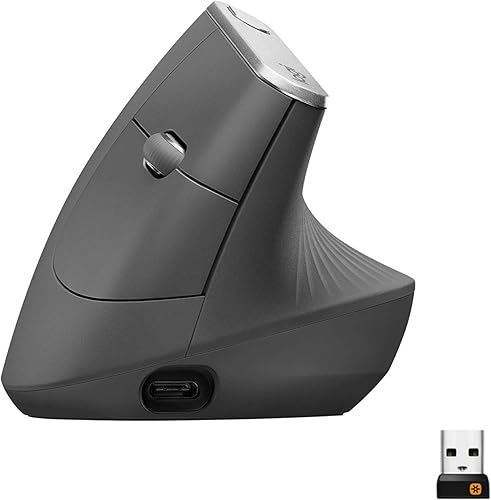
Logitech MX Vertical Mouse: Best for speed adjustments
- 57-degree angle
- Cursor speed switch
- 4000 DPI sensor
- Bluetooth or USB receiver
The MX Vertical pairs a 57-degree shape with a button for changing cursor speed. Its textured rubber surface and thumb rest add clear contact points.
Pros
- Cursor speed switch
- Bluetooth and USB receiver
- Rechargeable battery
Cons
- Right-hand model
The MX Vertical suits people who want a cursor speed switch within easy reach. Its 57-degree angle, thumb rest and textured rubber surface provide clear contact points as you learn to hold a vertical mouse.
It connects through Bluetooth Low Energy or the included USB receiver and recharges by cable. Logitech gives a full-charge life of up to four months, with actual life depending on use and computing conditions.
The shape is intended for a variety of hand shapes and sizes, but this is a right-hand model. Choose another option if you want a left-hand layout or prefer replaceable batteries.
Evoluent VerticalMouse 4 Wireless: Best for Windows shortcuts
- Six buttons
- Pointer speed controls on the side
- Broad bottom lip
- Windows customization software
The VerticalMouse 4 has six buttons, on-mouse pointer speed controls and a broad bottom lip. Its customization software is for Windows.
Pros
- Speed changes without releasing the grip
- Broad lip helps keep the last finger off the desk
- Windows button customization
Cons
- Advanced customization depends on Windows software
The Evoluent VerticalMouse 4 fits buyers who want several buttons and on-mouse pointer speed settings. Its six buttons include two thumb buttons, and the broad bottom lip helps keep the little finger from rubbing against the desk.
You can change pointer speed without letting go, and Evoluent Mouse Manager allows button customization in Windows. Mac and Linux have basic functionality without the driver, so skip this pick if advanced customization on either system is a must.
This is a regular-size, right-hand model. Its control layout is useful if you want shortcuts close at hand, but may be more than you need if you mainly browse and write.
ProtoArc EM11 Vertical Mouse: Best for three-device switching
- Designed for hands under 7.5 in
- Connects to up to 3 devices
- Rechargeable
- Three DPI levels
The EM11 connects to up to three devices and recharges by USB-C. Its maker recommends it for hand lengths under 7.5 in.
Pros
- Three-device connections
- Rechargeable
- Quiet left and right clicks
Cons
- Forward and back buttons aren't compatible with Mac
- Buttons aren't programmable
The ProtoArc EM11 is designed for small to medium hands under 7.5 in long. Its rechargeable battery and support for three devices make it a good match for someone who moves between a computer, tablet and phone.
It uses dual Bluetooth connections and a USB-A receiver, with three DPI settings. The left and right clicks are quiet, though the middle wheel and forward and back buttons make sound.
Skip it if you need programmable buttons or depend on the forward and back buttons on a Mac, where they aren't compatible. Measure your hand before choosing, since a mouse that is too large or small can make a relaxed grip harder to maintain.
Anker Wireless Vertical Mouse: Best for receiver simplicity
- 2.4 GHz USB receiver
- Three DPI settings
- Forward and back buttons
- Uses two AAA batteries
Anker keeps the setup simple with a 2.4 GHz receiver and three DPI settings. It uses two AAA batteries and has forward and back buttons.
Pros
- Three DPI settings
- Forward and back buttons
- Power-saving mode after inactivity
Cons
- No Bluetooth connection
- AAA batteries aren't included
The Anker is a simple choice if you want a USB receiver and don't need Bluetooth. Its three DPI settings let you adjust cursor speed, while forward and back buttons help with web browsing.
It runs on two AAA batteries, which aren't included, and enters power-saving mode after eight minutes without use. Press either main button to wake it.
The clicks are audible, so this is a poor fit for a quiet shared workspace. Choose it if you prefer replaceable batteries and basic receiver setup, and skip it if you want multi-device switching or Bluetooth pairing.
TECKNET 3-Device Vertical Mouse: Best for quiet shared desks
- Bluetooth and 2.4 GHz USB-A
- Up to 3 devices
- Six DPI settings
- Quiet left and right clicks
TECKNET offers two Bluetooth connections plus a USB-A receiver connection. Its left and right clicks are quiet, while other function buttons aren't.
Pros
- Three-device switching
- Six DPI settings
- Quiet left and right clicks
Cons
- Side buttons aren't compatible with macOS
- AAA batteries aren't included
TECKNET supports up to three devices through two Bluetooth connections and a 2.4 GHz USB-A receiver. It has six DPI settings, with quiet left and right clicks for shared offices or study spaces.
The fit guidance points to medium to large hands, and the shape is right-handed. It uses two AAA batteries, which aren't included.
Its side buttons aren't compatible with macOS, so choose another pick if you use those controls on a Mac. The main clicks are quiet, but its other function buttons aren't.
ProtoArc EM11 Pro Large-Hand Mouse: Best for wide spreadsheets
- Designed for 7.5–8.5 in hand lengths
- Side scroll wheel
- Browser-based button customization
- Connects to up to 3 devices
The EM11 Pro has a larger shape, side scroll wheel and browser-based customization for six buttons. It connects to up to three devices.
Pros
- Large-hand sizing guidance
- Sideways scrolling for wide sheets
- Rechargeable
Cons
- Measure hand length before choosing
- Customization requires a browser tool
The EM11 Pro is designed for large hands, with a recommended hand length of 7.5–8.5 in. Its side scroll wheel moves across wide spreadsheets and other workspaces without dragging a bottom scrollbar.
A browser-based tool lets you customize six buttons and adjust DPI. It connects to up to three devices through two Bluetooth channels and a USB-A receiver, and recharges by USB-C.
Measure before choosing, since its larger shell can feel awkward if your hand is smaller. Skip it if side scrolling and button customization would go unused, or if you don't want to configure controls in a browser.
Lekvey Vertical Mouse: Best for USB-C charging
- Rechargeable 600 mAh battery
- Three DPI levels
- Forward and back buttons
- USB receiver plug-and-play
Lekvey combines a rechargeable battery with a USB receiver and three DPI levels. Its recommended fit is medium or large right hands.
Pros
- Rechargeable by USB-C
- Forward and back buttons work with Mac
- No Bluetooth pairing or driver needed
Cons
- Buttons aren't programmable
- No Bluetooth connection
Lekvey combines a rechargeable battery with a USB receiver, three DPI levels and forward and back buttons. Its fit guidance recommends it for medium or large hands.
The battery charges by USB-C, and the receiver is stored under the mouse. Basic setup is plug and play, with no Bluetooth pairing or driver needed.
Choose it if you want a rechargeable receiver-based mouse and familiar navigation buttons. Skip it if you need Bluetooth, multi-device switching or custom button assignments.
UGREEN Ergonomic Wireless Mouse: Best for quiet large hands
- Bluetooth and 2.4 GHz wireless
- Up to 3 devices
- Four DPI levels
- Quiet clicks
UGREEN combines quiet clicks with Bluetooth or 2.4 GHz wireless and switching across up to three devices. It uses one AA battery.
Pros
- Four DPI levels
- Quiet clicks
- Works with Windows, macOS, Linux, ChromeOS and Android
Cons
- Right-hand model
- Larger-hand fit may not suit smaller hands
UGREEN is intended for larger right hands and combines quiet clicks with multi-device connections. It supports Bluetooth or 2.4 GHz wireless, switching between up to three devices, and four DPI levels.
It uses one AA battery and has a sleep mode to help extend battery life. It's compatible with Windows, macOS, Linux, ChromeOS and Android.
Choose it if quiet everyday clicking and device switching matter more than custom buttons. Its larger-hand guidance makes it a less certain fit for smaller hands, so compare the shell size and your hand measurements first.
How do you choose the best vertical mouse for your hand?
Choose a vertical mouse by matching hand fit and orientation before comparing extra features. A mouse that supports a relaxed grip is more useful than one with controls you won't use.
Measure from the base of your palm to the tip of your middle finger. Compare that measurement with the model's guidance: the Lift targets small to medium hands, the EM11 is for hands under 7.5 in, and the EM11 Pro is sized for 7.5–8.5 in.
A product's hand-length range is a useful starting point, but it doesn't replace checking how your fingers reach the buttons and how your thumb rests. The Evoluent is a regular-size right-hand model, while the MX Vertical is described as fitting a variety of hand shapes and sizes.
Check orientation as well. Most picks here are right-handed, so left-handed users should look for an explicitly left-hand version, such as the Lift's left-hand configuration.
For a broader overview of grip styles and sizing, see our vertical mouse guide to sizes and grips. If you have a smaller hand, our guide to the best ergonomic mouse for small hands compares other shapes too.
Which connection and controls suit your desk?
Choose the connection that your computer supports and the controls that match your routine. Bluetooth can keep a USB port free, while a receiver can offer a simple plug-in setup.
The Lift and MX Vertical offer Bluetooth and a USB receiver option. The EM11, EM11 Pro, TECKNET and UGREEN support connections to multiple devices, though the exact combination differs by model.
Anker and Lekvey use a USB receiver and don't offer Bluetooth.
Before buying, check whether your computer has a compatible port. The Anker and Lekvey receivers use USB, while the ProtoArc and TECKNET receiver is USB-A; their charging cables don't serve as wireless receivers.
Button count alone is not a reason to choose a mouse. The Evoluent supports Windows button customization, the EM11 Pro uses a browser-based tool, and the EM11, Lekvey and other simpler options have fixed button functions or stated compatibility limits.
If you switch among computers, check the device count and whether each one pairs by Bluetooth or uses the receiver. For help sorting out a wider mouse and keyboard setup, read our ergonomic mouse and keyboard buying guide.
How should you set up and learn a vertical mouse?
Set up the mouse beside your keyboard with enough space for your forearm to move, then rest your hand lightly on its grip. Let the shape support your hand instead of squeezing it.
Connect by pairing Bluetooth or inserting the receiver, following the connection method for your chosen model. Set cursor speed to a comfortable level, then adjust it in small steps if the pointer feels too slow or too fast.
A vertical mouse often feels unfamiliar at first because your hand and fingers meet the controls at a different angle. ProtoArc recommends about 1–2 weeks to adjust to its EM11 models, while TECKNET recommends about a week.
Begin with ordinary browsing and document work, and allow yourself time to find a relaxed grip. Avoid forcing a fast, precise work pace on the first day; keep the old mouse nearby if you have an urgent task while learning.
For a step-by-step first-use routine, see our guide on how to use a vertical mouse for the first time. If the pointer skips or the mouse stops responding, our wireless ergonomic mouse troubleshooting guide covers common connection checks.
What common vertical mouse buying mistakes should you avoid?
The most common mistake is choosing by feature count before checking hand fit. A large shell, unreachable buttons or a hand orientation mismatch can make the mouse frustrating even when it has many controls.
Don't assume all vertical mice connect the same way. Some support Bluetooth, some rely on a USB receiver, and some offer both; confirm your computer has the right connection and port before ordering.
Don't treat all clicks as quiet. The TECKNET and ProtoArc EM11 have quiet main buttons, but other controls can make sound, and the Anker clicks are audible.
Don't expect the posture to feel natural immediately. A short adjustment period is common, so try relaxed movements and give your hand time to learn the grip before deciding that the shape isn't for you.
Finally, don't pay attention only to DPI or the number of buttons. A pointer-speed setting helps only if you can control it comfortably, and extra buttons matter only when their placement and compatibility fit your daily tasks.
Which best vertical mouse should you choose?
Choose the Logitech Lift for a small to medium right hand and a choice of Bluetooth or Logi Bolt USB. Pick the MX Vertical if you want a cursor speed switch, the EM11 Pro for a large hand and spreadsheet side scrolling, or Anker for a basic USB receiver.
Choose Evoluent if Windows button customization and on-mouse speed controls matter, TECKNET for quiet main clicks and switching among three devices, Lekvey for rechargeable USB receiver use, or UGREEN for quiet clicks and a larger-hand fit.
If you're still deciding whether an upright grip fits your habits, our vertical mouse vs normal mouse comparison explains the change in hand position. For a closer category overview, visit our vertical mice guide, and see ergonomic mouse setup and fit for help positioning your workspace.
Our top 3 picks at a glance
-
1
-
2
-
3
Frequently asked questions
What is the best vertical mouse for most people?
The Logitech Lift is a strong starting point if your right hand is small to medium. It has a 57-degree angle, textured grip, thumb rest and Bluetooth or Logi Bolt USB connection.
For larger hands, compare the EM11 Pro's stated hand-length range before choosing.
How do I choose the right vertical mouse size?
Start with the hand-size guidance for each model, then compare the mouse's shape and support points with your grip. The Lift is aimed at small to medium hands, while the EM11 Pro is designed for hand lengths of 7.5–8.5 in.
Measure from the base of your palm to the tip of your middle finger.
Are vertical mice hard to get used to?
A vertical shape can feel unfamiliar because your hand rests differently and the buttons sit in new positions. ProtoArc recommends allowing about 1–2 weeks to adjust to its EM11 models, while TECKNET says to allow about 1 week.
Keep your grip relaxed as you get used to the shape.
Can a vertical mouse connect to more than one device?
Yes. The Lift supports Bluetooth or Logi Bolt connections, and the ProtoArc EM11, EM11 Pro, TECKNET and UGREEN models support connections to multiple devices.
Check the connection type each computer supports, especially if you need a USB-A receiver or Bluetooth.
Are vertical mice suitable for left-handed users?
Some are, but most picks here are right-hand models. Logitech offers the Lift in a left-hand configuration, so check that you select the correct orientation.
A mouse shaped for the opposite hand can change how your fingers reach its buttons and thumb rest.


