8 Best Split Keyboard (November 2026)
The best split keyboards include the Logitech Ergo K860 Keyboard for familiar full-size typing, the Kinesis Freestyle2 USB Keyboard for adjustable desk spacing, and the Kinesis Advantage360 Pro Keyboard for contoured key wells.
On this page (3 sections)
The Logitech Ergo K860 is the best split keyboard for most people who want a familiar full-size layout, wireless connections, and an integrated wrist rest. If you want to position each half yourself, the Kinesis Freestyle2 lets you separate its modules; for a contoured key layout, consider the Kinesis Advantage360 Pro.
Split keyboards range from fixed one-piece frames to designs with two modules you can move apart. Decide how much adjustment you need, how familiar you want the keys to feel, and how much clear desk space you have before comparing individual models.
For a broader look at shapes and sizes, read our split keyboard guide. Our wave keyboard overview explains how a curved frame differs from a keyboard with separate modules.
Our picks at a glance
-
1

-
2

-
3

- 4
 Check it
Perixx PERIBOARD-512B Keyboard
Best for wired curved typing - 5
 Best for colored desk lightingCheck it
- 6
 Check it
Perixx PERIBOARD-612B Keyboard
Best for wireless curved rows - 7
 Best for rechargeable wireless useCheck it
- 8
 Check it
Kinesis Freestyle2 Keyboard for Mac
Best for wireless Mac work
The best split keyboards for different setups
The Logitech Ergo K860 is the best fit for familiar full-size typing, while the Kinesis Freestyle2 offers the most control over hand spacing. The other picks cover contoured key wells, fixed curved frames, wired simplicity, and wireless use.
We compared layout, connection, adjustment options, and wrist support to match each keyboard to a clear type of buyer. The scores reflect how well each model’s features suit the needs of someone choosing a split keyboard.
| Product | Best for | Layout | Connection | Palm lift | Our score |
|---|---|---|---|---|---|
| Logitech Ergo K860 Keyboard | familiar full-size typing | Full-size QWERTY | Bluetooth or USB receiver | 0, -4, or -7 degrees | 9.1 |
| Kinesis Freestyle2 USB Keyboard | adjustable desk spacing | Standard Windows QWERTY | USB | 7.9 | |
| Kinesis Advantage360 Pro Keyboard | contoured key wells | Contoured, orthogonal QWERTY | Bluetooth or wired USB-C | 7.6 | |
| Perixx PERIBOARD-512B Keyboard | wired curved typing | One-piece split QWERTY | Wired USB | 7.5 | |
| Arteck Wired Split Keyboard | colored desk lighting | One-piece split QWERTY | Wired USB | 7.4 | |
| Perixx PERIBOARD-612B Keyboard | wireless curved rows | One-piece split layout | Bluetooth or 2.4 GHz receiver | 7.3 | |
| Nulea Split Keyboard | rechargeable wireless use | One-piece split QWERTY | Bluetooth or 2.4 GHz | 7.0 | |
| Kinesis Freestyle2 Keyboard for Mac | wireless Mac work | Standard Mac QWERTY | Bluetooth | 6.9 |
1. Logitech Ergo K860 Keyboard: Best for familiar full-size typing
Logitech Ergo K860 Keyboard: Best for familiar full-size typing
- Curved, split keyframe
- Pillowed wrist rest
- Bluetooth or USB receiver
- Adjustable palm lift
A fixed curved split frame keeps the familiar full-size layout, while the wrist rest and adjustable palm lift offer more ways to position your hands.
Pros
- Full-size layout with number pad
- Bluetooth and USB receiver options
- Adjustable palm lift
Cons
- The two halves do not separate
- The wrist rest is part of a wide keyboard
The Logitech Ergo K860 suits you if you want a full-size keyboard that keeps a familiar QWERTY layout while curving the key frame into two zones. Its integrated pillowed wrist rest and adjustable palm lift add support and angle choices without asking you to position two separate modules.
It connects by Bluetooth or the included USB receiver, and works with Windows, macOS, Linux, and Chrome OS. A number pad, quiet keys, and a CAPS LOCK indicator keep familiar features close at hand.
The palm lift has 0, -4, and -7 degree settings. The overall frame stays fixed, so this is not the right choice if you need to set each half at shoulder width.
Choose it for a low-fuss transition to a curved split frame. If adjusting hand spacing is your main concern, compare it with the Kinesis Freestyle2 USB Keyboard.
2. Kinesis Freestyle2 USB Keyboard: Best for adjustable desk spacing
Kinesis Freestyle2 USB Keyboard: Best for adjustable desk spacing
- Modules separate up to 9 in
- VIP3 lifters included
- Tenting at 5, 10, or 15 degrees
- USB connection
Separate modules let you set the space and angle between your hands. This PC model includes VIP3 lifters and palm supports.
Pros
- Adjustable module spacing
- Three tenting angles
- No software or special drivers required
Cons
- Wired USB connection
- The adjustable setup takes desk space
The Freestyle2 is the strongest fit here if you want to set the distance between your hands yourself. Its two modules can separate up to 9 in, and the included VIP3 lifters provide tenting at 5, 10, or 15 degrees with cushioned palm supports.
This PC model connects by USB and uses a standard Windows layout with hotkeys and an embedded numeric keypad. It requires no software or special drivers, which suits a desk where you want physical adjustment without adding a setup utility.
The split frame gives you more placement choices, but it also needs room for both modules and their connecting cable. Measure the available desk space before moving from a one-piece keyboard.
Choose this model for adjustable spacing and tenting in a wired setup. If you use a Mac and want wireless, see the Freestyle2 for Mac and confirm that its Mac layout suits your shortcuts.
3. Kinesis Advantage360 Pro Keyboard: Best for contoured key wells
Kinesis Advantage360 Pro Keyboard: Best for contoured key wells
- Concave key wells and thumb keys
- Three adjustable tenting heights
- Bluetooth or wired USB-C
- Programmable base layout
A contoured layout, thumb keys, and separate modules suit someone ready to learn a less traditional keyboard shape. It also offers adjustable tenting.
Pros
- Contoured key wells with thumb keys
- Wireless or wired connection
- Three tenting heights
Cons
- A more pronounced layout change
- Premium palm pads are sold separately
The Advantage360 Pro is for you if concave key wells, thumb keys, and tenting are priorities. Its orthogonal layout changes more than the curved, one-piece styles in this roundup, so it suits someone who is prepared to learn a new way to reach keys.
The modules can separate up to 10 in with the included cable, and the keyboard has three adjustable tenting heights. It supports Bluetooth or wired USB-C, and the base layout can be reconfigured with GitHub or a web-based interface.
The included bridge connector can join the two halves for a more consistent one-piece feel. Premium palm pads are sold separately, so factor that in if you want cushioned palm support.
Choose it when you want a customizable contoured layout and are ready for a substantial change in typing position. If you’d rather keep a familiar arrangement, start with our ergonomic keyboard guide.
4. Perixx PERIBOARD-512B Keyboard: Best for wired curved typing
Perixx PERIBOARD-512B Keyboard: Best for wired curved typing
- One-piece split-key layout
- Integrated palm rest
- Curved rows and keycaps
- Wired USB connection
A fixed one-piece design pairs split key zones with curved rows and an integrated palm rest. It suits buyers who want a conventional wired setup.
Pros
- Integrated palm rest
- Curved rows and keycaps
- Full key travel
Cons
- The halves cannot be repositioned
- The shape may take time to learn
The PERIBOARD-512B suits you if you want a one-piece keyboard with split key zones, curved rows, and an integrated palm rest. Its shape stays fixed, so there is less setup than with a keyboard whose modules move independently.
It uses a wired USB connection and offers long key travel with tactile feedback. The curved keycaps and stepped rows feel more sculpted than a flat, standard keyboard.
The ergonomic shape may take time to learn, especially if you’ve typed on a flat layout for years. Give yourself a little practice time before deciding whether the key shape fits your daily work.
Choose this Perixx for a fixed, wired design with a built-in palm rest. If you need to spread the halves apart, the Kinesis Freestyle2 has adjustable modules.
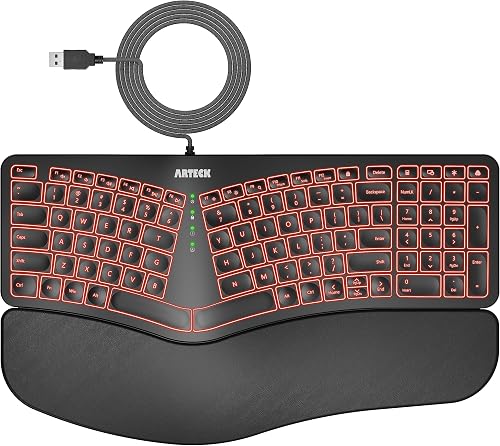
5. Arteck Wired Split Keyboard: Best for colored desk lighting
Arteck Wired Split Keyboard: Best for colored desk lighting
- Cushioned wrist and palm rest
- Seven backlight colors
- USB cable included
- Foldable tilt legs
This fixed split keyboard adds colored backlighting, a cushioned wrist rest, and a long USB cable for a straightforward desk setup.
Pros
- Seven backlight colors
- Cushioned wrist rest
- Simple wired setup
Cons
- The two halves do not separate
- No separate arrow or Home and End keys
The Arteck is the pick for a simple wired desk setup with backlighting. It has a cushioned wrist and palm rest, a 6 ft USB cable, and seven backlight colors with adjustable brightness.
Its one-piece frame keeps the halves at a fixed distance, and its foldable legs let you change the typing angle. The low-profile keys, Windows hotkeys, and media controls suit a conventional desktop workflow.
One layout detail may affect daily use: this keyboard does not have separate arrow or Home and End keys. Check whether you rely on those keys before choosing it.
Choose it if you want a backlit split layout without wireless pairing. For other layout options and setup advice, see our fit and setup guide.
6. Perixx PERIBOARD-612B Keyboard: Best for wireless curved rows
Perixx PERIBOARD-612B Keyboard: Best for wireless curved rows
- Bluetooth or 2.4 GHz receiver
- Windows and Mac support
- Integrated palm rest
- Curved rows and keycaps
A fixed split layout offers wireless options and Windows or Mac support. Its curved rows and integrated palm rest follow the same general shape as a traditional ergonomic keyboard.
Pros
- Two wireless connection options
- Switches between Windows and Mac
- Integrated palm rest
Cons
- Requires two AA batteries
- The modules do not separate
The PERIBOARD-612B keeps a one-piece split layout while offering Bluetooth or a 2.4 GHz receiver. Its curved rows and integrated palm rest suit buyers who want wireless use without moving two separate modules.
It supports Windows and Mac, with a switch on the keyboard to change systems. Four additional Mac and Windows keys and a key puller are included for customization.
The keyboard requires two AA batteries, which are not included. Its overall shape remains fixed, so choose another style if you want to change the spacing between the halves.
Choose this Perixx for wireless connection choices and a familiar curved-row layout. If you want a rechargeable wireless option, the Nulea below also offers Bluetooth and 2.4 GHz modes.
7. Nulea Split Keyboard: Best for rechargeable wireless use
Nulea Split Keyboard: Best for rechargeable wireless use
- Bluetooth and 2.4 GHz modes
- Oversized cushioned wrist rest
- Rechargeable battery
- Three tilt angles
A cushioned wrist rest, rechargeable power, and wireless modes make this a comfort-focused fixed layout. Its tilt supports add three angle choices.
Pros
- Oversized cushioned wrist rest
- Bluetooth and 2.4 GHz modes
- Rechargeable
Cons
- The two halves do not separate
- Windows compatibility is specified, but Mac details are less clear
The Nulea combines a fixed split layout with an oversized cushioned wrist rest, adjustable tilt, and rechargeable power. It supports Bluetooth and 2.4 GHz wireless modes, so you can choose between device pairing and a receiver connection.
Its three tilt angles let you choose how the keyboard sits on your desk. Nulea describes it as compatible with Windows and also mentions Mac compatibility in its description, so check compatibility if you need a Mac setup.
This is a one-piece keyboard, not a model with modules that move apart. Choose it for the padded rest and wireless modes; skip it if changing the space between the halves is the main reason you’re shopping.
For help pairing a keyboard with a mouse, read our ergonomic keyboard and mouse guide.
8. Kinesis Freestyle2 Keyboard for Mac: Best for wireless Mac work
Kinesis Freestyle2 Keyboard for Mac: Best for wireless Mac work
- Modules separate up to 9 in
- Bluetooth for up to three devices
- Mac-specific hotkeys
- Rechargeable battery
A Mac layout and Bluetooth connection pair with modules that separate for adjustable hand spacing. The Freestyle2 Blue can pair with up to three Bluetooth devices.
Pros
- Mac-specific hotkeys
- Adjustable module spacing
- Pairs with up to three Bluetooth devices
Cons
- Bluetooth only
- The base model does not include tenting accessories
The Freestyle2 for Mac combines Mac-specific hotkeys with modules that separate up to 9 in. Its Bluetooth connection can pair with up to three devices, making it a fit for a Mac setup that also uses an iPad or another Bluetooth device.
The keyboard uses low-force membrane keys and includes a 9 in linking cable, a USB charging cable, and a detachable pivot tether. It does not include tenting accessories in this configuration, so you can adjust the spacing without adding tenting.
Choose it for Mac shortcuts, wireless use, and adjustable hand spacing. If you prefer a fixed wireless shape, compare it with the Perixx PERIBOARD-612B.
How do you choose the best split keyboard for your desk?
Choose a split keyboard by deciding whether you need adjustable spacing, a familiar layout, or a fixed frame that takes less setup. These choices narrow the field before you compare connection types, power needs, and palm support.
Do you need separate keyboard modules?
A keyboard with separate modules lets you choose how far apart your hands sit. The Kinesis Freestyle2 models offer up to 9 in of separation, while the Advantage360 Pro offers up to 10 in with its included cable.
A fixed split keyboard keeps both sides on one frame. That means less setup and no separate modules to position, but the spacing and angle stay as designed.
Start with the modules near the position where your hands naturally rest, rather than placing them as far apart as possible. Keep the connecting cable clear of your mouse and other desk items, then move each half a little at a time until the arrangement feels usable.
How much layout change are you ready for?
If you want to keep a full-size arrangement, the Logitech Ergo K860 has a familiar QWERTY layout, number pad, and curved split frame. The Perixx and Arteck models also keep a one-piece layout while dividing the keys into left and right zones.
The Advantage360 Pro uses concave key wells and an orthogonal layout, which is a bigger change from a standard keyboard. That can suit someone seeking a different hand and finger arrangement, but it calls for more patience as you learn where keys sit.
Don’t assume every split keyboard separates into two pieces. A fixed split layout places the keys in left and right zones on one frame, while a separable model lets you reposition its modules.
Should you choose wired or wireless?
Choose wired USB if you want a direct connection and don’t mind a cable. Bluetooth or a wireless receiver can reduce desk cable clutter, while a model with both modes gives you a choice.
Check how a wireless keyboard gets power before buying. The Perixx PERIBOARD-612B uses two AA batteries, the Nulea is rechargeable, and the Logitech Ergo K860 uses two AAA batteries.
If you share a desk or move between devices, check the connection method and any switching features that matter to your routine. The Kinesis Freestyle2 for Mac pairs with up to three Bluetooth devices, while the Logitech can connect by Bluetooth or USB receiver.
Does tenting or palm support matter?
Tenting raises the thumb side of the keyboard, giving your hands a different angle from a flat desk position. The Freestyle2 USB model includes lifters with three angle settings, and the Advantage360 Pro has three tenting heights.
The Logitech Ergo K860 uses an adjustable palm lift with three positions. If you prefer a simple fixed shape, you may not need separate tenting accessories.
Palm rests and tenting solve different setup preferences. A palm rest gives you a place to rest the heel of your hand between typing, while tenting changes the angle of the key surface; choose the feature that matches the position you want to try.
How should you set up a new split keyboard?
Set up a new keyboard with your shoulders relaxed, elbows near your sides, and the key zones close enough that you don’t reach outward. Put the keyboard in front of you, then move a separate half at a time if the model allows it.
Keep the mouse close to the side you use most, and leave enough room to move it without stretching across a module or cable. A wide keyboard with a number pad may take more space than a compact arrangement, so clear the desk before settling on a position.
Try the keyboard at a comfortable height and angle. If the setup makes your wrists bend sharply or your shoulders feel raised, adjust the chair, desk, or keyboard position rather than forcing yourself to hold an awkward posture.
What mistakes make a split keyboard harder to use?
The most common setup mistake is spreading the halves too far apart too soon. A wide gap can make you reach for keys or strain to find the center, so begin with a modest separation and adjust gradually.
Another mistake is changing several things at once, such as the keyboard angle, spacing, and key layout. Change one setting at a time so you can tell which position is easier to use.
Don’t assume a split keyboard will feel natural on the first day. A fixed curved design may feel closer to a standard keyboard, while a contoured or orthogonal layout changes more of your familiar finger movement.
Also check the connection and key layout details that affect your work. A wired model needs a clear cable path, a wireless model needs a power plan, and the Arteck’s combined navigation keys may not suit someone who depends on separate arrow or Home and End keys.
When is a split keyboard the right choice?
A split keyboard is a practical choice if you want key zones angled or spaced differently from a standard straight keyboard. It’s less suitable if you need to keep the same compact footprint, expect to move between unfamiliar computers often, or want a layout that feels identical to a traditional keyboard.
Pick the Logitech Ergo K860 for a familiar full-size layout, wireless connections, and an integrated wrist rest. Choose the Kinesis Freestyle2 USB if adjusting module spacing and tenting matter most, or the Advantage360 Pro if you want contoured key wells and thumb keys.
For a fixed keyboard with simpler setup, compare the Perixx and Arteck options. If you use a Mac and want separated modules without a cable to the computer, consider the Kinesis Freestyle2 for Mac.
Before choosing, check the desk space, connection type, power needs, and any keys you use every day. Our split keyboard guide covers layouts and sizes, and the ergonomic keyboard guide offers more help adjusting to a new typing position.
Our top 3 picks at a glance
-
1
-
2
-
3
Frequently asked questions
What is the best split keyboard for most people?
The Logitech Ergo K860 is a strong starting point if you want a familiar full-size keyboard with a curved split frame, wrist rest, and wireless connection options. Choose a keyboard with separate modules if you need to change the distance between your hands.
Your desk space and comfort with a new layout matter as much as the feature list.
What is the difference between a fixed split and a separable keyboard?
A fixed split keyboard keeps both key zones on one frame, so their angle and spacing stay the same. A separable model lets you move the modules apart, and some also let you add tenting.
Fixed designs need less setup, while adjustable modules let you set hand spacing to suit your desk and posture.
Are split keyboards hard to learn?
The learning curve depends on how much the layout changes from your current keyboard. A fixed curved layout may feel familiar sooner, while a contoured or orthogonal design can require more practice.
Give yourself time to adjust, and keep your old keyboard nearby if you need to switch during work.
Should you choose a wired or wireless split keyboard?
Choose wired USB if you want a direct connection and do not mind a cable. Bluetooth or a wireless receiver can clear the cable from your desk, but check the model's connection options and power needs first.
Some keyboards offer both wired and wireless modes, while others support only one.
Do split keyboards come with tenting?
Some do, but tenting varies by model. The Kinesis Freestyle2 USB version here includes VIP3 lifters for three tenting angles, while the Logitech Ergo K860 uses an adjustable palm lift.
Check whether the tenting parts you want are included, since some accessories are sold separately.


