9 Best Vertical Mouse for Wrist Pain (November 2026)
The best best vertical mouse for wrist pain include the Logitech Mouse MX Vertical for adjustable wrist angle, the Logitech Lift Vertical Mouse for small to medium hands, and the TECKNET Ergonomic Mouse for silent clicking.
On this page (9 sections)
- The best vertical mice for wrist pain, picked by hand size and grip
- How the vertical mice compare side by side
- How these vertical mice were compared
- Which vertical mouse angle suits your wrist?
- Which vertical mouse fits small hands?
- Which vertical mouse works best for large hands?
- Should you pick a wired or wireless vertical mouse?
- Which extra features matter on an upright mouse?
- The verdict: which vertical mouse should you buy?
The best vertical mouse for wrist pain is the Logitech Mouse MX Vertical, because its angle adjusts so your hand sits as upright as your wrist likes and its 4000 DPI sensor moves across a wide screen without extra lifts. Pick the Logitech Lift for small to medium hands, the Evoluent VM4 for a wired desk setup, or the Anker if you just want a cheap way to try the upright grip.
The point of a vertical mouse is simple. A standard mouse turns your forearm inward and bends the wrist sideways all day.
An upright shape puts your hand in something close to a handshake, so the forearm stays straighter and the wrist sits nearer its neutral position.
That change takes a little getting used to. Most people need a week or two before pointing feels natural, and the angle of the mouse matters as much as the brand.
Our vertical mouse vs normal mouse comparison walks through exactly what changes in your grip and arm position.
Our picks at a glance
-
1

-
2
-
3

- 4
 Best for full-time wired useCheck it
- 5
 Check it
Evoluent VerticalMouse 4 Wireless
Best for large hands - 6
 Best for switching between devicesCheck it
- 7
 Best budget first vertical mouseCheck it
- 8
 Check it
TECKNET 3-Device Vertical Mouse
Best for long battery life between battery changes - 9
 Best for rechargeable everyday useCheck it
The best vertical mice for wrist pain, picked by hand size and grip
The top pick goes to most people, but hand size decides which upright mouse actually feels comfortable. The write-ups below name the buyer each model suits and where its specs matter in daily use.
Our score weighs specs, features and buyer feedback against what you're shopping for.
Logitech Mouse MX Vertical: Best for adjustable wrist angle
- Adjustable vertical angle
- 4000 DPI optical sensor
- Bluetooth or USB receiver
- Logitech says about 4 months of battery life
The vertical angle can be set to suit how upright you want your hand, and the high-DPI sensor crosses a wide desktop without extra lifts.
Pros
- Adjustable angle
- 4000 DPI tracking
- Bluetooth and receiver options
- Works with Mac and Windows
Cons
- Fewer buttons than some rivals
- Rechargeable cell needs periodic charging
The MX Vertical is the pick for most people because its vertical angle is adjustable. You can set how upright your hand sits, which matters when you are moving from a flat mouse for the first time.
Start closer to flat and work toward the steeper setting as your grip adapts.
The 4000 DPI sensor is among the highest here. On a large or high-resolution monitor that means fewer lifts and less arm travel across the desk.
It connects over Bluetooth or the bundled USB receiver, and Logitech puts average battery life at about 4 months on one charge.
It works with Mac and Windows, so the same mouse follows you between a work laptop and a home desktop. The trade-off against the cheaper picks is button count: 4 buttons here against 6 on the Lift and both Evoluent models.
If you rely on extra shortcuts in a design or spreadsheet app, the MX Vertical asks you to give some up.
Choose it if you want one upright mouse that adapts to your wrist and covers a big screen. Look elsewhere if programmable buttons drive your workflow.
Logitech Lift Vertical Mouse: Best for small to medium hands
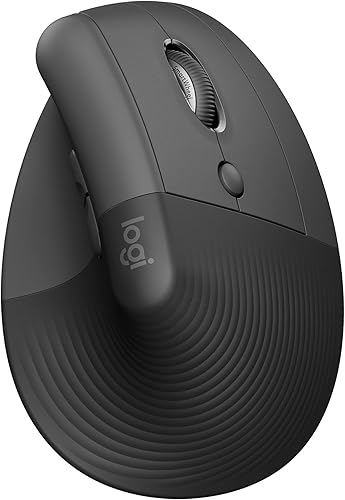
- 57-degree vertical angle
- Logitech says up to 2 years of battery life
- Bluetooth Low Energy or Logi Bolt USB
- 6 buttons
A 57-degree shape built around smaller right hands, with a thumb rest and quieter clicks for shared offices.
Pros
- Sized for small to medium hands
- 6 buttons
- Up to 2 years per AA battery
- Connects to 3 devices
Cons
- Not built for large hands
- Receiver type is Logi Bolt only
The Lift is the better first upright mouse for smaller hands. Logitech builds it for small to medium right hands, and the 57-degree shape sits your palm on a softly textured grip with a thumb rest under the side of your hand.
That support matters in the first week, when an upright grip can feel odd.
Six buttons give you more shortcuts than the MX Vertical, and the clicks are quiet enough for a shared office. It pairs over Bluetooth Low Energy or the Logi Bolt USB receiver and works across Windows, macOS, iPadOS, Chrome OS and Linux.
Logitech says one AA battery lasts up to 2 years.
Against the MX Vertical, the main difference is fit rather than features. The angle is fixed, so there is no dialing in, and the body is smaller.
That is the point for smaller hands, but anyone with long fingers will find the MX Vertical or the Evoluent easier to wrap around.
Buy it if your hands are small to medium and you want an upright mouse with real shortcut buttons and long battery life.
TECKNET Ergonomic Mouse: Best for silent clicking
- 52-degree vertical angle
- 4800 DPI, 6 settings
- Bluetooth 5.0/3.0 and USB-A receiver
- Rechargeable 600mAh battery
Silent left and right clicks keep a shared office quiet, and the rechargeable battery means no spare AAAs in a drawer.
Pros
- Quiet main clicks
- Rechargeable
- Switches between 3 devices
- 6 DPI levels
Cons
- Forward and back buttons do not work on Mac
- Quiet feature covers only the main buttons
The TECKNET Ergonomic Mouse wins on quiet and on charging. Its silent click design covers the left and right buttons, which helps in a library, a shared office or a room where someone else is working.
The 52-degree angle is shallower than the Lift's 57, so the move from a flat mouse feels gentler.
It runs on a built-in 600mAh rechargeable battery with a Type-C cable, and TECKNET says 1.5 hours of charging gives up to 2 months of use. That removes the spare-battery drawer problem.
It also pairs with 3 devices over Bluetooth 5.0/3.0 or the included USB-A receiver.
The 4800 DPI sensor with 6 settings is more adjustable than most of the cheaper upright mice here. One caveat: TECKNET says the forward and back buttons do not work on Mac.
If you browse on a MacBook and rely on those buttons, this is not the one.
Choose it for a quiet desk and easy charging. Skip it if Mac side buttons matter to you.
Evoluent: Best for full-time wired use
- Wired connection
- 4 pointer speeds
- 6 customizable buttons
- Medium to large hands
No battery to think about, and the widest customization options here for buyers who work at one desk all day.
Pros
- No battery or charging
- 6 customizable buttons
- 4 pointer speeds
- Finger support along the bottom edge
Cons
- Cable limits where you can sit
- Evoluent Mouse Manager software is Windows only for full mapping
The wired Evoluent is the answer for anyone who never wants to think about a battery again. Evoluent introduced the upright mouse and this version keeps the handshake grip that started it.
It is built for medium to large right hands and includes a finger support so your pinkie does not drag on the desk.
Six customizable buttons and 4 pointer speeds with indicator lights give you more setup control than most picks here. The Evoluent Mouse Manager software offers deep remapping of buttons and the wheel on Windows.
Pointer speed changes happen on the side of the mouse without letting go of your grip.
The cable is the trade-off. It limits where you can sit and rules out carrying the mouse between rooms easily.
Against the wireless Evoluent below, this one costs less to own and never needs charging.
Buy it for a fixed desk and full-time use. If you move between a laptop and a monitor all day, the wireless version fits better.
Evoluent VerticalMouse 4 Wireless: Best for large hands
- USB wireless connection
- 4 pointer speeds
- 6 customizable buttons
- Regular size for larger hands
The wireless version of the original upright mouse, with a broad body that gives big hands room to rest.
Pros
- Wireless with no desk cable
- 6 customizable buttons
- Speed controls on the side
- Works with Windows, Mac and Linux
Cons
- Regular size suits large hands rather than small ones
- Uses a USB wireless dongle
The Evoluent VerticalMouse 4 Wireless is the large-hand version of the same idea. Its regular size suits bigger hands, and the wide bottom lip keeps your outer finger off the desk.
Evoluent's shape supports the hand upright and the thumb rest is reshaped for more comfort than earlier versions.
It uses a USB wireless connection, so there is no Bluetooth pairing step and no cable across the desk. The 6 buttons and 4 pointer speeds match the wired model, with speed controls on the side and LEDs under the chrome thumb rest showing the selected setting.
Evoluent lists 2600 DPI.
Battery life is the weak spot next to the Logitech models. Evoluent gives average battery life of about 3 months, so plan on periodic changes.
It works with Windows, Mac and Linux, though full button mapping needs the Windows driver.
Pick it if you have large hands and want the original upright shape without a cable. Small hands should look at the Lift instead.
ProtoArc EM11 Vertical Mouse: Best for switching between devices
- 58-degree vertical angle
- Three-device pairing
- Rechargeable 500mAh battery
- Silent main clicks
Pairs with a laptop, tablet and phone at once and switches without re-pairing, so one mouse covers a mixed desk.
Pros
- Connects 3 devices
- Rechargeable
- 7 buttons
- Quiet left and right clicks
Cons
- Buttons are not programmable
- Forward and back do not work on Mac
The ProtoArc EM11 is built for desks with more than one device. It pairs with up to 3 devices over dual Bluetooth and 2.4G USB-A and switches between them without re-pairing.
If you move between a work laptop, a tablet and a phone, one mouse can cover all three.
The 58-degree angle is the steepest in this group, so the handshake position is pronounced. ProtoArc recommends 1 to 2 weeks to adjust.
It is sized for small to medium hands, so measure before ordering if your hands run large. The built-in 500mAh battery recharges over Type-C, and the main left and right clicks are silent.
The catch is customization. ProtoArc says the buttons are not programmable, and the forward and back buttons do not work on Mac.
For everyday clicking and scrolling that is fine. For heavy shortcut use, the Lift or Evoluent give you more control.
Choose it for multi-device switching in a small to medium hand. Skip it if you need mapped buttons.
Anker Wireless Vertical Mouse: Best budget first vertical mouse
- Handshake wrist position
- 1600 DPI optical sensor
- USB receiver only
- Power saving after 8 minutes idle
A low-cost way to try the upright grip before spending more, with simple buttons and a plain USB dongle.
Pros
- Simple setup with a USB receiver
- Forward and back buttons
- Sleeps after idle time
- Low-cost entry point
Cons
- No Bluetooth
- Runs on 2 AAA batteries that are not included
The Anker Wireless Vertical Mouse is the cheapest way to try the upright grip. It puts the wrist in a neutral handshake position and offers 800, 1200 and 1600 DPI settings.
The 1600 DPI top end is enough for a standard laptop screen, though it is less precise than the 4000 DPI MX Vertical on a large monitor.
Setup is a USB receiver, so there is no Bluetooth pairing. It has next and previous buttons for web browsing, and it drops into a power-saving mode after 8 minutes idle.
Anker notes the key clicks are audible, which matters in a quiet room.
It runs on 2 AAA batteries that are not included. Against the rechargeable TECKNET and ProtoArc, you will be buying batteries over time.
Against the rest, the draw is the low entry cost for trying a vertical shape before committing to a pricier model.
Buy it if you want to test whether an upright mouse suits your wrist without spending much. Move up to the Lift or MX Vertical once you know the grip works for you.
TECKNET 3-Device Vertical Mouse: Best for long battery life between battery changes
- 4800 DPI, 6 settings
- Bluetooth 5.0/3.0 and 2.4G USB-A
- Switches between 3 devices
- Right hand only
Built for medium to large hands with three-device switching and a long battery life between changes.
Pros
- 3-device switching
- 6 DPI levels
- Quiet main clicks
- Wide hand fit
Cons
- Right hand only
- Needs 2 AAA batteries that are not included
- Side buttons do not work on macOS
The TECKNET 3-Device Vertical Mouse suits medium to large hands and covers long stretches between battery changes. It switches between 3 devices over Bluetooth 5.0/3.0 and 2.4G USB-A.
TECKNET lists average battery life of 24 months, which is among the longest here.
The 6 DPI levels run from 800 to 4800, so it covers detailed work and fast cursor movement on a big screen. Its silent design covers the left and right buttons only.
The right-hand shape puts your palm at a near-vertical angle to ease the pressure that a flat mouse can create.
Its trade-offs are simple. It needs 2 AAA batteries that are not included, and TECKNET says the side buttons do not work on macOS.
Against the rechargeable TECKNET Ergonomic Mouse above, you give up charging convenience in exchange for far longer time between battery changes.
Pick it if you want a big-hand upright mouse and rarely want to think about power. Mac users who lean on side buttons should pass.
Lekvey Vertical Mouse: Best for rechargeable everyday use
- Handshake grip
- 1600 DPI, 3 settings
- Built-in 600mAh rechargeable battery
- USB-C charging cable
Rechargeable instead of disposable batteries, with page back and forward buttons for web work.
Pros
- Rechargeable battery
- USB-C charging
- Page back and forward buttons
- Auto sleep saves power
Cons
- Receiver only, no Bluetooth
- Buttons are not programmable
The Lekvey Vertical Mouse is a straightforward rechargeable upright mouse. Its built-in 600mAh battery charges over USB-C, and Lekvey says a full charge lasts about 3 to 4 weeks with 8 to 10 hours of daily use.
Auto sleep mode helps stretch that further. There is no Bluetooth, just a small USB receiver that sits in the bottom of the mouse.
The ergonomic shape puts the wrist and forearm in a handshake position. It offers 3 DPI levels at 800, 1200 and 1600.
Page back and page forward buttons sit on the side for web work, and Lekvey says they work on Mac OS as well. The buttons are not programmable.
Against the TECKNET and ProtoArc models, the Lekvey asks you to give up Bluetooth and device switching. Against the Anker, the rechargeable battery is the clear upgrade.
Its medium to large sizing means small hands should skip it.
Buy it if you want a simple rechargeable upright mouse for a single computer. Skip it if you need Bluetooth or multi-device pairing.
How the vertical mice compare side by side
The comparison table puts the numbers next to each other so you can match a mouse to your hand size and desk setup at a glance. The highest score is the best overall pick; every other row is the best choice for a specific need.
| Product | Best for | Hand | Connection | Buttons | Our score |
|---|---|---|---|---|---|
| Logitech Mouse MX Vertical | adjustable wrist angle | Right hand (ambidextrous shape listed) | Bluetooth, USB receiver | 4 | 9.7 |
| Logitech Lift Vertical Mouse | small to medium hands | Right hand, small to medium | Bluetooth Low Energy, Logi Bolt USB | 6 | 9.0 |
| TECKNET Ergonomic Mouse | silent clicking | Right hand, small to medium | Bluetooth, 2.4G USB-A | 6 | 8.8 |
| Evoluent | full-time wired use | Right hand, medium to large | Wired | 6 | 8.4 |
| Evoluent VerticalMouse 4 Wireless | large hands | Right hand, large | USB wireless | 6 | 8.3 |
| ProtoArc EM11 Vertical Mouse | switching between devices | Right hand, small to medium | 2.4G USB-A, Bluetooth | 7 | 8.0 |
| Anker Wireless Vertical Mouse | budget first vertical mouse | Right hand | 2.4G USB receiver | 5 | 7.8 |
| TECKNET 3-Device Vertical Mouse | long battery life between battery changes | Right hand, medium to large | Bluetooth, 2.4G USB-A | 6 | 7.7 |
| Lekvey Vertical Mouse | rechargeable everyday use | Right hand, medium to large | 2.4G USB receiver | 6 | 7.5 |
How these vertical mice were compared
We ranked these mice on the specs that change how an upright grip feels day to day: angle, hand size, button count, connection type and battery. Angle and size come first, because a vertical mouse only helps if your hand can actually rest on it without strain.
Connection type decides how tidy your desk stays. Bluetooth models free up a USB port and can follow you between machines, while receiver models need a free USB-A port.
Rechargeable batteries remove the spare-battery routine; standard cells trade that for longer life between changes.
DPI and button count set how the mouse handles a big screen and your shortcuts. A 4000 DPI sensor needs fewer lifts on a wide monitor.
Six buttons beat four when you live in a design app. We weighed all of it against what a wrist-pain shopper needs most: a comfortable angle and a shape that fits.
Which vertical mouse angle suits your wrist?
Pick an angle you can hold with a relaxed wrist, usually between 50 and 60 degrees. A steeper angle feels more like a handshake.
A shallower one is easier on the first few days.
The TECKNET Ergonomic Mouse sits at 52 degrees and suits buyers moving from a flat mouse who want a gentle change. The Logitech Lift uses 57 degrees and the ProtoArc EM11 uses 58, giving a more upright hand position.
The MX Vertical's adjustable angle lets you start flat and increase it as you adapt.
Shallow versus steep upright mice
If your wrist pain comes from twisting the forearm inward, the steeper shapes do more to change that position. If you are only mildly uncomfortable or brand new to upright mice, start shallower and give it a couple of weeks.
Our guide on how to use a vertical mouse for the first time covers the first-week setup, from wrist position to pointer speed.
Which vertical mouse fits small hands?
The Logitech Lift and ProtoArc EM11 are the best fits for small to medium hands. Both are shaped around smaller right hands and both put a thumb rest where your thumb can relax.
The Lift is built for small to medium right hands and pairs that with six buttons and up to 2 years on one AA battery. The ProtoArc EM11 is sized for small to medium hands and switches between 3 devices, which suits a student or a hybrid worker moving between machines.
The MX Vertical and both Evoluent models are roomier. Buyers with long fingers will find them easier to wrap around.
Small hands on a large upright mouse tend to hover over the buttons rather than rest on them, which defeats the point.
Which vertical mouse works best for large hands?
The Evoluent VerticalMouse 4 Wireless is the pick for large hands, with the wired Evoluent and the TECKNET 3-Device as solid alternatives. All three give big hands room to rest rather than perch.
The Evoluent wireless model uses a regular size for larger hands and adds a wide bottom lip so your outer finger stays clear of the desk. The TECKNET 3-Device is also built for medium to large hands and offers 6 DPI levels up to 4800.
Both Evoluent mice include a finger support and speed controls on the side.
The MX Vertical is ambidextrous in shape but its adjustable angle gives larger hands more room to find a comfortable grip. The Lift and ProtoArc, both aimed at smaller hands, are the ones to skip.
Should you pick a wired or wireless vertical mouse?
Go wireless if you move between rooms or want a clear desk. Go wired if you never want to think about a battery and work at one fixed spot.
The Evoluent wired model is the strongest wired pick here.
Wireless options split into Bluetooth and USB-receiver types. Bluetooth frees a port and pairs straight to a laptop; receiver models need a free USB-A slot but often skip the pairing step.
The MX Vertical offers both. Battery type then matters: rechargeable models like the TECKNET Ergonomic and ProtoArc remove the spare-battery routine, while the Lift runs up to 2 years on one AA.
The wired Evoluent's advantage is zero maintenance and deep button mapping on Windows. Its cable is the cost.
For a laptop bag, a Bluetooth model such as the Lift or MX Vertical makes more sense. Our guide to the best ergonomic mice for laptops covers the portable choices in more detail.
Which extra features matter on an upright mouse?
Buttons and DPI matter more than anything after the shape. Six programmable buttons save real time in design, coding and spreadsheet work.
High DPI reduces arm travel on a large monitor. Everything else is convenience.
Start with button count. The Lift and both Evoluent models offer 6 buttons and give you more shortcuts than the 4 on the MX Vertical.
Evoluent's Windows software goes furthest, with nearly unlimited remapping. ProtoArc's buttons are not programmable at all, so its extra count means less.
Then check DPI against your screen. A 4000 DPI sensor like the MX Vertical's needs fewer lifts across a wide monitor.
The 4800 DPI TECKNET models also cover big screens. A 1600 DPI budget mouse like the Anker or Lekvey is fine for a laptop display and cramped for a dual-monitor setup.
Finally, decide whether silent clicks and multi-device pairing are worth paying for. The TECKNET Ergonomic and ProtoArc EM11 both quiet their main buttons and switch between devices.
The verdict: which vertical mouse should you buy?
Buy the Logitech Mouse MX Vertical if you want the best vertical mouse for wrist pain overall and one that adapts to your grip. Its adjustable angle, 4000 DPI sensor and dual Bluetooth and receiver connection cover most desks without compromise.
Pick the Logitech Lift for small to medium hands and more shortcut buttons. Choose the Evoluent if you work at a fixed desk and want a wired mouse with deep customization.
The Evoluent VerticalMouse 4 Wireless is the large-hand wireless option. For a multi-device desk, the ProtoArc EM11 switches between three machines.
The Anker is the low-cost way to test the upright grip before spending more.
Whichever you choose, give it about two weeks before you judge it. A vertical mouse changes your hand position, and the first few days feel slower.
Ongoing wrist pain is worth a doctor's visit, since a new mouse changes posture but does not treat a condition on its own. If you are still deciding between shapes, the best vertical mouse shortlist covers the wider field.
Our top 3 picks at a glance
-
1
-
2
-
3
Frequently asked questions
What is the best vertical mouse for wrist pain?
The Logitech MX Vertical is the best all-round pick because its angle adjusts and its sensor covers wide screens. For smaller hands, the Logitech Lift at 57 degrees is easier to hold.
Buyers who want no battery at all should choose the wired Evoluent.
Do vertical mice really help wrist pain?
They change your hand position, which is the main benefit. An upright grip keeps the forearm from twisting and puts the wrist closer to a straight line.
Many people find that more comfortable for long desk sessions.
Ongoing wrist pain deserves a doctor's advice, not just a new mouse.
How long does it take to get used to a vertical mouse?
Plan on about one to two weeks. ProtoArc tells buyers to allow 1 to 2 weeks to adjust to its 58-degree shape.
Expect slower pointing at first while your arm learns the new grip.
Keep a regular mouse nearby for the first few days if accuracy matters.
What angle should a vertical mouse be?
Most upright mice sit between 50 and 60 degrees. The TECKNET Ergonomic Mouse uses 52 degrees and the Logitech Lift and ProtoArc use 57 and 58 degrees.
A steeper angle feels more like a handshake.
Pick one you can hold with a relaxed wrist rather than a clenched grip.
Can I use a vertical mouse with a laptop?
Yes. Bluetooth models pair straight to a laptop, and the Logitech Lift and ProtoArc EM11 both support three-device switching.
Check the connection type first: some cheaper upright mice use a USB-A receiver only.
Our guide to the best ergonomic mice for laptops covers the compact options.
Are vertical mice good for gaming?
They are fine for casual and strategy games but not ideal for fast aiming. The Evoluent mice offer 6 programmable buttons and 4 pointer speeds.
A vertical grip trades quick flick shots for a more relaxed forearm.
Pick a standard gaming mouse if competitive play is the priority.


