8 Best Wireless Ergonomic Keyboard (November 2026)
The best wireless ergonomic keyboards include the Logitech Ergo K860 Keyboard for adjustable palm lift, the Logitech Wave Keys Keyboard for compact wave typing, and the ProtoArc EK01 Plus Keyboard for backlit rechargeable typing.
On this page (3 sections)
The Logitech Ergo K860 is the best wireless ergonomic keyboard for most people, with a curved split keyframe, a cushioned wrist rest and three palm lift settings. Choose Logitech Wave Keys for a more compact wave shape, or ProtoArc EK01 Plus if you want backlighting and a rechargeable battery.
Wireless ergonomic keyboards vary in how much they change the feel of typing. A split keyframe moves the left and right key zones apart, while a wave shape keeps them connected in a curved layout.
The right choice depends on your desk, device connections and how much adjustment you want.
Start with our split keyboard guide to compare keyboard shapes, then read the keyboard fit and setup guide if you want help positioning a new layout.
Our picks at a glance
-
1

-
2

-
3

- 4
 Check it
Arteck Wireless Split Keyboard
Best for simple USB setup - 5
 Check it
Perixx PERIBOARD-612B Keyboard
Best for switching between Mac and Windows - 6
 Check it
Kensington Pro Fit Wireless Keyboard
Best for quiet, spill-resistant typing - 7
 Best for a separate number padCheck it
- 8
 Best for a large cushioned wrist restCheck it
Which wireless ergonomic keyboard fits your setup?
The Logitech Ergo K860 earns the top score for its split design and adjustable palm lift, while Wave Keys is a compact option with a continuous wave shape. Other picks add features such as backlighting, a separate number pad or multiple wireless modes.
We compared the layouts, support features and connection options against common buying needs. Our score weighs specs, features and buyer feedback against what you’re shopping for.
| Product | Best for | Layout | Connections | Palm lift | Our score |
|---|---|---|---|---|---|
| Logitech Ergo K860 Keyboard | adjustable palm lift | Full-size QWERTY | Bluetooth and USB receiver | 0, -4 and -7 degrees | 9.1 |
| Logitech Wave Keys Keyboard | compact wave typing | Compact QWERTY | Bluetooth or Logi Bolt receiver | 8.7 | |
| ProtoArc EK01 Plus Keyboard | backlit rechargeable typing | Full-size QWERTY | Bluetooth and 2.4G USB | 7.8 | |
| Arteck Wireless Split Keyboard | simple USB setup | Split QWERTY | 7.7 | ||
| Perixx PERIBOARD-612B Keyboard | switching between Mac and Windows | Split layout | Bluetooth and 2.4 GHz receiver | 7.3 | |
| Kensington Pro Fit Wireless Keyboard | quiet, spill-resistant typing | Split and sloped QWERTY | Bluetooth and 2.4 GHz | 7.2 | |
| HP 960 Ergonomic Keyboard | a separate number pad | Split-zone QWERTY with detached number pad | Bluetooth or HP Unifying Dongle | 7.1 | |
| Nulea Split Keyboard | a large cushioned wrist rest | Split QWERTY | Bluetooth and 2.4G | 7.0 |
Logitech Ergo K860 Keyboard: Best for adjustable palm lift
- Curved split keyframe
- Memory foam wrist rest
- 0, -4 and -7 degree palm lift
- Bluetooth and USB receiver
A curved split layout, memory foam wrist rest and three palm lift positions give you several ways to adjust your typing posture. The full-size layout includes a number pad.
Pros
- Adjustable palm lift
- Memory foam wrist rest
- Bluetooth and USB receiver
Cons
- Full-size layout takes desk space
- Heavier than the compact Wave Keys
The Logitech Ergo K860 is the most adjustable pick here. Its curved split keyframe separates the key zones, and its palm lift can be set to 0, -4 or -7 degrees for seated or standing work.
A memory foam layer in the curved wrist rest provides a cushioned place for your palms. Logitech says the design offers 54% more wrist support and 25% less wrist bending compared with a standard keyboard without a palm rest.
The full-size QWERTY layout includes a number pad, so this keyboard suits a desk where you want those keys within reach. It connects through Bluetooth or the included USB receiver, and Logitech Options software can customize Fn keys and shortcuts.
The K860 makes sense if you want a split shape and more than one tilt choice. Measure your desk before buying, since its full-size body and wrist rest need room.
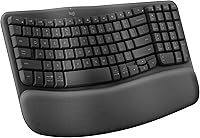
Logitech Wave Keys Keyboard: Best for compact wave typing
- Wavy compact shape
- Cushioned memory foam palm rest
- Bluetooth or Logi Bolt receiver
- Easy-Switch for up to 3 devices
A compact wave shape and cushioned palm rest make this a simpler transition from a standard keyboard. Easy-Switch can move between as many as three devices.
Pros
- Compact shape
- Cushioned palm rest
- Switches among up to 3 devices
Cons
- Wave layout is not a split keyframe
- No adjustable palm lift
Logitech Wave Keys suits people who want a smaller change from a standard keyboard. Its wavy compact shape keeps the keys in one continuous layout, while a cushioned memory foam palm rest supports the wrists.
Easy-Switch moves between as many as three devices, and the keyboard connects through Bluetooth or a Logi Bolt receiver. Logitech Options+ also lets you set shortcuts to match your work habits.
The wave shape differs from the separated key zones on the Ergo K860. If you want a compact wireless keyboard with a connected wave layout, this is an option to consider.
Choose Wave Keys if desk space matters or if you prefer a connected wave layout. Compare our best split keyboard picks if you want to look at more keyboards with separated key zones.
ProtoArc EK01 Plus Keyboard: Best for backlit rechargeable typing
- Full-size curved split layout
- Three brightness levels
- Bluetooth and 2.4G USB
- 2000mAh rechargeable battery
This full-size split keyboard adds soft white backlighting, three device connections and a rechargeable battery. Its size may take more desk space than a compact option.
Pros
- Backlighting has three brightness levels
- Connects with up to 3 devices
- Rechargeable battery
Cons
- Backlight use affects battery life
- Full-size design may occupy more desk space
ProtoArc EK01 Plus combines a full-size curved split layout with soft white backlighting. You can choose among three brightness levels or turn the light off to conserve power.
It pairs with up to three devices through Bluetooth or 2.4G USB. The rechargeable 2000mAh battery powers the keyboard, and its cushioned wrist rest and adjustable tilt feet offer three angle options.
The backlight affects battery life. ProtoArc gives different run-time estimates for each brightness setting and for use with the backlight off.
Choose it if adjustable lighting and multi-device switching matter more than a compact footprint. Its full-size shape may take more desk space, so measure the space available first.
Arteck Wireless Split Keyboard: Best for simple USB setup
- Split design
- Cushioned wrist rest
- 2.4G USB receiver
- Rechargeable battery
A single USB receiver provides a straightforward connection for a Windows desktop or laptop. The split layout and cushioned wrist rest suit buyers who want a basic wireless setup.
Pros
- Simple receiver setup
- Cushioned wrist rest
- Foldable legs adjust typing angle
Cons
- Windows layout and functions may differ on Mac
- No Bluetooth connection
Arteck's split design and cushioned wrist rest give you a place to rest your wrists and forearms while typing. Foldable legs let you choose a typing angle, and a 2.4G USB receiver provides a direct wireless connection.
The rechargeable battery is rated for up to six months based on two hours of use per day. The keyboard is designed for Windows, and some keys and functions may differ on Mac.
This model suits you if you want a split layout without configuring Bluetooth. The USB receiver is stored at the back of the keyboard, and the included cable is for charging.
Choose Arteck for a simple receiver setup with wrist cushioning. If you switch between Mac and Windows, consider the Perixx instead, which has a switch between operating system modes.
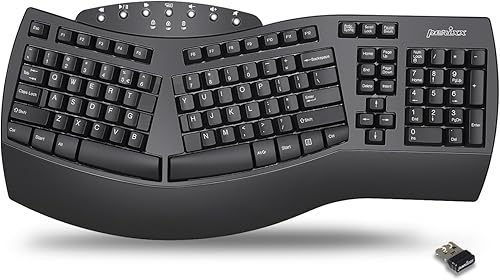
Perixx PERIBOARD-612B Keyboard: Best for switching between Mac and Windows
- Split key layout
- Bluetooth and 2.4 GHz receiver
- Windows and Mac switch
- Four extra switchable keys
This split model combines Bluetooth with a receiver and includes a switch for Windows or Mac. Four extra keys and a key puller support changing the key setup.
Pros
- Two wireless connection options
- Windows and Mac mode switch
- Curved key rows
Cons
- Requires 2 AA batteries
- Longer footprint than compact keyboards
The Perixx PERIBOARD-612B offers a split layout with Bluetooth and 2.4 GHz receiver connections. A switch on the bottom changes between Mac and Windows modes, and four extra keys can be swapped using the included key puller.
Its curved rows and keycaps are shaped to follow the fingertips. The keyboard has an integrated palm rest and full key travel.
This model runs on two AA alkaline batteries, which are not included. It suits buyers who value operating system switching over rechargeable power.
Choose Perixx if your computer setup includes both Mac and Windows use. Check the key layout and available desk width before deciding, especially if you prefer a smaller keyboard.
Kensington Pro Fit Wireless Keyboard: Best for quiet, spill-resistant typing
- Split and sloped design
- Adjustable reverse tilt
- Bluetooth and 2.4 GHz wireless
- Spill-proof keys
The split, sloped shape and adjustable reverse tilt let you adjust the keyboard angle. Quiet keys and spill-proof keys suit a shared work area.
Pros
- Two wireless connection options
- Adjustable reverse tilt
- Quiet keys
Cons
- No backlighting
- Spill resistance does not make it waterproof
Kensington Pro Fit has a split, sloped design with adjustable reverse tilt. It connects through Bluetooth or 2.4 GHz wireless and includes a three-mode power-saving switch.
The quiet keys suit a shared workspace, while the spill-proof keys are designed to make cleanup easier. Kensington describes its resistance to breakdown after exposure to certain cleaning and disinfecting solvents, but that does not make the keyboard waterproof.
Choose it if you want quiet typing, angle adjustment and two wireless connection options. Buyers who want backlighting or a rechargeable battery should compare other picks in this roundup.
HP 960 Ergonomic Keyboard: Best for a separate number pad
- Split-zone layout and negative tilt
- Detached numeric keypad
- 20 programmable keys
- Connects to up to 3 devices
A separate numeric keypad gives you freedom to place it where it suits your desk. The keyboard also has a split-zone layout, negative tilt and connections for up to three devices.
Pros
- Number pad can be positioned separately
- 20 programmable keys
- Connects to up to 3 devices
Cons
- Separate keypad adds another item to manage
- Confirm operating system support for your setup
The HP 960 pairs a split-zone layout with a detached numeric keypad. You can position the number pad separately, which can leave more room for a mouse beside the main keyboard.
Its 20 programmable keys support custom shortcuts, and it can connect to up to three devices through Bluetooth or the HP Unifying Dongle. The foam wrist rest and negative tilt add support features alongside the split-zone layout.
This layout suits work that involves frequent number entry or custom shortcuts. Since the numeric keypad is separate, check that you have room for both pieces.
Choose the HP 960 if a movable number pad is useful at your desk. Confirm compatibility with your computer and preferred connection before buying.
Nulea Split Keyboard: Best for a large cushioned wrist rest
- Split and splayed design
- Oversized cushioned wrist rest
- Bluetooth and 2.4G connectivity
- Three tilt angles
An oversized cushioned wrist rest and three tilt positions give this split keyboard a range of fit adjustments. It supports Bluetooth and 2.4G wireless connections.
Pros
- Oversized wrist rest
- Three tilt angles
- Dual wireless modes
Cons
- Function keys may require Fn lock adjustment
- Compatibility details are limited
Nulea has an oversized cushioned wrist rest and three tilt angles. Its split and splayed layout follows the hand alignment, while Bluetooth and 2.4G offer two wireless connection modes.
The keyboard is rechargeable, with a stated battery life of up to 200 hours. Its function keys may need an Fn key combination depending on whether Fn lock is on, so check the instructions if a function key does not respond as expected.
Choose Nulea if a broad wrist rest and tilt options matter to you. Check that its connection modes suit your devices before buying.
What should you compare before choosing a wireless ergonomic keyboard?
Compare the keyboard shape, desk space, wrist support and connection options before you focus on extra features. These details affect how the keyboard fits your daily setup.
Does a split or wave shape suit your typing?
A split keyboard separates the left and right key zones, while a wave keyboard curves a connected layout. Split models in this roundup include the Ergo K860, ProtoArc EK01 Plus, Arteck, Perixx and Kensington.
Wave Keys has a continuous wave shape. If you have not used either layout before, read our guide to typing on an ergonomic keyboard for tips on adjusting to a new key arrangement.
How much wrist support and tilt do you want?
Wrist support ranges from cushioned palm rests to the broad padded rest on the Nulea. The Ergo K860, ProtoArc and Nulea also offer tilt or palm lift choices, so compare the available angles with how you sit or stand.
A wrist rest should support your palms while you type, not hold your wrists bent upward. Our keyboard fit and setup guide explains where to position the keyboard and your hands.
Which wireless connection works with your devices?
Bluetooth appears on several picks, while the Arteck uses a 2.4G USB receiver. Logitech Wave Keys, ProtoArc, Perixx and Kensington offer more than one wireless connection option.
Check which connection your computer, tablet or phone supports. Also check whether a USB-A port is available if you plan to use a receiver.
Will the keyboard fit your desk?
Full-size models with wrist rests need more room than compact layouts. The HP 960 adds a separate number pad, which you can place apart from the main keyboard.
Measure the area from the front edge of your desk to your monitor, and include the keyboard's wrist rest in that space. Leave enough room beside the keyboard for your mouse.
Which wireless ergonomic keyboard should you choose?
Pick the Logitech Ergo K860 if you want a full-size split keyboard with a wrist rest and adjustable palm lift. Choose Wave Keys for a compact wave layout, ProtoArc for backlighting and rechargeable power, or the HP 960 if you want a separate number pad.
If you are still comparing keyboard shapes, our split keyboard guide explains common layouts and sizes. For a broader desk setup, see our ergonomic mouse and keyboard buying guide.
Our top 3 picks at a glance
-
1
-
2
-
3
Frequently asked questions
What is the best wireless ergonomic keyboard for most people?
The Logitech Ergo K860 is the strongest all-around fit here because it pairs a curved split keyframe with a memory foam wrist rest and three palm lift settings. Those features give you options for adjusting the keyboard to your desk setup.
If you prefer a smaller wave shape, consider the Logitech Wave Keys instead.
Is a split keyboard better than a wave keyboard?
A split keyboard separates the left and right key zones, while a wave keyboard uses a curved shape across the key area. Which feels better depends on your typing habits, desk space and comfort with a new layout.
See our wave keyboard guide to compare the shapes.
Can a wireless ergonomic keyboard connect to more than one device?
Some can. The Logitech Wave Keys and ProtoArc EK01 Plus each connect to as many as three devices, and the HP 960 also supports up to three.
Check which connection options your devices support, since Bluetooth and USB receivers are not interchangeable.
How should I choose the right ergonomic keyboard?
Start with the shape you want, then check wrist support, tilt choices, connection type and available desk space. A full-size split keyboard can offer more adjustment or a number pad, while a compact wave model takes up less room.
Our keyboard fit and setup guide covers desk position and adjustment.