Which Ergonomic Mouse Works Best With a Mac?
The best ergonomic mouse for Mac depends on your grip and desk space: choose a vertical mouse for an angled handshake grip or a trackball to move the cursor while the mouse stays put. Check macOS compatibility and connection options before you choose.
On this page (7 sections)
- Which ergonomic mouse works best with a Mac?
- How do you choose between a vertical mouse and a trackball?
- What connection should you check for a Mac?
- Which Mac features and buttons matter?
- Does mouse size or hand orientation matter?
- How should you set up an ergonomic mouse on a Mac?
- Which ergonomic mouse for Mac should you choose?
The best ergonomic mouse for Mac depends on your grip and desk space: a vertical mouse holds your hand at an angled handshake position, while a trackball lets you move the cursor without moving the mouse. Check macOS support, connection type, hand orientation, and size before you choose.
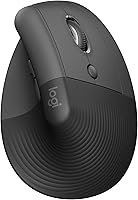
The Logitech Lift for Mac is a vertical option for small to medium hands. It connects to compatible MacBook, iMac, and iPad models through Bluetooth Low Energy.
Which ergonomic mouse works best with a Mac?
The Logitech Lift for Mac is a fit if you want a vertical mouse designed for Mac and have small to medium hands. If you want another vertical shape or a thumb-controlled trackball, compare the Logitech MX Vertical and Logitech MX Ergo S Trackball.
The Lift has quiet clicks, a silent SmartWheel, and 4 customizable buttons. It uses one AA battery and has a stated battery life of up to 2 years.
The MX Vertical also has a 57-degree angle and supports macOS. The MX Ergo S Trackball is a thumb trackball with a 20-degree tilt and Bluetooth or an included Logi Bolt receiver.
These mice use different shapes and controls. Consider how you want to hold and move the mouse, then check that your Mac can connect to it.
How do you choose between a vertical mouse and a trackball?
Choose a vertical mouse if you prefer moving the mouse with your whole hand, or a trackball if you want the mouse to stay in one place. The control style affects how you guide the cursor, so consider your desk space and preferred movements.
Is an ergonomic vertical mouse for Mac a good fit for your hand?
A vertical mouse holds your hand at an angled, handshake-like position. The Lift and MX Vertical both have a 57-degree angle, but their hand-fit descriptions differ: the Lift is for small to medium hands, while the MX Vertical fits a variety of hand shapes and sizes.
Both models are right-handed. If you use your left hand, look for a left-handed mouse instead of assuming a vertical model works for either hand.
Our vertical mouse guide explains how size and grip affect the fit. You can also compare the best vertical mice if you want to review more shapes.
Is a trackball mouse a better fit for a small desk?
A trackball can suit a small desk because you guide the cursor with the ball while the mouse stays put. It lets you control the cursor without sweeping the mouse across the work surface.
The MX Ergo S Trackball is designed for medium to large hands and has 6 customizable buttons. It supports macOS and connects over Bluetooth or its included receiver.
The Nulea M501 is another thumb trackball with Bluetooth and a USB dongle option. Its buttons aren't programmable, and its forward and back buttons aren't compatible with Mac OS.
Trackballs use a different cursor control method than standard mice. See our best trackball mouse picks for more options, or read how to use a trackball mouse for a starting point.
What connection should you check for a Mac?
Bluetooth is a convenient choice if you want to connect without a USB receiver. If a mouse uses a receiver, check its connector and your Mac's available ports before you buy.
The Lift for Mac connects through Bluetooth Low Energy. The MX Vertical offers Bluetooth or an included USB receiver, while the MX Ergo S Trackball connects through Bluetooth or an included Logi Bolt receiver.
The Nulea M501 can connect through Bluetooth or its USB dongle. The dongle is stored on the underside of the mouse.
Some Logitech mouse features depend on software. Logi Options+ is used to customize buttons on the Lift and MX Ergo S Trackball, so check that the app supports your macOS version before relying on custom shortcuts.
Which Mac features and buttons matter?
Check that the mouse supports your macOS version and that its extra buttons do what you need. A mouse can move the cursor while some side buttons or customization features work differently on Mac.
The Lift for Mac lists macOS 10.15 Catalina as its minimum required system version. The MX Vertical supports macOS 10.15 or later, and the MX Ergo S Trackball lists macOS 14 Sonoma among its minimum system requirements.
The M501 supports macOS, but its forward and back buttons aren't compatible with Mac OS. If those buttons matter for browsing or app shortcuts, choose a model whose Mac button support matches your routine.
If you switch between a Mac and another computer, check how many devices the mouse can pair with and how you switch between them. The Lift and M501 can connect with up to 3 devices, while the MX Ergo S Trackball connects to 2.
Does mouse size or hand orientation matter?
Yes. A mouse that supports Mac can still be a poor fit if its shape doesn't suit your hand or it is made for the other hand.
Check hand orientation and the brand's stated hand-size guidance before choosing.
The Lift is intended for small to medium hands. The MX Ergo S Trackball is described as a fit for medium to large hands, and the MX Vertical fits a variety of hand shapes and sizes.
All 4 mice here are right-handed. If you need a left-handed shape, use our left-handed ergonomic mouse guide to compare options.
How should you set up an ergonomic mouse on a Mac?
Place the mouse close to your keyboard and keep your forearm relaxed while you use it. A comfortable shape helps only if you can reach it without stretching or holding your shoulder up.
For a vertical mouse, rest your hand around the shape rather than gripping it tightly. For a trackball, keep the device steady and use small thumb movements to guide the cursor.
Adjust cursor speed in macOS until the pointer moves across your screen at a pace that feels comfortable. If your work involves long hours at a desk, our ergonomic mouse and keyboard guide can help you think through the rest of your setup.
Which ergonomic mouse for Mac should you choose?
Choose the Logitech Lift for Mac Mouse if you want a Mac-specific vertical mouse for small to medium hands. Choose the Logitech MX Vertical Mouse if you want a vertical shape with Bluetooth or a USB receiver, or the Logitech MX Ergo S Trackball if a thumb trackball suits your hand and desk.
The Nulea M501 is another Bluetooth trackball option, but its forward and back buttons aren't compatible with Mac OS. Compare button support and hand fit alongside the connection type.
For more setup advice, see our MacBook ergonomic keyboard guide. It can help you decide whether your keyboard setup also needs attention.
Frequently asked questions
What should I check before buying an ergonomic mouse for Mac?
Check that the mouse supports your version of macOS and offers a connection your Mac can use, such as Bluetooth. Then compare its shape, hand orientation, and size with your grip and hand.
If it uses a receiver, check whether your Mac has a compatible port or whether you need an adapter.
Is a vertical mouse good for Mac?
A vertical mouse can suit Mac users who want a raised handshake grip. The Logitech Lift for Mac and Logitech MX Vertical both have a 57-degree angle, and both support macOS.
Check each model's hand orientation and size fit before choosing.
Is a trackball mouse compatible with a Mac?
Some trackballs support macOS and connect over Bluetooth, but button support can vary. The Nulea M501 supports macOS, though its forward and back buttons aren't compatible with Mac OS.
Check the functions you rely on before buying.
Should I choose a vertical mouse or a trackball for Mac?
Choose a vertical mouse if you want to move the whole mouse while holding your hand at an angled position. Choose a trackball if you want to steer the cursor with a ball while the mouse stays put.
Hand fit, desk space, and your comfort with each control style should guide the choice.