9 Best Ergonomic Keyboards for Office Work (November 2026)
The best ergonomic keyboards for office work include the ULSOU Wireless Keyboard And Mouse Combo for a complete desk setup, the Logitech Ergo K860 Keyboard for split-key posture support, and the RECCAZR Wireless Keyboard and Mouse Combo Silent for shared quiet offices.
On this page (5 sections)
The best ergonomic keyboard for office work is the ULSOU Wireless Keyboard And Mouse Combo, because its wave keyframe, wrist rest and adjustable stand come with a matching mouse for one desk setup. Pick the Logitech Ergo K860 for the strongest split-key posture support, or the RECCAZR combo for silent typing in shared rooms.
An ergonomic keyboard changes how your hands sit, not how fast you type on day one. The gain comes from keeping wrists straighter and forearms relaxed across a full 8-hour shift.
The main decision is split versus wave. A split keyframe separates your hands at shoulder width; a wave board curves the keys but stays in one piece.
Both beat a flat rectangle, and the right one depends on how much relearning you'll accept.
Our picks at a glance
-
1
 Best for a complete desk setup
ULSOU Wireless Keyboard And Mouse Combo
9.2/10 our score
See it on Amazon -
2

-
3
 Best for shared quiet offices
RECCAZR Wireless Keyboard and Mouse Combo Silent
9.0/10 our score
See it on Amazon
- 4
 Check it
TECKNET Wireless Ergonomic Keyboard Rechargeable
Best for multi-device switching - 5
 Best for compact desksCheck it
- 6
 Check it
EAYBLLY 2.4G Wireless Ergonomic Keyboard
Best for phones and tablets at the desk - 7
 Check it
Arteck Wireless Split Keyboard
Best for trying a split layout - 8
 Check it
Perixx PERIBOARD-512B Keyboard
Best for long key travel - 9
 Check it
SABLUTE Keyboard and Mouse Set
Best for backlit late shifts
The best ergonomic keyboards for office work, judged by the specs
ULSOU takes the top spot for most desks because it covers the full setup in one box. The other eight picks each solve a narrower office problem, from split-key posture to quiet shared rooms.
Our score weighs specs, features and buyer feedback against what you're shopping for.
ULSOU Wireless Keyboard And Mouse Combo: Best for a complete desk setup
- Wave keys with wrist rest
- Adjustable stand
- 2.4G combo with one receiver
- Windows and Mac layout switching
A wave-shaped keyboard and contoured mouse share one receiver, so a whole desk can go ergonomic in a single step.
Pros
- Matching mouse included
- Adjustable height stand
- Layout switch for Windows and Mac
Cons
- Mouse needs its own AA battery
- Receiver plugs in over USB-A
ULSOU suits the office worker who wants the whole desk to change at once. Its wave keyframe puts each row on a gentle curve under your fingers, and the built-in wrist rest keeps your palms from dropping to the desk.
An adjustable stand lets you set the keyboard height, so you can match it to your chair and monitor rather than accepting one fixed angle. The included contoured mouse has forward and back buttons within thumb reach.
One 2.4G receiver runs both pieces, though they also work separately. The signal holds up to 33 feet with no delay, and power saving kicks in after 30 seconds of keyboard idle time and 15 minutes of mouse idle time.
FN+Q and FN+W switch between Windows and macOS layouts, which matters in a mixed-device office.
The trade-off is battery dependence: the keyboard needs 1 AA and the mouse needs another, neither included. The mouse is also shaped for right hands only.
Choose it when you'd rather buy one matched pair than assemble a set piece by piece.
Logitech Ergo K860 Keyboard: Best for split-key posture support
- Curved split keyframe
- Memory foam wrist rest
- Tilt legs at 0, -4 and -7 degrees
- Bluetooth or USB receiver
Logitech's split keyframe separates the hands at shoulder width and adds a pillowed rest plus three tilt settings.
Pros
- Three tilt positions
- Connects by Bluetooth or receiver
- Scooped keys for fingertip comfort
Cons
- Heavy for a keyboard
- Split layout needs an adjustment period
Logitech's Ergo K860 is the pick when wrist posture is the whole point. The curved split keyframe separates your hands and the sloping design lowers the forearm angle across a long typing day.
The pillowed wrist rest uses memory foam. Logitech says the design offers 54% more wrist support and 25% less wrist bending than a standard keyboard without a palm rest.
Scooped Perfect Stroke keys match fingertip contours, so each press lands with less searching.
Tilt legs set the board at 0, -4 or -7 degrees, so seated and standing desks both get a natural position. You can connect by USB receiver or Bluetooth, and the full-size layout keeps the number pad for spreadsheet work.
A CAPS LOCK indicator and customizable Fn keys round out the familiar features.
The cost is weight: 2.6 lb makes it a board you set and leave rather than move between rooms. The split shape also asks for an adjustment period.
Pick it for a fixed desk where you type for hours and want the strongest posture support in this group. Our wireless ergonomic keyboard guide covers more split and wave options if you want to compare.
RECCAZR Wireless Keyboard and Mouse Combo Silent: Best for shared quiet offices
- Silent membrane keys and quiet mouse
- Curved key layout
- Front and back tilt legs
- One nano receiver
The quiet keys and quiet mouse suit open-plan desks where clicking carries. The combo works for left- and right-handed mouse users.
Pros
- Quiet keys and mouse
- Adjustable front and back tilt
- Symmetrical mouse shape
Cons
- Batteries not included
- Mac users need a separate USB-C adapter
RECCAZR is the best fit for open-plan offices and shared rooms. The silent membrane keys and quiet mouse buttons keep noise low when desks sit close together.
Its curved key layout puts every key within easy finger reach. Front and back tilt legs adjust to your table height and habits, which helps when you switch between sitting and standing.
Nine shortcut keys add one-touch access to common functions.
The symmetrical mouse works for left- and right-handed users, and 3 DPI settings (800/1200/1600) let you match cursor speed to your screen. One nano receiver runs both pieces and stores under the mouse.
Two limits stand out. Batteries aren't included, so plan for 2 AA cells.
Mac users also need to buy a USB-C adapter, because the box doesn't include one. Its sleep timer is short and fixed: the keyboard rests after 3 to 5 seconds, though any key wakes it.
Choose it when quiet matters more than split-key posture. For a full pair that already handles Mac, see our wireless ergonomic keyboard and mouse roundup.
TECKNET Wireless Ergonomic Keyboard Rechargeable: Best for multi-device switching
- Split layout with curved keycaps
- Dual-density memory foam wrist rest
- Bluetooth 5.0 plus USB dongle
- Rechargeable battery
Bluetooth memory for 3 devices plus the dongle lets this keyboard move between a work PC, tablet and phone without re-pairing.
Pros
- Up to 4 connected devices
- Four tilt stages
- USB-C charging while in use
Cons
- Windows only
- Battery needs a 4-hour charge
TECKNET suits the worker who moves between several machines in a day. Bluetooth 5.0 remembers 3 devices and the USB dongle adds a fourth, so you can jump from desktop to laptop to tablet with one shortcut key.
The split layout puts your hands at shoulder-width distance and curves each row along the natural path of your fingers. A dual-density wrist rest pairs firm foam on the bottom with slow-rebound memory foam on top.
The fabric cover resists stains, which helps on a shared desk.
Four tilt stages (0, 1.2, 3 and 6.2 degrees) let you fine-tune the angle. The 500mAh battery charges in 4 hours and runs up to 200 hours, with USB-C charging while you type.
That works out to nearly a month at 8 hours a day.
Its main limit is platform: TECKNET lists this board for Windows computers only. If you split time with a MacBook, look at a board built for both, such as the ergonomic keyboard for MacBook options we compared.
Logitech Wave Keys Keyboard: Best for compact desks
- Wavy keyframe
- Memory foam palm rest
- Bluetooth or Logi Bolt receiver
- Easy-Switch for 3 devices
A wavy keyframe in a smaller footprint, so hands sit in a natural position without a split board eating desk depth.
Pros
- Smaller than full split boards
- Memory foam palm rest
- Three-device Easy-Switch
Cons
- No split key zones
- No adjustable tilt legs
Logitech's Wave Keys is the space-saver. At 14.8 x 8.62 in it takes less desk depth than the full split boards here, yet the wavy keyframe still puts hands, wrists and forearms in a natural typing position.
A cushioned palm rest with memory foam supports your wrists all day. Easy-Switch connects a laptop, tablet and phone, and you can pair by Bluetooth or the included Logi Bolt receiver.
The Logi Options+ app handles shortcuts and battery notifications.
Logitech says the battery lasts up to 3 years, which removes charging from your routine. The board also carries an ergonomics certification from United States Ergonomics.
What you give up is real split separation: the keys stay on one piece, so your hands sit closer than on the K860. There are also no adjustable tilt legs, so the angle is fixed.
Pick it for a shallow desk or a hot-desking setup where you move between machines. Our guide to typing on an ergonomic keyboard explains how to settle into the wave shape.
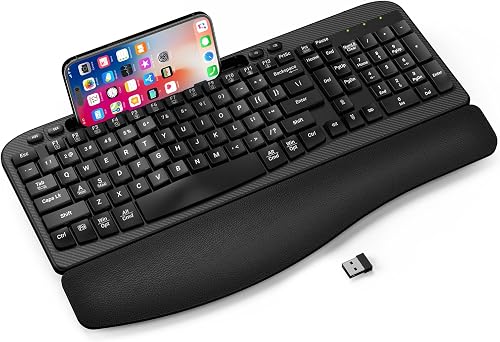
EAYBLLY 2.4G Wireless Ergonomic Keyboard: Best for phones and tablets at the desk
- Wave keys with 3-layer memory foam rest
- Built-in 7.28 in device holder
- 8 and 12 degree tilt legs
- USB-C adapter included
The integrated device slot holds a phone or small tablet upright during calls and classes, and the wrist rest is leather-wrapped memory foam.
Pros
- Built-in device holder
- USB-C adapter in the box
- Two tilt settings
Cons
- No matching mouse
- Runs on a AA battery
EAYBLLY is built for people who keep a phone or tablet on the desk. A built-in 7.28 in slot holds either device upright during video calls, online classes and home-office multitasking.
It takes both vertical and horizontal placement.
The wave keys curve to your hand shape, and the wrist rest is 3-layer high-density memory foam wrapped in leather. Tilt legs adjust to 8 or 12 degrees, and the board includes a USB-C adapter so Windows, Mac and Chrome OS devices all connect.
The 2.4G link reaches about 33 ft with no driver install. Splash resistance covers the occasional coffee spill, and auto sleep stretches the AA battery.
The catch is the extras you don't get: no matching mouse, and no battery in the box. It's also one of the widest boards here at 16.57 in.
Choose it if the device holder replaces a stand you'd otherwise buy. Skip it if you want one matched keyboard-and-mouse pair.
Arteck Wireless Split Keyboard: Best for trying a split layout
- Split design with palm rest
- 2.4G USB receiver
- Rechargeable lithium battery
- Foldable legs
A low-price split board for buyers who want to test the posture change before spending more on a premium model.
Pros
- Split layout at a lower price
- Rechargeable battery
- Whisper-quiet low-profile keys
Cons
- Windows layout only
- Charging cable is for power only
Arteck is the low-cost way to try a split layout. The split design positions wrists and forearms in a relaxed stance, and a cushioned palm rest gives them somewhere to land between bursts of typing.
The three-section build is what sets the two key zones apart.
Low-profile keys keep the stroke whisper-quiet. Arteck says the rechargeable lithium battery lasts about 6 months on a single charge, based on 2 hours of non-stop use a day.
The scissors-style key construction is rated past 3 million presses.
Setup is a single nano receiver stored at the back of the board. Four foldable legs let you set the angle, and the full-size layout includes a number pad.
Media and hotkeys sit within reach for volume and playback.
The limits are its price-point build: it's a Windows layout only, and some keys and functions differ on a Mac. The USB-C cable is for charging only, so the dongle does the connecting.
Buy it to test whether split typing suits you before spending on a premium board. Our wireless ergonomic keyboard comparison shows what the extra spend adds.
Perixx PERIBOARD-512B Keyboard: Best for long key travel
- One-piece split layout
- Integrated palm rest
- 4.2 mm key travel
- Wired USB connection
A wired split keyboard with deep 4.2 mm travel and tactile feedback for typists who want a firmer key feel than flat wireless boards.
Pros
- Long 4.2 mm key travel
- No charging or batteries
- Built-in palm rest
Cons
- Cable across the desk
- Bulky footprint
Perixx is for typists who miss the deep feel of an old office keyboard. Its one-piece split layout separates left and right key zones to cut wrist bending, while 4.2 mm key travel gives tactile feedback with an audible click.
The stepped, curved rows promote a natural typing posture.
The board is rated for up to 20 million keystrokes. Curved keycaps with flatter tops and back edges follow fingertip contours, and the integrated palm rest supports your wrists.
The case is made from ABS plastic.
Perixx says most users adapt within 1 to 2 weeks and notice less wrist pressure with continued use. That makes it the honest pick for someone willing to ride out a learning curve.
It also ships in black, beige and white to match older office setups.
The trade-offs are weight and wires: 2.3 lb and a 19.09 in width make it a fixed-desk board, and the USB cable is permanent. There's no battery to charge or receiver to lose.
Pick it if a wired connection and long key travel matter more than portability.
SABLUTE Keyboard and Mouse Set: Best for backlit late shifts
- Backlit wave keys
- Faux lambskin palm rest
- 4000mAh rechargeable battery
- RGB mouse with 3 DPI levels
A backlit keyboard and mouse set for people who work into the evening and want keys they can see without a lamp.
Pros
- Backlight with several colors
- Large rechargeable battery
- Keyboard and mouse share one receiver
Cons
- Heaviest set here
- Backlight uses extra battery
SABLUTE rounds out the list for late shifts and dim rooms. The backlit wave keys come in soft tones or bold colors, so you can type without turning on a desk lamp.
Six fixed colors and five cycle modes let you set the mood.
Its 4000mAh battery is the largest here, and SABLUTE says the keyboard runs weeks on a charge with auto sleep. The palm rest is faux lambskin leather, which wipes clean more easily than fabric.
The keys are rated for 10 million presses.
The set includes an RGB mouse with 6 buttons and 3 DPI levels. One 2.4G receiver reaches 33 ft, and the USB-A and USB-C combo covers most laptops and desktops.
Nine shortcut keys handle frequent commands.
It's heavier than every pick here except the Perixx, and the backlight draws extra power when left on. This is a set for a settled desk, not a bag.
Choose it when you work past sunset and want visible keys plus a matching mouse. For lighter wireless sets, see our wireless ergonomic keyboard and mouse picks.
How the ergonomic keyboards compare
The table lines up the nine boards by what changes your daily typing: keyframe shape, wrist support and how the keyboard connects. Read down the layout column first, then check the tilt and connection columns against your desk.
| Product | Best for | Layout | Connection | Key type | Our score |
|---|---|---|---|---|---|
| ULSOU Wireless Keyboard And Mouse Combo | a complete desk setup | Full size, QWERTY | 2.4G wireless, one receiver | Membrane | 9.2 |
| Logitech Ergo K860 Keyboard | split-key posture support | Full size, QWERTY | Bluetooth and USB | Membrane | 9.1 |
| RECCAZR Wireless Keyboard and Mouse Combo Silent | shared quiet offices | Full size, QWERTY | 2.4G wireless, one receiver | Membrane | 9.0 |
| TECKNET Wireless Ergonomic Keyboard Rechargeable | multi-device switching | Full size, 104 keys | Bluetooth 5.0 and 2.4G USB | Linear | 8.9 |
| Logitech Wave Keys Keyboard | compact desks | Compact, QWERTY | Bluetooth and USB-A | Membrane | 8.7 |
| EAYBLLY 2.4G Wireless Ergonomic Keyboard | phones and tablets at the desk | Full size, 104 keys | 2.4G wireless, USB-C adapter | Membrane | 8.5 |
| Arteck Wireless Split Keyboard | trying a split layout | Full size, 102 keys | 2.4G USB wireless | Low profile | 7.7 |
| Perixx PERIBOARD-512B Keyboard | long key travel | AZERTY | Wired USB | Membrane | 7.5 |
| SABLUTE Keyboard and Mouse Set | backlit late shifts | Full size, QWERTY | 2.4G wireless, USB-A and USB-C | Membrane | 7.0 |
How these keyboards were compared
We ranked these boards on the features that change an office typing day, not on box specs alone. Each score weighs the ergonomic design against the price tier and how well it serves the office keyword.
The first check was keyframe shape. Split boards like the Ergo K860, TECKNET and Perixx separate the hands; wave boards like the ULSOU, Wave Keys and EAYBLLY curve the rows on one piece.
Both reduce wrist bending, but split asks more relearning.
Wrist support came next. Every board here includes a built-in rest, so we compared the foam type and whether the rest sits at the right height with the tilt legs.
The Ergo K860 and TECKNET lead on foam depth and adjustment range.
Connection type decided the rest of the ranking. Bluetooth models suit multi-device desks; 2.4G-only models suit a single work computer; the wired Perixx avoids charging altogether.
We also checked OS support, because a Windows-only board is the wrong buy for a Mac-heavy office. Battery type followed the same logic: rechargeable boards cut ongoing cost, while AA boards let you swap cells mid-shift without a cable.
Layout details were the last filter. The TECKNET lists a Workman key layout rather than the QWERTY most typists know, so check that before ordering if touch typing speed matters to you.
The Perixx ships as an AZERTY variant in some listings, so confirm the key legends before you buy. These small print points decide whether the board matches your fingers or fights them.
Which ergonomic keyboard suits your desk?
The right board for your office depends on your desk depth, your devices and how much noise your room tolerates. Start with the setup you type on every day.
Do you need a split or a wave keyframe?
Pick split if wrist bending is your main complaint. The Ergo K860, TECKNET and Perixx separate your hands at shoulder width, which lowers the forearm angle more than any single-piece board.
Pick wave if you want comfort without relearning touch typing. The ULSOU, Wave Keys, EAYBLLY and SABLUTE keep the familiar key positions but curve them under your fingers.
Expect a few days of typos with split, and a few hours with wave.
How much desk space do you have?
Measure the depth before you buy. The Logitech Wave Keys needs about 8.62 in of depth and the RECCAZR and ULSOU boards sit in the same range.
The Ergo K860 runs to 9.17 in deep and 17.95 in wide.
The Perixx and Arteck split boards are the widest at roughly 16.5 to 19 in. Leave room behind the wrist rest for your chair to pull in.
On a narrow desk, a wave board buys you typing comfort without the shoulder-width spread.
Should the keyboard match your other devices?
A Bluetooth board is the better buy for a laptop, tablet and phone rotation. TECKNET remembers 3 Bluetooth devices plus the dongle, and the Wave Keys switches 3 devices with Easy-Switch.
The Ergo K860 connects by Bluetooth or receiver as well.
The ULSOU, RECCAZR and EAYBLLY rely on a single 2.4G receiver. That's simpler for one work computer and fewer pairing steps to manage.
Mac users should check for layout switching or a USB-C adapter, as covered in our ergonomic keyboard for MacBook comparison.
Which extras earn their place?
A matching mouse saves a purchase and keeps one receiver on the desk. The ULSOU, RECCAZR and SABLUTE sets all include one.
A device holder, as on the EAYBLLY, replaces a separate phone stand during calls.
Backlighting helps in dim rooms but draws power. Long battery life matters more for desks you can't easily reach a charger from; the Wave Keys claims up to 3 years.
Rechargeable boards like the TECKNET avoid buying AA cells, though they need a cable now and then. The SABLUTE's 4000mAh cell sits at the other end, lasting weeks between charges even with the light on.
What should you check before switching?
Give yourself a short adjustment period. Start with 20-minute typing blocks and raise the height or tilt a notch at a time until your forearms sit level.
Check the key feel too. Deep 4.2 mm travel on the Perixx feels very different from the flat low-profile Arteck.
Neither is better; one matches your hands and the other doesn't. If you share the keyboard, a quieter membrane set like the RECCAZR avoids complaints from the next desk.
Our guide to typing on an ergonomic keyboard covers the hand and wrist positions in more detail.
The verdict: the best ergonomic keyboard for office work
The best ergonomic keyboard for office work overall is the ULSOU Wireless Keyboard And Mouse Combo. Its wave keyframe, wrist rest and adjustable stand cover the desk in one order, and the matching mouse means one receiver instead of two.
Pick the Logitech Ergo K860 if split-key posture support matters most and your desk has the depth for it. The TECKNET is the better board for a worker hopping between several machines over Bluetooth.
For a quiet shared room, the RECCAZR combo keeps noise down. On a shallow desk, the Logitech Wave Keys fits where a split board won't.
And if you type past sunset, the SABLUTE set's backlight earns its spot.
Whichever you choose, set the tilt legs before your first long typing session. A comfortable angle is the part most buyers skip.
Our top 3 picks at a glance
-
1
Best for a complete desk setup
ULSOU Wireless Keyboard And Mouse Combo
9.2/10 our score
See it on Amazon -
2
-
3
Best for shared quiet offices
RECCAZR Wireless Keyboard and Mouse Combo Silent
9.0/10 our score
See it on Amazon
Frequently asked questions
Is a split or wave keyboard better for office work?
A split keyframe does more for posture because it separates your hands at shoulder width. Wave keys keep a single board but curve each row, which is easier to learn.
Pick split if wrist bending is your main issue, and wave if you want comfort without relearning typing.
How long does it take to adjust to an ergonomic keyboard?
Perixx says most users adapt to its split shape within 1 to 2 weeks. Expect typos to rise for the first few days as your fingers find the new row positions.
Shorter sessions at the start help.
Can I use an ergonomic keyboard with a MacBook?
Yes. The Logitech Ergo K860 and Logitech Wave Keys connect over Bluetooth and support macOS.
The ULSOU and EAYBLLY boards have layout switching or a USB-C adapter for Mac use, while the TECKNET, Arteck and Perixx boards are Windows layouts.
Do ergonomic keyboards need a separate wrist rest?
No, when the board already includes one. The ULSOU, Logitech Ergo K860, RECCAZR, TECKNET, Logitech Wave Keys, EAYBLLY, Arteck and Perixx models all ship with a built-in rest.
A separate rest only helps if you buy a board without one.
Will a wave keyboard fit a small office desk?
The Logitech Wave Keys is the compact pick here at 14.8 x 8.62 in. Full-size boards like the Ergo K860 run about 18 x 9.2 in.
Measure your desk depth and leave room for the wrist rest overhang before ordering a larger model.
Are silent keyboards worth it in an open office?
Yes, if colleagues sit close by. The RECCAZR combo uses a silent membrane structure for both keyboard and mouse.
Its soft keys reduce the click that carries across a shared desk, though no membrane board is completely silent.


