Trackball vs Vertical Ergonomic Mouse: Which to Buy? (November 2026)
Pick a vertical mouse for everyday office work and a trackball for tight desks or heavy scrolling. In this ergonomic mouse trackball vs vertical matchup, the Logitech Lift Vertical Mouse takes the overall win for most people.
On this page (8 sections)
Pick a vertical mouse for everyday office work and a trackball for tight desks or heavy scrolling. In this ergonomic mouse trackball vs vertical matchup, the Logitech Lift Vertical Mouse takes the overall win for most people.
The two designs solve the same problem in different ways. A vertical mouse tilts your hand onto its side edge so the wrist sits straighter.
A trackball keeps the body still and moves the cursor with your thumb.
Both are worth a look if a flat mouse leaves your wrist bent all day. The right one depends on how much desk space you have, how much you scroll and the size of your hands.

Quick verdict: which design wins?
The vertical mouse wins for most desk workers; the trackball wins for cramped setups and heavy scrolling. The Logitech Lift scores 9 against 7.6 for the best trackball here, and the gap is mostly about how natural the hand position feels from day one.
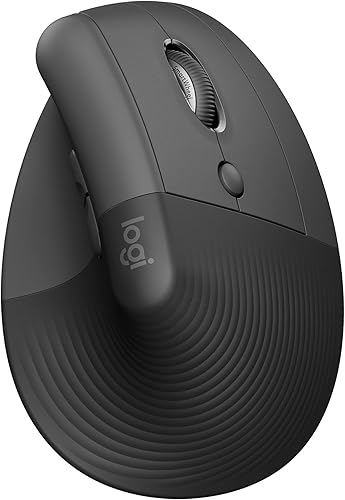
The Lift holds the hand at a 57-degree angle. That is close to the handshake position, so your forearm rests more naturally on the desk.
The trackball keeps your hand flat but stops your arm from moving.
Neither design is a cure for wrist pain. Think of them as ways to change the load on your hand and forearm across a long workday.
If pain continues, see a doctor rather than buying more peripherals.
The full comparison comes down to five things: hand position, cursor control, space, hand size and connection.
The two designs side by side
A vertical mouse tilts the wrist; a trackball moves the cursor without moving the arm. The table shows how the two types differ on the points that decide the choice.
| Feature | Vertical mouse (Logitech Lift) | Trackball (Nulea M501) |
|---|---|---|
| Hand position | 57-degree tilt, handshake posture | Palm flat, thumb on the ball |
| Cursor control | Move the mouse across the desk | Roll the ball, body stays put |
| Space needed | A mouse pad and sweep room | A small patch of desk |
| Hand size fit | Small to medium right hands | Right hand, larger body |
| Connection | Bluetooth or Logi Bolt | Bluetooth or 2.4 GHz dongle |
| Power | One AA, up to 24 months | Built-in rechargeable battery |
The table already shows the trade-off. The vertical mouse asks for more desk room but gives you a more upright wrist.
The trackball asks for almost no room but asks your thumb to do the pointing.
Hand position and wrist angle
The vertical mouse puts your wrist in a more upright position, while a trackball keeps your palm flat. If wrist posture is your main concern, the vertical design has the clearer benefit.
Logitech's Lift sits at 57 degrees, which Logitech says promotes a more natural forearm posture. Your hand rests on its side with the thumb on a shaped rest.
The wrist does not twist flat onto the desk.
A thumb trackball such as the Nulea M501 keeps the palm facing down. The comfort comes from stillness: your hand stays in one place instead of gliding across a pad.
The wrist angle changes less.
That distinction matters over a full day. If your wrist bends backward to reach a flat mouse, the tilt helps more.
If your shoulder tires from sweeping the mouse around, the trackball helps more.
What a 57-degree tilt actually changes
The Lift's angle means your forearm rolls toward its side edge rather than lying flat. Your fingers still click buttons on top of the mouse.
The difference is how much the wrist has to turn.
A 16-degree tilt, like the TECKNET's, is a smaller change. It eases some of the flat posture without going as far as the Lift.
For readers who want a gentler first step, that middle ground is easier to adapt to.
Cursor control and precision
A vertical mouse feels like a normal mouse from a new angle; a trackball changes how you point. The Nulea M501 moves the cursor with a smooth thumb ball and offers four DPI settings from 400 to 1600.
If you have used a mouse for years, the Lift is the smaller change. Its SmartWheel scrolls smoothly and its buttons are easy to reach.
You still move the mouse to move the pointer.
A trackball takes longer to learn because your thumb now drives the pointer. The upside is fine control in a small space.
You can park it next to a laptop and never sweep it across the desk.
The TECKNET's five DPI levels run from 100 to 1200. That gives you slower, more precise pointing at the low end.
The Anker vertical mouse covers 800, 1200 and 1600 DPI.
Which gives smoother scrolling?
Vertical mice and trackballs both scroll with a wheel or button, so the difference is small. The Lift's SmartWheel is built for smooth scrolling through long pages.
A trackball's advantage shows in documents and spreadsheets. You can flick the ball and land close to the target without moving your arm.
Readers who scroll for hours often find that useful.
Desk space and travel
A trackball wins on a cramped desk, and a vertical mouse needs a normal mouse pad. If your desk is small, shared or often cleared away, the trackball saves room.
The Nulea M501 measures 5.51 x 4.37 inches. You roll the ball and leave the body in place.
That works on a messy desktop, a couch, a bed or a small writing board, as Nulea describes it.
The Lift measures 4.3 x 2.7 inches in length and width. You still need clear space to sweep it left and right.
Its wireless range reaches up to 10 m.
For a laptop bag, the Lift's smaller footprint packs more easily. For a train tray table or a cluttered home desk, the trackball's stationary body is the better fit.
Neither needs a cable once connected.
Working away from a desk
A trackball is easier on soft or uneven surfaces. You can use it on a cushion or a blanket without a flat pad underneath.
A vertical mouse needs a firm, level surface to track well.
If you move between rooms with a laptop, the stationary trackball is the calmer choice. If you mostly sit at one desk, the Lift's sweep room is easy to find.
Hand size and grip
The Lift is sized for small to medium right hands; the TECKNET trackball is for medium to large hands. Matching the mouse to your hand matters more than the design label.
Logitech says the Lift is a great fit for small to medium right hands. Its softly textured grip and snug thumb rest support the hand at the 57-degree angle.
That makes it the better first vertical mouse for many people.
The TECKNET trackball measures 5.5 x 4.1 x 2 inches and TECKNET recommends it for medium to large hands. Its 16-degree tilt adds some wrist relief on top of the thumb control.
The Nulea M501 is a right-hand trackball with a curved shape. It is not described by hand size, so the TECKNET is the clearer fit for bigger hands.
Left-handed readers
Every mouse in this comparison is built for the right hand. The Lift's product page mentions left configurations in the wider product line, but the graphite version here is right-handed.
If you are left-handed, look for a left-hand model in the same series. Logitech sells the Lift in a left configuration, so check for that version when you order.
Connection and battery life
The vertical mouse offers Bluetooth and a long battery; the trackballs offer more device switching. Connection matters if you move between a laptop, a desktop and a tablet.
The Lift connects by Bluetooth Low Energy or the included Logi Bolt USB receiver. It works with Windows, macOS, iPadOS, Chrome OS and Linux.
Logitech rates its AA battery at up to 24 months.
The Nulea M501 connects by Bluetooth or a 2.4 GHz dongle and switches between 3 devices. Its built-in rechargeable battery means no disposable cells.
Note that its forward and back buttons do not work on macOS.
The TECKNET pairs with 3 devices over Bluetooth and 2.4 GHz. Its 500 mAh battery charges quickly, and 15 minutes gives a full day of use.
The Anker vertical mouse uses a 2.4 GHz USB receiver only, with no Bluetooth.
Picking for a Mac
For Mac users, the Lift is the easiest fit. It supports macOS 10.15 or later over Bluetooth or Logi Bolt.
Our guide to the best ergonomic mouse for Mac covers the setup details in more depth.
The Nulea M501 runs on macOS too, but its side buttons stop working there. If you rely on forward and back buttons in a browser, the Lift is the safer pick.
Which should you buy?
Buy the Logitech Lift if you want a vertical mouse for daily desk work. Buy a trackball if space is tight or you scroll more than you point.
These are the two firm rules for most readers.
The Lift is the best overall pick in this ergonomic mouse trackball vs vertical comparison. Its 57-degree tilt, handshake posture and long battery life make it the easier switch from a flat mouse.
It also connects by Bluetooth on a Mac without an extra dongle.
The Nulea M501 is the best small-desk pick. Its stationary body and rechargeable battery suit a compact setup or a laptop that moves around the house.
Pick it when your desk has no room for a mouse pad and a full arm sweep.
The Anker Wireless Vertical Mouse is the budget way into the vertical design. It costs less and still tilts the hand into a neutral position.
The catch is the USB receiver only, with no Bluetooth.
The TECKNET Wireless Trackball is the trackball for bigger hands. Its medium-to-large sizing and 16-degree tilt give larger hands a trackball with a little wrist relief.
Who should skip both?
Skip both if your hand or wrist pain is ongoing or getting worse. See a doctor before spending more on peripherals.
A new mouse shape can change how your hand rests, but it is not a treatment.
Skip a trackball if you want to keep using familiar mouse movements without relearning. Skip a vertical mouse if you have no clear space to sweep it.
Where to go next
If the vertical design appeals, our Evoluent VerticalMouse 4 review covers a larger alternative for bigger hands. For a wider field of trackball options, the best trackball mouse roundup compares the top models.
Readers who want to stay with the vertical shape can browse the best vertical mouse picks for more sizes and prices. Start with the Lift unless your hand size or space rules it out.
The bottom line
The best ergonomic mouse trackball vs vertical comparison ends here: the Lift wins for most people. The 57-degree angle and wireless freedom make it the easiest move away from a flat mouse.
Reach for a trackball when desk space is the problem. Its still body and thumb control suit small desks, couches and laptops on the move.
That is the whole decision: vertical for the wrist angle, trackball for the space.
One last tip: give any new design a week or two before you judge it. A vertical tilt or a thumb ball both feel odd on day one and natural within a week or two.
Frequently asked questions
Is a trackball or a vertical mouse better for wrist strain?
Both keep the wrist straighter than a flat mouse. A vertical mouse holds the hand in a handshake position, while a trackball removes arm movement and leaves the hand still.
Pick vertical for general office work and trackball for tight space or heavy scrolling.
Do I still move a trackball mouse with my arm?
No. You move the cursor by rolling the ball with your thumb and the mouse body stays in place.
That is why the Nulea M501 works on a narrow desktop or a couch, where there is no room to sweep a mouse across a pad.
How long does it take to get used to a vertical mouse?
Plan on a week or two. The TECKNET trackball is described as taking 1 to 2 weeks to learn, and the same adjustment period applies to the 57-degree Logitech Lift.
Give it a full work week before you decide it is not for you.
Does a vertical mouse work with a Mac?
The Logitech Lift does. It connects over Bluetooth Low Energy or the Logi Bolt USB receiver to macOS 10.15 or later.
The Nulea M501 also runs on macOS, but its forward and back buttons do not work there.
Which is better for small hands?
The Logitech Lift. Logitech builds it for small to medium right hands, and its 57-degree angle is the steepest here.
A trackball's larger body and the TECKNET's medium-to-large sizing are less suited to smaller hands.
Can I use a trackball for gaming?
You can, but a trackball's thumb control and 1200 DPI ceiling on the TECKNET suit everyday tasks better than fast games. The Anker vertical mouse offers up to 1600 DPI.
For competitive play, a standard gaming mouse remains the usual pick.


