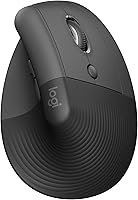
Evoluent VerticalMouse 4 Review: Worth It? (November 2026)
The Evoluent vertical mouse suits right-handed users who want an upright grip, six buttons and on-mouse speed controls. Choose the regular wireless model for a standard fit, the D Large for more room and a cable, or a Logitech alternative for a different fit or sensor.
On this page (8 sections)
- Is the Evoluent VerticalMouse 4 a good fit?
- Which Evoluent vertical mouse should you choose?
- How do the Evoluent and Logitech vertical mice compare?
- Is the VerticalMouse 4 comfortable for your hand?
- How do you set up an Evoluent vertical mouse?
- What should you know about software and compatibility?
- What common mistakes should you avoid?
- Which Evoluent vertical mouse is worth choosing?
The Evoluent vertical mouse suits right-handed users who want an upright grip and several buttons for shortcuts. The regular-size VerticalMouse 4 is wireless, while the D Large has a larger shell and a wired USB connection.
This review compares those Evoluent options with Logitech's MX Vertical and Lift. Your best fit depends on hand size, connection preference, software needs and whether you value extra buttons or a particular sensor feature.
Is the Evoluent VerticalMouse 4 a good fit?
The Evoluent VerticalMouse 4 fits right-handed users who want a regular-size mouse with six buttons and four pointer speed settings. Its upright shape is designed to hold your hand in a more neutral, handshake-like position.
Evoluent VerticalMouse 4 Wireless: Best for cable-free desks

- Right-handed, regular size
- Six customizable buttons
- Four pointer speed settings
- Broad bottom lip
A regular-size upright mouse with six buttons and speed controls on the shell. Choose it if you want Evoluent's shape without a cable.
Pros
- Four pointer speed settings
- Two thumb buttons
- Broad bottom lip
Cons
- Right-hand orientation only
- Advanced button customization uses Windows software
The speed button sits on the side, so you can change cursor speed without letting go. A broad bottom lip gives your little finger a resting place instead of letting it drag on the desk.
This is a practical choice if you switch between pointer speeds or want to assign shortcuts to extra buttons. Skip it if you need a left-handed mouse, prefer a simple two-button layout, or want advanced button customization on Mac or Linux.
What does the Evoluent vertical mouse change about grip?
The Evoluent vertical mouse changes how your hand approaches the desk: instead of resting palm-down, your hand sits upright on the shell. That change may feel unfamiliar at first, so a vertical shape is a fit preference, not a guaranteed remedy for discomfort.
Evoluent's Mouse Manager can assign actions to the six buttons on Windows. Basic mouse functions work on Mac and Linux without a driver, but those systems do not get the same software-based customization described for Windows.
If you want a broader overview of grip and hand size, read our vertical mouse guide. The vertical mouse versus normal mouse comparison explains what changes when you switch.
Which Evoluent vertical mouse should you choose?
Choose between the Evoluent models by matching shell size and connection to your desk. The VerticalMouse 4 is regular-size and wireless; the D Large is taller and uses wired USB.
The regular-size model is the safer starting point when a large mouse tends to stretch your fingers. Choose the Evoluent VerticalMouse 4 Wireless if you want the right-handed shape with a cable-free desk.
The D Large makes sense when your hand needs more room on top of the mouse and a cable fits your workspace. Skip it if you have a small hand or need to move the mouse between desks often.
The D Large's wire also avoids charging and wireless pairing. Keep in mind that a wired connection can limit where you place the mouse, depending on your desk and computer position.
How do the Evoluent and Logitech vertical mice compare?
The main differences are fit, button count, connection and sensor detail. The two Evoluent models provide six buttons and four on-device speed settings, while the Logitech choices offer their own fit guidance and connection features.
| Mouse | Fit and orientation | Buttons | Connection | Notable feature |
|---|---|---|---|---|
| Logitech Lift Vertical Mouse | Small to medium right hands | 6 | Bluetooth or Logi Bolt USB | Compact shape and SmartWheel |
| Logitech MX Vertical Mouse | Right-handed | 4 | Bluetooth or USB receiver | 57° angle and 4000 DPI sensor |
| Evoluent VerticalMouse 4 Wireless | Regular, right-handed | 6 | USB wireless | Four speed settings on the mouse |
| Evoluent VerticalMouse D Large Wired | Large, right-handed | 6 | Wired USB | Large shell and four speed settings |
The Logitech MX Vertical has four buttons and a 57° angle. Choose it if you want the stated sensor resolution and wireless connection options; skip it if six programmable buttons are a priority.
The Lift is the clearest alternative when you want a compact mouse with explicit small-to-medium hand guidance. Its six buttons, SmartWheel and wireless connections may suit you better than a larger Evoluent shell.
The comparison comes down to your hand and work habits. Pick an Evoluent model for its six-button layout and physical speed control, the MX Vertical for its sensor feature, or the Lift if its fit range matches your hand.
Is the VerticalMouse 4 comfortable for your hand?
The VerticalMouse 4 is more likely to fit if your right hand rests on the regular shell without reaching for the buttons. Your fingers should land near the controls while your palm stays relaxed.
Don't clamp down on the shell. Rest your hand on it, keep the mouse near the keyboard, and move from your arm rather than making every movement from your wrist.
If you have a larger hand, compare the wired Evoluent D Large before choosing. If your hand is small to medium, the Logitech Lift has a stated fit range that may make it easier to shortlist.
Left-handed users should skip the right-handed Evoluent models described here. See our left-handed ergonomic mouse guide for options made for that grip.
How do you set up an Evoluent vertical mouse?
Set up an Evoluent vertical mouse close to your keyboard and give your hand time to adapt. A relaxed hand and a comfortable forearm position matter more than trying to copy a single grip exactly.
Start with a pointer speed you can control easily. The Evoluent models let you adjust speed on the mouse, so try a slower setting for precise work and a faster one when you need to cross a wide display.
Use the mouse for familiar tasks during the first few sessions. Avoid changing pointer speed, button assignments and your desk position all at once; adjust one thing at a time so you can tell what feels better.
Evoluent's guidance for the D Large says that moving from a flat mouse can feel different for a few days. Rest your hand on the shell rather than gripping it, keep the mouse near the keyboard and move from your elbow.
Read our guide to using a vertical mouse for the first time for more setup ideas. If discomfort persists, stop using the mouse and ask a qualified health professional for advice.
What should you know about software and compatibility?
Basic functions on the VerticalMouse 4 work on Mac and Linux without a driver. Windows users can install Evoluent Mouse Manager to customize the buttons, including assigning different actions in different programs.
The model is compatible with PC, Mac and Linux. Evoluent lists Windows 10 as a minimum operating system requirement, so confirm your computer supports the functions you plan to use before choosing this mouse.
The wired D Large also provides basic button and wheel functions without a driver on systems that support USB. That can suit a locked-down work computer, though it still may not allow custom button assignments.
What common mistakes should you avoid?
The most common mistake is choosing a vertical mouse by its shape alone without considering hand size. A tall large shell can overwhelm a smaller hand, while a regular-size model may feel cramped if your hand needs more room.
Another mistake is gripping the mouse tightly while trying to hold a prescribed posture. Let your hand rest on the shell and keep your wrist and arm relaxed; the mouse should not force your fingers into an uncomfortable position.
Don't assume every button can be customized on every computer. The Evoluent Mouse Manager is for Windows, so Mac and Linux users should decide whether basic functions are enough.
Finally, don't judge a new grip after a few minutes. Allow a few sessions for the hand position to feel familiar, and make small setup changes instead of trying to adapt through strain.
Which Evoluent vertical mouse is worth choosing?
Choose the VerticalMouse 4 Wireless if you want a regular-size right-handed mouse with six buttons and on-device speed settings. Choose the D Large Wired if your hand needs a taller shell and a cable works at your desk.
Choose the MX Vertical if its 4000 DPI sensor is the feature you value most, or the Lift if you have small to medium right hands and want its wireless options. For more help narrowing down the shape, start with our best vertical mouse guide.
Frequently asked questions
Is the Evoluent VerticalMouse 4 wireless?
The VerticalMouse 4 reviewed here connects wirelessly through USB. Evoluent also offers the VerticalMouse D Large as a wired USB option, so choose based on whether you prefer a cable-free desk or a plug-in connection.
Does the Evoluent VerticalMouse 4 work with Mac?
The VerticalMouse 4 supports basic functionality on Mac without a driver, while its included Mouse Manager software is for Windows customization. Check the operating system requirements and the functions you need before choosing it for a Mac setup.
What is the difference between the VerticalMouse 4 and VerticalMouse D Large?
The VerticalMouse 4 in this review is a regular-size wireless model, while the VerticalMouse D Large has a larger shell and wired USB connection. Both are right-handed and have six buttons with four pointer speed settings.
How long does it take to adjust to a vertical mouse?
The adjustment period varies by person. Evoluent's guidance for its large wired model says the first few days can feel different after using a flat mouse; rest your hand on the shell, keep the mouse close to the keyboard and move from your elbow.