Logitech MX Vertical vs MX Master 4: Which Is Better? (November 2026)
Pick the Logitech MX Vertical if wrist comfort comes first; pick the MX Master 4 if you want more buttons and faster scrolling. The MX Vertical wins overall here for most desk workers thanks to its vertical grip and 9.7 score against 8.1 for the MX Master 4.
On this page (9 sections)
- Logitech MX Vertical vs MX Master 4: which one should you buy?
- The two mice side by side
- Grip and wrist position decide the winner
- Buttons, shortcuts and haptics favor the MX Master 4
- Sensor speed and scrolling: who needs the extra headroom?
- Battery life and charging compared
- Connectivity and system support
- Price tier and what you pay for
- Which mouse should you buy?
Pick the Logitech MX Vertical if wrist comfort comes first; pick the MX Master 4 if you want more buttons and faster scrolling. That is the short answer to the logitech mx vertical vs mx master 4 question, and our score agrees: the MX Vertical rates 9.7 and the MX Master 4 rates 8.1.
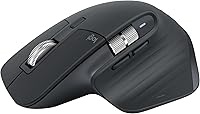
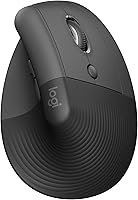
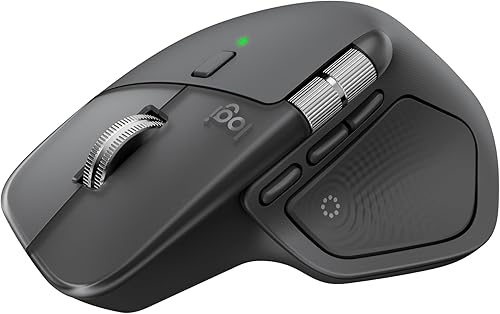
The MX Vertical is a mouse built around an angled grip that holds your hand more like a handshake. The MX Master 4 is a flat-topped productivity mouse packed with shortcuts, haptics and a very fast scroll wheel.
They solve different problems, so the right buy depends on what your hand and your workday need most. This comparison uses the specs each maker publishes.

Logitech MX Vertical vs MX Master 4: which one should you buy?
Most desk workers should buy the MX Vertical, because its vertical layout is the bigger change for a hand that spends all day on a mouse. The MX Master 4 is the stronger choice when speed and shortcuts matter more than wrist angle.
The MX Vertical's whole reason for existing is the ergonomic tilt. Logitech describes a vertical layout with an adjustable angle, designed to reduce strain on your hand and wrist.
That is the feature you notice on day one, and it is why the mouse scores so high for anyone with wrist discomfort.
The MX Master 4 takes a different route to comfort. It has a natural tilt, intuitive buttons and a thumb scroll wheel that Logitech says reduces hand stress.
The tilt is mild, so your hand still rests close to a flat position.
Why the MX Vertical wins for most readers
The score gap of 9.7 to 8.1 is not about one mouse being faster. It reflects how many buyers the design helps.
A vertical mouse changes your wrist posture, and that single change is the reason people move away from flat mice in the first place.
If your main complaint is a bent wrist by the time you finish work, the MX Vertical addresses it directly. If your main complaint is reaching for the same menu 40 times an hour, the MX Master 4 is the better answer.
Start with your complaint, not the feature list.
The two mice side by side
The table shows how far apart these mice are on the basics. One is a simple vertical mouse; the other is a shortcut machine with a flat body.
| Feature | Logitech MX Vertical | Logitech MX Master 4 |
|---|---|---|
| Grip | Vertical, adjustable angle | Flat with natural tilt |
| Hand | Ambidextrous | Right |
| Sensor | Optical, 4000 DPI | Optical, 8000 DPI |
| Buttons | 4 | 7 |
| Scroll | Standard wheel | MagSpeed wheel, 1,000 lines per second |
| Extras | Ergonomic angle | Haptic Sense Panel, Actions Ring, thumb wheel |
| Battery | About 4 months | Up to 70 days |
| Charging | Battery included | USB-C, cable not included |
| Systems | Mac and Windows | Windows, macOS, Linux, ChromeOS, iPadOS, Android |
| Product | Best for | Connectivity | Sensor | Buttons | Our score |
|---|---|---|---|---|---|
| Logitech Mouse MX Vertical | wrist comfort | Bluetooth, radio frequency, USB | Optical, 4000 DPI | 4 | 9.7 |
| Logitech MX Master 4 Mouse | power users | Bluetooth, radio frequency, USB-C dongle | Optical, 8000 DPI | 7 | 8.1 |
The numbers tell the story quickly. The MX Vertical trades buttons and speed for grip angle.
The MX Master 4 trades grip angle for controls. Two details sit outside the table but matter for fit.
The MX Vertical weighs 4.76 ounces and measures 4 by 4 inches. The MX Master 4 has a matte finish over its plastic shell, and Logitech says 54 percent of its plastic parts are recycled in Graphite.
Our MX Master 4 vs MX Master 3S comparison covers how the newer Master model changed, if you're already looking at that family.
Grip and wrist position decide the winner
The MX Vertical's tilted grip is the strongest reason to choose it. A vertical mouse keeps your forearm and wrist in a straighter line than a flat mouse, and Logitech builds this one with an adjustable angle so you can find a position that suits your desk.
The MX Master 4's grip is ergonomic in a gentler way. Its natural tilt and sculpted body support your hand, but your palm still rests mostly flat.
That's comfortable for many people, yet it doesn't change wrist posture the way a vertical body does.
Who each grip suits
The MX Vertical is built for the person who ends the day with a twisted wrist. Its adjustable angle lets you tune how upright your hand sits, so you can find the handshake position that feels least strained.
Logitech lists the MX Vertical as ambidextrous.
The MX Master 4 suits the person who likes a sculpted flat mouse with a thumb rest. Its natural tilt and thumb wheel reduce reaching for the scroll wheel, but the overall posture stays close to a conventional mouse.
If you've never had wrist trouble and just want a comfortable mouse with controls, this grip is the more familiar starting point.
If you've never used a vertical mouse, expect a short adjustment period as your hand learns the new angle. People who make the switch often describe less wrist twisting.
Our trackball vs vertical ergonomic mouse guide helps if you're unsure whether a vertical grip or a stationary trackball suits you better.
Neither design is a medical device. If wrist pain is ongoing or getting worse, speak to a doctor rather than expecting a mouse to solve it.
Buttons, shortcuts and haptics favor the MX Master 4
The MX Master 4 wins clearly on controls. It has 7 buttons against 4 on the MX Vertical, and those extra buttons are the point of the mouse.
The Actions Ring is a customizable overlay that appears at your cursor and adapts to each app. Logitech says it puts your most-used filters, adjustments and shortcuts right where you're working.
The Haptic Sense Panel adds customizable feedback for actions, shortcuts and notifications, with intensity set in Logi Options+.
The MX Vertical keeps things simple with four buttons. That's fine for everyday pointing and clicking, but it won't satisfy someone who wants macros and app-specific controls.
If you edit photos, build spreadsheets or jump between windows all day, the Master 4's extra controls earn their place.
What each mouse asks of your software
The MX Master 4 needs Logi Options+ for advanced customization. Without the app, you lose the haptic tuning and the Actions Ring shortcuts, which are its main draws.
Plan to install it before you judge the mouse.
The MX Vertical works with Mac and Windows without that kind of setup burden. Its appeal is the grip, not a software layer.
That makes it the easier mouse to hand to someone who just wants a comfortable pointer.
Logitech's own numbers make the case for the Master 4's controls. The brand says the Actions Ring and its shortcuts can save up to 33 percent of your time by cutting repetitive movements by up to 63 percent.
Those figures come from Logitech rather than independent testing, so treat them as the company's pitch. The idea still holds: the more often you repeat a click or menu trip, the more a shortcut overlay is worth.
Sensor speed and scrolling: who needs the extra headroom?
The MX Master 4's 8000 DPI sensor and MagSpeed wheel beat the MX Vertical's 4000 DPI and standard wheel on paper. Whether that matters depends on what you do.
Logitech says the MagSpeed wheel scrolls 1,000 lines per second and switches between hyper-fast and pixel-perfect modes. That's useful for long documents, code files and giant spreadsheets.
It's also the quietest scroll Logitech makes, according to the brand. The same goes for the Master 4's Quiet Clicks, which Logitech rates at 90 percent less click noise, a real plus in a shared office or a quiet room.
The MX Vertical's optical sensor reaches 4000 DPI. That's plenty for everyday office work and general browsing.
The gap matters most for high-resolution screens and fast, precise cursor movement.
If your day is mostly email, writing and light web work, the MX Vertical's sensor is more than enough. If you scroll through hundreds of rows or zip across multiple monitors, the Master 4's speed is the practical advantage.
The Master 4's sensor is also rated to track on any surface, even glass, which matters if you work away from a desk mat.
Battery life and charging compared
The MX Vertical lasts longer between charges; the MX Master 4 asks for more frequent top-ups but charges fast. Logitech rates the MX Vertical at about 4 months of average battery life, and it ships with its battery included.
The MX Master 4 is rated at up to 70 days, with three hours of use from a one-minute charge. Its charging cable is not included, so you'll need your own USB-C cable when it runs low.
Four months versus about 10 weeks is a real difference for anyone who hates hunting for a cable. The MX Vertical's longer stretch between charges suits a simple desk setup.
The MX Master 4's quick top-up suits people who keep a cable nearby anyway. The one-minute charge is the detail worth remembering: a short plug-in buys you a few hours, so a dead Master 4 rarely means stopping work.
Both mice run on battery power. The MX Vertical includes one lithium polymer battery, while the MX Master 4 includes an AA battery.
Either way, you won't be swapping batteries every few weeks.
Connectivity and system support
Both mice connect over Bluetooth or a USB receiver, but the MX Master 4 covers more systems. The MX Vertical works with Mac and Windows, which covers most office desks.
The MX Master 4 supports Windows, macOS, Linux, ChromeOS, iPadOS and Android. It uses a USB-C dongle with an advanced radio chip and optimized antenna, which Logitech says gives 2X more powerful connectivity and stronger, more reliable performance.
Bluetooth is there when you want to skip the dongle. Logitech also lists Googlebook laptop compatibility for the Master 4.
If you move between a Windows laptop and an Android tablet, the Master 4's wider compatibility is useful. If you work on one Mac or PC all day, the MX Vertical's Mac and Windows support is all you need.
Both also pair over radio frequency and USB, so neither locks you into one connection type. The MX Master 4's USB-C dongle is the more modern option, while the MX Vertical's receiver setup is simpler and familiar.
The Master 4's system list includes minimum versions to check against your machine, such as Windows 10 and macOS 12 Monterey, while the MX Vertical's floor is Windows 8. Neither asks for much, but the Master 4's newer floor is worth noting on an old work laptop.
Price tier and what you pay for
The MX Master 4 sits in a higher price tier, and its features explain why. You're paying for haptics, the Actions Ring, the MagSpeed wheel and the extra buttons.
Those are real additions, not marketing extras.
The Master 4 also bundles a complimentary one-month Adobe Creative Cloud subscription, which is a small offset if you already pay for Adobe tools.
The MX Vertical costs less and spends its budget on one idea: the vertical grip. There's no haptic panel or shortcut overlay to pay for.
If you want comfort without a pile of features, that focus works in your favor.
Neither mouse is cheap, so match the spend to the problem. Buying the Master 4 for its buttons and never using them wastes money.
Buying the MX Vertical for wrist comfort and then missing your shortcuts is the same mistake in reverse.
Which mouse should you buy?
Buy the Logitech MX Vertical if wrist comfort is your top priority and four buttons cover your daily work. It wins this logitech mx vertical vs mx master 4 matchup overall at 9.7, and its adjustable vertical angle is the reason.
It also runs about 4 months on its included battery and works with Mac and Windows.
Buy the Logitech MX Master 4 if you want shortcuts, haptics and the fastest scrolling Logitech makes. Its 8.1 score reflects a feature-packed mouse for power users, with 7 buttons, the Actions Ring and up to 70 days of battery life.
Just plan on installing Logi Options+ to get the most from it.
If you're still unsure whether a vertical shape is right for you, read our Logitech Lift vs MX Master comparison for a smaller vertical option. And if you'd rather keep your hand still, the Logitech MX Ergo S trackball is worth a look before you decide.
Frequently asked questions
Is the Logitech MX Vertical better than the MX Master 4?
For wrist comfort, yes: the MX Vertical's angled grip keeps your hand in a handshake position. The MX Master 4 is the better pick for shortcuts and fast scrolling, with 7 buttons, haptic feedback and a MagSpeed wheel.
Our score puts the MX Vertical ahead at 9.7 to 8.1.
Does the MX Vertical work with Mac and Windows?
Yes. Logitech says the MX Vertical works with both Mac and Windows, and it connects over Bluetooth or a USB receiver.
The MX Master 4 adds Linux, ChromeOS, iPadOS and Android to that list, so check your device if you work across systems.
How long does the battery last in each mouse?
Logitech rates the MX Vertical at about 4 months on average. The MX Master 4 is rated at up to 70 days, with three hours of use from a one-minute charge.
The MX Vertical ships with its battery included, while the MX Master 4's charging cable is not included.
Which mouse is better for wrist strain?
The MX Vertical is the one to try first, because its vertical layout and adjustable angle aim to reduce wrist strain. The MX Master 4's natural tilt is milder.
If pain continues, stop and speak to a doctor rather than relying on a mouse change alone.
Can I use the MX Master 4 without installing Logi Options+?
You can use it for basic pointing and scrolling, but the haptic intensity and the Actions Ring shortcuts are customized in Logi Options+. Without the app you lose much of what makes the MX Master 4 different from a plain mouse.
Do both mice connect over Bluetooth?
Yes. Both the MX Vertical and the MX Master 4 support Bluetooth, and both also work through a USB receiver.
The MX Master 4 uses a USB-C dongle with an advanced radio chip, while the MX Vertical takes a standard USB receiver.