Logitech Lift vs MX Master 3S: Which Is Better? (November 2026)
Choose the Logitech Lift for a vertical grip and the MX Master 3S for a contoured shape with more controls and fast scrolling. Your hand size, preferred grip and connection needs point to the better fit.
On this page (7 sections)
- Logitech Lift vs MX Master 3S: which shape fits your hand?
- Which mouse gives you better control and scrolling?
- Which mouse connection works with your computer?
- Which mouse needs less battery attention?
- How should you set up a new ergonomic mouse?
- What common buying and setup mistakes should you avoid?
- Which Logitech mouse should you choose?
For Logitech Lift vs MX Master 3S, choose the Lift for a vertical grip and the MX Master 3S for a contoured shape with more controls and fast scrolling. Your hand size, preferred grip and connection needs make the choice clearer.
The Lift is designed for small to medium right hands and has a 57-degree vertical shape. The MX Master 3S has a contoured shape, 7 buttons, a thumbwheel and a MagSpeed scroll wheel.
All 3 mice here are wireless and right-handed. Start with our vertical mouse guide if you want to compare upright designs.
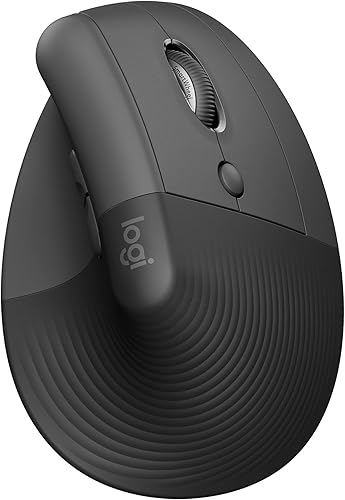
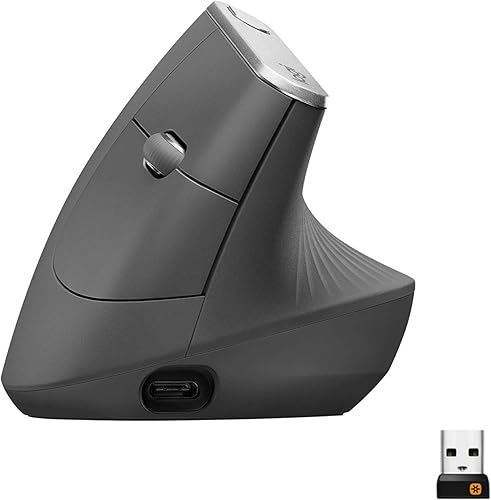
Logitech Lift vs MX Master 3S: which shape fits your hand?
The Lift and MX Vertical have vertical shapes; the MX Master 3S has a contoured shape. Choose based on the grip you want to use throughout the workday.
Logitech describes the Lift's 57-degree angle as promoting a more natural forearm posture. It has a softly textured grip and thumb rest, with buttons positioned for the hand to reach.
The MX Master 3S has a contoured ergonomic shape and thumb controls. It doesn't have the Lift's vertical angle, so it suits someone choosing a familiar, palm-down style with added controls.
The Lift measures 4.3 x 2.7 in, while the MX Master 3S measures 4.92 x 3.32 in. Those measurements are a useful starting point, but button reach, palm contact and grip style also affect fit.
How does hand size affect the Logitech Lift vs MX Master choice?
The Lift is designed for small to medium right hands. If your hand is larger or you prefer a broader contoured shape, compare the MX Master 3S's size and thumb-control placement.
A mouse can seem like a good fit on paper and still feel awkward if your fingers reach too far or your palm sits in the wrong place. Compare its dimensions with a mouse you already use, then consider whether you grip with your whole palm or guide the mouse with your fingers.
All 3 options here are right-handed. If you're left-handed, use our guide to ergonomic mouse fit and setup to consider fit, hand orientation and desk position before choosing.
Which mouse gives you better control and scrolling?
Choose the MX Master 3S for more controls and MagSpeed scrolling; choose the Lift for its SmartWheel and quiet clicks. The MX Master 3S has 7 buttons, while the Lift has 6.
The MX Master 3S pairs its main scroll wheel with a thumbwheel. MagSpeed is designed for fast, precise and quiet scrolling, and its sensor sensitivity can be customized up to 8000 DPI.
The Lift's SmartWheel supports smooth scrolling. Its customizable buttons are easy to reach, and its clicks are whisper-quiet.
DPI measures sensor sensitivity, not comfort or hand fit. A higher maximum can give you more cursor-speed options, but it doesn't make a mouse better for every kind of work.
Is the MX Master 3S better for spreadsheets and long pages?
The MX Master 3S may suit long pages or wide spreadsheets because it combines MagSpeed scrolling with a thumbwheel. Its 7 buttons can also be customized for repeated actions.
The Lift's SmartWheel handles everyday scrolling, but it doesn't have a separate thumbwheel. If you rarely scroll horizontally or through long documents, the extra control may not help enough to guide your decision.
Our MX Master 4 vs MX Master 3S comparison covers another mouse in the same line. Use it if you're leaning toward the Master shape and want to compare nearby options.
Which mouse connection works with your computer?
The Lift supports Bluetooth Low Energy or Logi Bolt USB; this MX Master 3S Bluetooth Edition connects through Bluetooth. Choose based on your computer's available connection and whether you need a USB receiver.
The Lift includes a Logi Bolt USB receiver and supports Bluetooth Low Energy. It's compatible with Windows, macOS, iPadOS, Chrome OS and Linux.
This MX Master 3S Bluetooth Edition doesn't include a USB receiver, adapter or charging cable. It connects to up to 3 devices through Bluetooth, and its box includes the mouse and user documentation.
The MX Vertical is another upright option with Bluetooth or an included USB receiver. It has a 57-degree angle and a rechargeable battery, so it may suit you if you want a vertical grip with a different connection setup.
Before buying, check that your computer supports the connection you plan to use. If you rely on a USB receiver, note that the MX Master 3S Bluetooth Edition doesn't include one.
Which mouse needs less battery attention?
The Lift runs on a replaceable AA battery, while the MX Master 3S and MX Vertical are rechargeable. Pick the power style that fits your routine.
Logitech specifies up to 24 months of battery life for the Lift. It comes with one AA battery and a Logi Bolt receiver.
The MX Master 3S has a rechargeable battery with an average life of 70 days. This Bluetooth Edition doesn't include a charging cable, so plan how you'll charge it before you buy.
The MX Vertical has an average battery life of 4 months. Actual battery life varies with use and computing conditions, so consider these figures as a guide rather than a promise.
How should you set up a new ergonomic mouse?
Set up the mouse so your forearm stays relaxed, the buttons are easy to reach and the pointer speed feels controlled. A few small adjustments can make either shape easier to use.
Place the mouse close to your keyboard, with your elbow near your side and your shoulder relaxed. Avoid reaching forward or holding your wrist at an angle to reach the buttons.
If you choose the Lift, begin with a light grip around its upright shape and let the thumb rest sit naturally under your hand. Give yourself time to adjust before deciding the shape is wrong, but stop if use brings persistent discomfort.
If you choose the MX Master 3S, set the pointer speed to a level that lets you move across your display without repeated large arm movements. Try the thumbwheel and extra buttons one at a time, then customize only the controls that fit your daily tasks.
What common buying and setup mistakes should you avoid?
The most common mistake is choosing by a headline feature such as DPI or button count before checking hand fit and connection needs. Start with the way you hold a mouse and the ports or wireless options your computer supports.
A vertical shape isn't automatically comfortable for every person. The Lift is intended for small to medium right hands, and the MX Vertical and MX Master 3S are also right-handed options, so left-handed buyers should check orientation before ordering.
Don't assume every wireless mouse includes a receiver. The Lift includes Logi Bolt USB, while this MX Master 3S Bluetooth Edition does not include a USB receiver or charging cable.
More buttons also don't guarantee a faster workflow. If you won't use thumb controls or customize buttons, the MX Master 3S's added controls may matter less than choosing a shape that feels natural.
Which Logitech mouse should you choose?
Pick the Lift for a vertical grip and smaller right hands; pick the MX Master 3S for a contoured grip, a thumbwheel and fast scrolling. The MX Vertical is a third option if you want an upright shape with a rechargeable battery and included receiver.
Choose the Lift if you want to move away from a standard mouse grip and its small to medium hand sizing suits you. Our vertical mouse vs normal mouse comparison explains the adjustment involved in changing mouse shape.
Choose the MX Master 3S if you prefer a contoured shape and will use its scrolling and button controls. Remember that this Bluetooth edition connects without a receiver and doesn't include a charging cable.
Choose the MX Vertical if an upright grip is your priority and you'd rather have a rechargeable battery with Bluetooth or USB receiver options. For a broader view of desk setup, see our ergonomic mouse and keyboard guide.
For Logitech Lift vs MX Master, use hand fit and grip as the first filter, then compare controls, scrolling and connection. If your hand fits the Lift's intended size and you want a vertical posture, choose it; if you prefer a contoured shape and will use the thumbwheel, choose the MX Master 3S.
Frequently asked questions
Is the Logitech Lift or MX Master 3S better for wrist comfort?
The Lift is the clearer choice if you want a vertical grip: its 57-degree shape is designed to promote a more natural forearm posture. The MX Master 3S has a contoured shape crafted for a more natural wrist posture.
Neither shape guarantees comfort for every hand.
Choose the grip you can hold without strain.
Is the Logitech Lift too small for large hands?
The Lift is designed for small to medium right hands, so buyers with larger hands may want to compare its fit with the MX Master 3S or MX Vertical. Check how your fingers reach the buttons and where your palm rests before choosing.
Does the MX Master 3S come with a USB receiver?
This MX Master 3S Bluetooth Edition doesn't include a USB receiver or adapter; it connects over Bluetooth. The Lift includes a Logi Bolt USB receiver and also supports Bluetooth Low Energy, while the MX Vertical includes a receiver and supports Bluetooth.
Which mouse is better for scrolling through long documents?
The MX Master 3S is a strong fit if fast scrolling matters: its MagSpeed wheel is designed for speed, precision and quiet operation, and it also has a thumbwheel. The Lift has a SmartWheel for smooth scrolling and may suit you if you prefer a simpler layout.
Can I connect these mice to more than one computer?
The Lift and MX Master 3S can each connect to up to 3 devices, with Easy-Switch for moving between them. The MX Master 3S uses Bluetooth in this edition, while the Lift can use Bluetooth Low Energy or Logi Bolt USB.


