Trackball Mouse vs Regular Mouse: Which Fits You? (November 2026)
Choose a trackball if you want cursor control without sliding the device; choose a regular mouse if you prefer guiding it across the desk. The trackball mouse vs regular mouse decision depends on your workspace, hand and preferred movement.
On this page (8 sections)
A trackball suits you if you want cursor control without sliding a device; a regular mouse suits you if you prefer guiding it across the desk. The trackball mouse vs regular mouse choice comes down to your workspace, hand and preferred movement.
A regular mouse moves as you push it. A trackball stays in place while your thumb or fingers roll a ball to move the pointer.
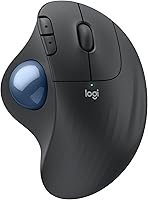
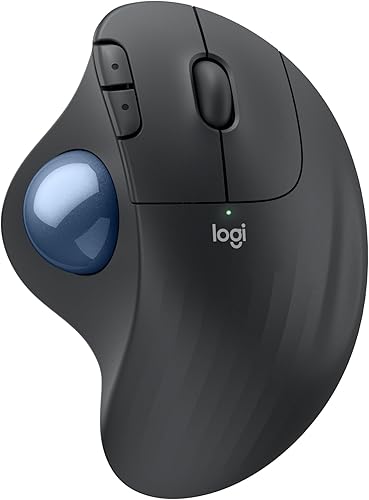
That distinction affects desk space, the motion your hand repeats and how quickly the controls feel familiar. The three trackballs below show how thumb and finger control can differ, but a regular mouse remains the straightforward choice if you already like sliding a device.

Trackball mouse vs regular mouse: what changes?
A trackball moves its ball under your thumb or fingers, while a regular mouse moves across the desk. Choose based on which movement you want to use and the space you have for it.
With a regular mouse, your hand guides the whole body. You need clear space around it for the movements you make, and a surface where its sensor tracks reliably.
With a trackball, the body stays put. Your thumb or fingers move the cursor within a smaller area, so there’s less need to reposition the device when you run out of room.
Neither style guarantees comfort. The fit of the shape, the way you hold it and the tasks you do matter more than the label.
How does a trackball move the cursor?
A trackball senses the ball’s movement as you roll it. Thumb models put the control under your thumb, while finger-operated designs put a larger ball where several fingers can reach it.
The Logitech ERGO M575S and MX Ergo S are thumb-operated. The Kensington Expert Wireless has a 55 mm ball, a scroll ring for pages and documents, and an ambidextrous design.
Fine cursor movements may feel unfamiliar at first. Adjusting pointer speed can make it easier to move from broad motions to precise selections while you learn.
How does a regular mouse move?
A regular mouse tracks as you slide it across a desk or mouse pad. Your hand moves the body to guide the pointer, with clicks and a scroll wheel under your fingers.
This motion may feel familiar if you’ve used a standard mouse for years. It also takes room: you may need to lift and reposition the mouse when it reaches the edge of your usable surface.
If you want to compare a different shape that still moves across the desk, our vertical mouse vs normal mouse guide explains how the grip changes.
Which one fits your desk space?
Choose a trackball when the area around your mouse is limited; choose a regular mouse when you have room to guide it. Measure the space for your hand as well as the device.
A thumb trackball stays in one spot, which can work well on a crowded desk or compact work surface. You can move the cursor without sliding the device or needing a clear path beside it.
The M575S is designed for small or space-saving setups and can work on any surface. Leave room for your hand and a comfortable reach to the keyboard.
A regular mouse needs space to slide and turn. Before replacing one because the desk feels crowded, clear a small area and see whether it gives you enough room for the movements you make.
The Kensington Expert has a large ball and detachable wrist rest, so allow space for both. Its wrist rest supports the hand and wrist, but it makes the setup larger than a compact thumb model.
Which control style should you choose?
A regular mouse is a familiar starting point; a trackball can suit you if you want to keep the device still. Think about your grip and the motion you find easiest to repeat.
A regular mouse gives you a direct link between hand movement and pointer movement: push the body toward the target. If that motion is already comfortable and your desk has enough clear space, there may be little reason to change.
A trackball asks you to roll the ball instead. It can reduce the amount of space needed for mouse movement, but the different control takes practice, especially for small targets.
Don’t judge a new trackball by the first few minutes. Use it for everyday tasks, adjust cursor speed as needed and give your thumb or fingers a chance to learn the motion before deciding whether it suits you.
Is a thumb trackball right for you?
A thumb trackball suits you if you want to steer the cursor with your thumb while keeping the rest of your hand near the mouse body. The M575S is a practical option for a compact setup; the MX Ergo S adds adjustable tilt and switchable tracking modes.
The MX Ergo S is shaped for medium to large hands and has a 20-degree tilt. It connects by Bluetooth or the included Logi Bolt receiver, and its rechargeable battery charges over USB-C.
The charging cable isn’t included.
Logitech says the MX Ergo S’s tilt reduces forearm muscle activity by 27% compared with its M650 mouse. That figure describes Logitech’s comparison; your own experience depends on fit and how you use the device.
Skip this shape if you want to control the ball with your fingers, need a left-hand-oriented model, or have a small hand that doesn’t fit its contoured body. For a simpler thumb model, the M575S uses an AA battery and Logitech says it can run for up to 18 months, depending on use and computing conditions.
Is a finger-operated trackball right for you?
A finger-operated trackball is a good option if you don’t want the ball under your thumb or want an ambidextrous design. The Kensington Expert Wireless combines a large ball with a scroll ring and detachable wrist rest.
The scroll ring can help you move through long pages and documents without relying on a separate wheel. Its layout can suit either hand, while the wrist rest offers support alongside the ball.
Skip this model if your desk can’t fit a larger trackball and wrist rest, or if you need Linux support. The Expert Wireless doesn’t support Linux.
If you prefer a trackball but aren’t sure which size or control style to buy, our best trackball mouse guide compares options for different setups.
What matters for left-handed use?
The Kensington Expert Wireless is the clearest fit for either hand among these picks. It’s ambidextrous, while both Logitech models are right-hand oriented.
A regular mouse may work with either hand if its shape and button setup suit you. Check that the buttons can be configured for your preferred hand before relying on that choice.
With a trackball, consider where the ball sits and which fingers you’ll use. A design that feels natural in your right hand may not transfer comfortably to your left, even if the ball itself is easy to reach.
How should you set up a trackball?
Put the trackball where your hand can rest comfortably and adjust cursor speed before judging its control. Keep the device close enough to reach without stretching.
Start with the mouse beside your keyboard, with room for your hand and any wrist rest. Connect using Bluetooth or the supplied wireless receiver, depending on the model and your computer’s available connections.
Begin with ordinary tasks, such as opening menus and selecting text. If the pointer overshoots, lower its speed; if it takes too many rolls to cross the screen, raise it.
Make one adjustment at a time so you can tell what helps.
A regular mouse also benefits from a clear path, a stable surface and a position close to your keyboard. If you keep running out of room, try a larger clear area before deciding whether to switch to a trackball.
For step-by-step help, read how to use a trackball mouse. If you choose a mouse that moves across the desk and want a different grip, our vertical mouse guide covers shapes and fit.
What mistakes should you avoid?
The common mistake is choosing by feature alone instead of matching the control to your hand, space and habits. Check fit, setup needs and upkeep before you buy.
Don’t assume every trackball saves the same amount of room. A compact thumb model stays in one place, while a larger ball with a separate wrist rest needs more space for your hand and support.
Don’t expect precise cursor control to feel instant. A trackball’s thumb or finger motion differs from sliding a mouse, so give yourself time to learn it and adjust the pointer speed.
Don’t overlook hand orientation. The Logitech thumb models are right-hand designs; the Kensington Expert is ambidextrous.
If you want to switch hands or use your left, check that point before comparing other features.
Finally, don’t treat a trackball as maintenance-free. Dust and skin oils can collect around its ball, so occasional cleaning is part of ownership.
Follow our trackball cleaning guide for the basic routine.
Which trackball should you choose?
Pick the MX Ergo S for adjustable tilt and rechargeable power, the M575S for a compact thumb-control setup, or the Kensington Expert for an ambidextrous finger-operated design. Pick a regular mouse if you prefer to steer the whole device.
For an uncomplicated first trackball, the M575S is the most direct fit if you want to keep the device still and conserve desk space. The MX Ergo S makes more sense if its tilt, tracking options and rechargeable design matter to you, and your hand fits its medium-to-large shape.
The Kensington Expert is the pick when you want an ambidextrous layout and a ball controlled by several fingers. Choose a regular mouse if you already like moving it by hand, have room for that movement and don’t want to learn a different control style.
The score weighs specs, features and buyer feedback against what you’re shopping for.
Trackball mouse vs regular mouse: the final choice
Choose a trackball if desk space is tight or you want cursor control without moving the device; choose a regular mouse if sliding it across the desk feels natural. For a trackball, match the ball style and hand orientation to your needs.
Start with the motion you want to make, then check hand fit, workspace and any connection or power needs. If you settle on a trackball, use the trackball mouse guide to compare shapes and features.
Ergonomics guidance from the U.S. Occupational Safety and Health Administration Logitech ERGO M575S details
Frequently asked questions
Is a trackball mouse better than a regular mouse?
A trackball suits you if you want cursor control without sliding a device across the desk. A regular mouse may suit you better if you prefer guiding the whole device and have room to move it.
Compare the hand motion, available space and control style you expect to use each day.
Does a trackball mouse take time to learn?
Yes, a trackball can take practice because you guide the cursor with your thumb or fingers while the device stays still. Start with everyday tasks, then adjust pointer speed if the cursor feels too fast or slow.
See our trackball setup guide for first steps.
Can a trackball mouse work on any surface?
A trackball stays in place, so the surface matters less than it does for a mouse you slide around. The Logitech ERGO M575S is designed for use on any surface.
Keep enough room for your hand and any wrist support you use.
Is a trackball mouse good for a small desk?
A thumb-operated trackball can suit a small desk because the device stays put while you move the cursor. The Logitech ERGO M575S is designed for space-saving setups.
Allow room for your hand, and account for a separate wrist rest if you choose a larger model.
Which trackball works for left-handed users?
The Kensington Expert Wireless has an ambidextrous design, making it the clearest fit of these 3 for either hand. The Logitech ERGO M575S and MX Ergo S are right-hand oriented.
Check the ball position and shape before choosing, especially if you plan to switch hands.