Logitech Ergo M575S Trackball Review: Worth It? (November 2026)
The Logitech M575S is a right-handed thumb trackball for compact desks and people who want to move the cursor without sliding a mouse. It connects by Bluetooth or Logi Bolt and runs on an included AA battery.
On this page (9 sections)
- What does the Logitech M575S offer?
- How do you choose between the M575S and its alternatives?
- Does thumb control take time to learn?
- How do you set up the Logitech M575S?
- What settings should you change first?
- How long does the M575S battery last?
- How should you care for the trackball?
- What common mistakes should you avoid?
- Should you buy the Logitech M575S?
The Logitech M575S is a right-handed thumb trackball for compact desks and people who want to keep their hand in place while moving the cursor. It connects by Bluetooth or an included Logi Bolt receiver and uses one included AA battery.
Its fixed shape and thumb control make it a focused choice. If you want a tilt angle, more buttons or switching between two devices, the MX Ergo S adds those controls.
The score reflects how its size-saving control, quiet clicks and connection choices fit the needs of someone looking for a Logitech M575 trackball. It earns 8.5 for a straightforward setup with useful adjustment options.
What does the Logitech M575S offer?
The Logitech M575S offers thumb-controlled tracking, a sculpted right-handed shape and quiet clicks. Logitech says the shape supports a more natural forearm position and fits most hand sizes.
Logitech Ergo M575S Trackball: Best for compact desks
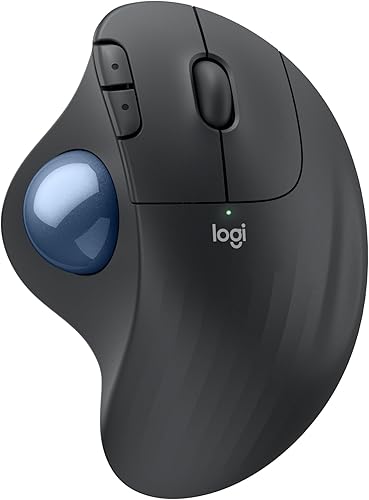
- Right-handed thumb control
- Bluetooth or Logi Bolt
- Up to 18 months on an included AA battery
- 3 customizable buttons
A Logitech trackball for moving the cursor with your thumb while keeping your hand in place. It offers quiet clicks, two connection options and adjustable cursor speed.
Pros
- Doesn't need to be moved across the desk
- Bluetooth and included Logi Bolt receiver
- AA battery included
- Quiet clicks
Cons
- Right-handed design
- Uses a thumb-controlled ball rather than a centered trackball
- Three customizable buttons require Logi Options+ for adjustments
Logitech reports a 25% reduction in forearm muscle strain compared with its M650 mouse. Treat that as a comparison from Logitech's stated conditions, not a prediction of how your own arm will feel.
The key difference from a regular mouse is that your hand stays put while your thumb rolls the ball. That removes the need to sweep the mouse across the desk, though you still need space to rest your hand and operate the ball comfortably.
Who should choose the Logitech M575S?
Choose it if you have a crowded desk, a narrow work surface or a setup where a mouse pad and broad tracking path are inconvenient. It can also suit you if you prefer to keep your forearm still while making cursor movements with your thumb.
The M575S is a right-handed design, so left-handed users should skip it. It may also be a poor fit if thumb movement feels uncomfortable or you want to control the cursor with a centered ball; compare other shapes in our best trackball mouse guide.
Trackballs feel different from standard mice at first. Our guide to how to use a trackball mouse explains how to get comfortable with the motion.
How do you choose between the M575S and its alternatives?
Choose based on hand fit, control preferences, device count and power routine. The M575S is the simpler choice; the MX Ergo S adds tilt and device switching, while the Nulea and TECKNET models offer rechargeable power.
| Feature | Logitech Ergo M575S | Logitech MX Ergo S | Nulea M501 | TECKNET |
|---|---|---|---|---|
| Hand orientation | Right-handed | Right-handed | Right-handed | Right-handed |
| Control | Thumb trackball | Thumb trackball | Thumb trackball | Thumb trackball |
| Shape detail | Sculpted shape | 20-degree tilt | Natural palm angle | 16-degree vertical angle |
| Customizable buttons | 3 | 6 | Not programmable | Not specified |
| Device switching | Not specified | Switches between 2 devices | Connects to up to 3 devices | Connects to up to 3 devices |
| Connection | Bluetooth or Logi Bolt | Bluetooth or Logi Bolt | Bluetooth or USB receiver | Bluetooth and 2.4G |
| Power | Included AA battery, up to 18 months | Rechargeable, up to 120 days per full charge | Rechargeable | Rechargeable |
The M575S is the clearest fit when you want Logitech's thumb control and a battery-powered mouse without extra tilt or device-switching controls. Pick the MX Ergo S if you use two devices or want its tilt and customizable controls, and consider the Nulea or TECKNET if rechargeability matters more.
The alternatives have different hand-fit limits. The MX Ergo S is intended for medium to large hands, and TECKNET recommends its model for medium to large hands; choose the M575S if you want a shape Logitech describes as suitable for most hand sizes.
See our Logitech MX Ergo S review for more on its tilt and controls. If you are comparing trackball movement with a familiar mouse, read trackball mouse vs regular mouse before deciding.
Does thumb control take time to learn?
Yes, thumb control can take practice if you're used to moving a mouse with your whole hand. Instead of shifting the mouse, you roll the ball to make small cursor corrections.
Start with a slower cursor speed and make short, deliberate movements. The M575S lets you adjust cursor speed in Logi Options+, so you can raise it once the motion feels more natural.
Give yourself a few short sessions before judging the fit. If your thumb feels strained or the ball is hard to control, pause and reassess; a different shape or control style may suit you better.
How do you set up the Logitech M575S?
The M575S pairs by Bluetooth or through the included Logi Bolt USB receiver. Choose the connection that suits your computer, then follow the device's pairing prompts.
For Bluetooth, turn on Bluetooth on your computer and select the mouse when it appears among available devices. For Logi Bolt, connect the receiver to an available USB port and use the mouse's pairing process.
Keep the receiver somewhere you can find it if you plan to use that connection. Our Logitech M575 connection guide walks through the pairing steps.
What settings should you change first?
Adjust cursor speed before assigning shortcuts. A setting that feels too fast can make precise pointing harder while you're learning thumb control, while a slower starting point helps you build steady movements.
Logi Options+ lets you change cursor speed and customize three buttons. The app requires a recent version of Windows or macOS, but basic mouse functions don't depend on assigning shortcuts.
Think about your everyday tasks before changing button actions. A shortcut you use often can save repeated clicks, while leaving the defaults alone keeps the setup simple.
How long does the M575S battery last?
Logitech rates the M575S for up to 18 months on one included AA battery. Battery life varies with use and computing conditions, so consider that an estimate rather than a schedule.
The AA battery means you don't need to plug the mouse in to recharge it. That suits people who prefer replaceable batteries; skip it if you want a rechargeable model and would rather charge by cable.
The MX Ergo S is rechargeable over USB-C and has a stated full-charge life of up to 120 days. Its charging cable isn't included, so account for that when choosing between the two power styles.
How should you care for the trackball?
Keep the ball and its cage free of dust so the ball can roll smoothly. Logitech says you can eject the ball from its cage to clean it.
Avoid letting liquid enter the mouse housing, and follow the care instructions for the device. For a step-by-step routine, see our guide to cleaning a trackball mouse.
What common mistakes should you avoid?
Don't assume a trackball will feel natural on the first day. Thumb steering is a different motion, so give yourself time to adjust cursor speed and learn how far to roll the ball.
Check hand orientation before ordering. The M575S is right-handed, and neither the MX Ergo S, Nulea M501 nor TECKNET option here is described as left-handed.
Don't confuse cursor speed with physical mouse movement. The M575S stays in one place, so changing cursor speed affects how far the pointer travels for a given thumb movement, not how much desk space the mouse needs.
Finally, check your connection and power preferences in advance. Bluetooth and Logi Bolt give you two pairing routes, but the receiver needs a USB port; the included AA battery avoids charging, while rechargeable alternatives require a charging routine.
Should you buy the Logitech M575S?
Buy the Logitech M575S if you want right-handed thumb control, quiet clicks and a compact desk setup with no need to slide the mouse. Its Bluetooth and Logi Bolt connections, adjustable cursor speed and included AA battery cover the essentials.
Choose the MX Ergo S if you want tilt, more customizable buttons or switching between two devices. Pick the Nulea M501 for rechargeable basics, or the TECKNET if its vertical angle and larger-hand fit suit you.
If you are still comparing control styles, use our best trackball mouse guide to weigh the M575S against other trackballs.
Frequently asked questions
Is the Logitech Ergo M575S good for small desks?
Yes. The Logitech Ergo M575S uses thumb control, so you can move the cursor without sliding the mouse across the desk.
You still need room for your hand and the mouse itself, but you don't need a broad, clear tracking path.
Can you connect the Logitech M575S to a computer without Bluetooth?
Yes. The M575S connects over Bluetooth or with its included Logi Bolt USB receiver.
Check which connection your computer supports and whether you have an open USB port before choosing how to pair it.
How long does the Logitech Ergo M575S battery last?
Logitech rates the M575S for up to 18 months from one included AA battery. Actual battery life varies with use and computing conditions, so treat that figure as an estimate rather than a fixed replacement schedule.
Is the Logitech M575S right-handed?
Yes. The M575S is designed for right-handed use, with the trackball controlled by the thumb.
If you need a left-handed mouse, check the hand orientation before choosing a trackball.